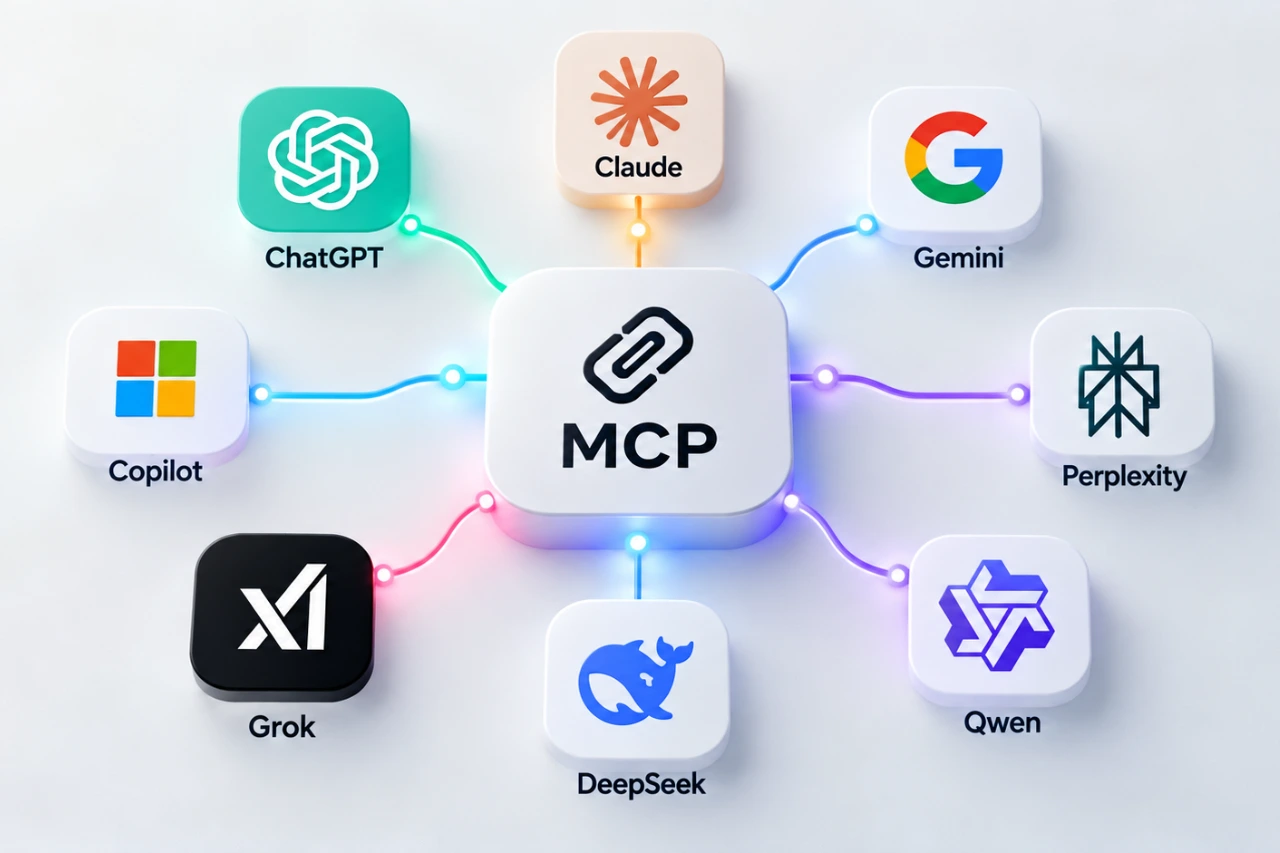
MCP connecting ChatGPT, Claude, Gemini, Copilot, Perplexity, Grok, DeepSeek and Qwen

Which AI Tools Support MCP? ChatGPT, Claude, Gemini, Copilot and More

Research checked: October 6, 2026. MCP support is changing quickly. The features, plans and limitations described below reflect what we could verify on this date and may change later.

Which AI tools support MCP today? Model Context Protocol (MCP) is spreading quickly across AI products, but a simple “yes” can mean very different things. If MCP itself is new to you, start with our beginner’s guide to Model Context Protocol.

For one assistant, MCP may mean that an ordinary user can paste a server URL into a web interface. For another, it may mean installing a command-line tool and editing configuration. For another, MCP may mainly exist inside an enterprise agent platform. And sometimes an AI model can be used inside somebody else’s MCP-compatible software even though its own consumer chat is not an MCP client.

So we tried something slightly different: we asked eight major AI assistants to describe their own MCP support, then checked the important claims against their companies’ current documentation.

What “supports MCP” actually means

Before comparing products, it helps to separate several questions that are often squeezed into one MCP checkmark. Can you use MCP in the normal consumer chat? Can you connect your own server? Is the server local or remote? Can the AI only read information, or can it take actions? Is the feature free? And can a beginner configure it without writing code?

Those distinctions matter. A platform can genuinely support MCP while still being impractical for a beginner who simply wants to experiment.

MCP support comparison

Can I use MCP with this AI?

Want to try MCP yourself? Click an AI assistant’s name in the tables to open its official MCP documentation.

AI assistantWebMobileCustom MCPFreeNo-code
ChatGPT✓*✕*✓*✕✓*
Claude✓✓*✓✓*✓
Gemini✓*✓*✓*✓*✓*
Microsoft Copilot✓*✓*✓*✕*✓*
Perplexity✓*✓*✓✕✓
Grok✓✓*✓✓*✓
DeepSeek✕✕✕✕✕
Qwen✕*✕✓*✕*✕*
✓ = supported; ✕ = not supported. * Availability may depend on plan, region, device, account type, product surface or permissions. See the platform notes below for details.

What kind of MCP does it support?

AI assistantLocalRemoteReadWrite/actionsCLI/API
ChatGPT✕*✓✓✓*✓
Claude✓*✓✓✓✓
Gemini✓*✓✓✓*✓
Microsoft Copilot✕*✓✓✓✓
Perplexity✓*✓✓✓✓
Grok✓*✓✓✓*✓
DeepSeek✕✕——Third-party
Qwen✓*✓*✓✓✓
* Asterisked capabilities have important restrictions or apply only to particular products, plans or environments. Details are explained in the individual platform sections below.

ChatGPT: powerful MCP, but plan and product matter

ChatGPT supports custom remote MCP servers, but its capabilities are not identical across plans. OpenAI’s current documentation distinguishes Pro access, which can use custom MCP for read/fetch scenarios, from fuller MCP support on Business and Enterprise/Edu, where write and modify actions can be available.

ChatGPT does not directly connect to a local stdio MCP server in the same way some desktop and CLI clients do. OpenAI instead documents remote servers and a secure tunnel approach for private or locally hosted infrastructure. Custom MCP apps are also not simply available everywhere ChatGPT runs.

This is a good example of why “ChatGPT supports MCP” is true but incomplete. A user’s plan, ChatGPT mode, the MCP server and the connected service can all affect what actually works.

Claude: one of the easiest places to experiment

Claude currently offers unusually broad MCP access. Anthropic documents custom remote connectors across Free, Pro, Max, Team and Enterprise plans. Free users can add one custom remote connector, making Claude one of the more accessible ways for a beginner to try MCP without first buying a higher-tier subscription.

Claude Desktop can also work with local MCP servers, while Claude Code provides a more technical command-line route. Depending on the tools exposed by a server and the permissions granted, Claude can both retrieve information and perform actions.

Gemini: consumer-friendly MCP with important restrictions

Google’s implementation is another interesting case. Gemini can connect a custom app through an MCP server URL from its consumer interface, and configured apps can be used from the Gemini web and mobile experiences. Actions that change data require confirmation.

However, availability is not universal. At the time of this research, Google documents restrictions including age, region, account type, language and activity settings for consumer custom apps. Gemini CLI is much more flexible technically and supports local stdio as well as remote MCP transports.

Microsoft Copilot: MCP is strongest in the agent ecosystem

Microsoft clearly supports MCP, particularly through Copilot Studio and Microsoft 365 agent extensibility. Users can connect remote MCP servers to agents, work with resources and tools, and build workflows capable of reading data or performing actions.

What we could not verify is a comparable feature that lets any ordinary free consumer Copilot user simply attach an arbitrary MCP server to a normal chat. For beginners, that distinction is important: Microsoft’s MCP story is currently much more closely tied to agents, organizations and its broader enterprise ecosystem.

Perplexity: capable custom connectors, but paid

Perplexity supports custom remote MCP connectors for paid users, including Pro, Max and Enterprise, and its macOS application supports local MCP through a helper component. Remote connectors can be configured through the interface without writing code.

There is a documentation wrinkle worth noting: an older Perplexity Help Center page still contains wording suggesting remote MCP was coming soon, while a newer 2026 product announcement confirms Bring Your Own Connector. We therefore used the newer product information for this comparison.

Grok: broader MCP support than you might expect

xAI documents custom MCP connectors through Grok’s connector interface. Users can add a remote server URL, while developers have additional MCP options through the API and Grok Build. Grok Build supports local stdio servers as well as remote HTTP MCP servers.

The main practical distinction is that consumer custom connectors use remotely reachable servers; local command-based MCP belongs to the developer-oriented Grok Build environment. Availability is broad, but specific usage quotas can still depend on the Grok plan and on the connected services.

DeepSeek: an MCP participant is not necessarily an MCP client

DeepSeek gave perhaps the cleanest “no” in our experiment. We could not verify native support in DeepSeek’s normal consumer chat for connecting arbitrary external MCP servers.

That does not mean DeepSeek models cannot appear in an MCP workflow. Community tools and third-party clients can use DeepSeek models while also supporting MCP. But that is different from saying that DeepSeek Chat itself is an MCP client. This distinction is easy to lose when comparing AI products.

Qwen: strong developer support, but watch outdated information

Qwen supports MCP primarily through Qwen Code and Alibaba Cloud Model Studio. Qwen Code supports local and remote MCP configurations, while Model Studio exposes MCP through developer APIs. This is much more developer-oriented than a simple consumer “paste a URL” experience.

Our experiment also produced a useful warning about rapidly changing AI features. Qwen told us that Qwen Code offered a free tier through Qwen OAuth with daily quotas. Current Qwen documentation says that free OAuth tier was discontinued on April 15, 2026. We therefore did not treat the assistant’s answer as current.

So which AI is easiest for a beginner?

If the goal is simply to learn what MCP feels like without immediately building infrastructure, Claude and Gemini currently stand out because they offer consumer-facing ways to connect custom MCP servers, although Gemini has significant eligibility restrictions. Grok also provides a consumer connector interface, while Perplexity offers a friendly route on paid plans.

ChatGPT has substantial MCP capabilities, but custom access and write functionality are more strongly differentiated by plan. Microsoft’s strongest MCP implementation is currently centered on Copilot Studio and agents. Qwen is attractive for developers comfortable with CLI/API workflows, while DeepSeek currently relies on external MCP-capable tools rather than providing a native consumer MCP client.

There is no single “best MCP AI” because the answer changes depending on whether you want a no-code experiment, local file access, developer automation, enterprise governance or write actions.

Where MCP limits actually come from

One lesson was consistent across almost every platform: MCP limits are rarely controlled by just one company.

  • The AI service can restrict MCP by subscription, workspace policy, token allowance or product surface.
  • The MCP server or connector provider can impose its own quotas, authentication rules, pricing and tool restrictions.
  • The connected application can impose API rate limits, account permissions and subscription restrictions of its own.

In practice, the strictest layer wins. Being able to connect an MCP server does not mean the connection is unlimited.

A real example: hitting an MCP limit while designing in Figma

We experienced this distinction while working on an EdTech dashboard design in Figma through an AI integration. The AI could inspect and work with the design through connected tooling, but eventually the available Figma-side tool calls were exhausted. The AI subscription itself was not enough to explain the limit.

That experience is a useful reminder that you may already have used an MCP-style integration without thinking about the protocol underneath it. From the user’s perspective, you are simply talking to an AI. Underneath, several services, permissions and quotas may be involved.

Can you trust an AI to describe its own MCP support?

Mostly — but not completely.

The eight assistants generally gave useful answers and several were impressively careful about distinguishing native support from third-party integrations. But the Qwen free-tier claim showed why current documentation still matters. AI products change faster than many model responses and help pages can keep up with.

Our rule for this comparison was therefore simple: ask the product, then verify the important claim. That is also good advice for anyone choosing an MCP setup of their own.

The bottom line

By October 2026, MCP has moved well beyond being a niche developer experiment. Most of the major AI ecosystems we examined now interact with MCP in some form. But the phrase “supports MCP” hides enormous differences in accessibility, pricing, local versus remote connections, permissions and the ability to take actions.

For beginners, the most useful question is no longer simply “Does my AI support MCP?” It is:

What kind of MCP support can I actually use, on my plan, with my device and the application I want to connect?

That question usually leads to a much better answer than a green checkmark.

Young game creator overlooking a fantasy game world, illustrating the journey from learning game development to publishing on Steam

What Is Steam? How Anyone Can Create and Publish a Game

Have you ever wondered what Steam is, or who actually creates the games you play? Maybe you imagined a huge studio and a budget running into millions. But some successful games begin with one person, a computer, and an idea that refuses to go away.

But first, what is Steam, and how does it help independent creators? Today, independent creators can reach players around the world through platforms such as Steam. Is it just a place to download games, or can ordinary people publish their creations there too?

What Is Steam, and Why Is It So Popular?

Steam is an online gaming platform created by Valve Corporation. Launched in 2003, it has become one of the best-known places to discover, buy, download, and play PC games. Think of it as a digital game store combined with a personal library and an online community.

Additionally, Steam provides automatic updates, achievements, player reviews, multiplayer features, and community discussions.

Creating an account and downloading Steam are free. You can visit the official Steam website to explore free and paid games. You can also check the free-to-play section.

Who Uses Steam?

  • Players discover games, play with friends, and share reviews.
  • Independent developers publish games without necessarily needing a traditional publisher.
  • Game studios distribute both smaller projects and major releases.
  • Students and aspiring developers can explore game design and eventually publish their own work.

The same platform that hosts games from enormous studios can also host a project created by a small team. Of course, being listed doesn’t automatically mean millions of people will discover it.

What Are Steam Charts and Rankings?

The official Steam Charts help players explore popular games. Top Sellers ranks games by revenue over a specified period; Most Played highlights concurrent player counts. You can also explore new releases and yearly highlights.

For developers, these rankings offer clues about the gaming market. But popularity isn’t the same as quality: a small puzzle game with a few hundred enthusiastic fans can still be a wonderful achievement.

Young indie game developer playing Fallgate on a computer, showing real gameplay from the game published on Steam.

Can Anyone Publish a Game on Steam?

You don’t have to own a major studio. Independent developers can distribute games through Steamworks, Valve’s developer platform. But publishing involves more than dragging a file onto a website.

  1. Create your game. Tools such as Unity, Godot, and Unreal Engine can help you build a playable project.
  2. Register with Steamworks. Supply required identity, banking, and tax details.
  3. Pay the Steam Direct fee. Steam charges $100 per game, recoupable after $1,000 in adjusted gross revenue. A free game without revenue may never recover the fee.
  4. Prepare your store page. Add artwork, screenshots, a description, and system requirements.
  5. Upload and test. Valve reviews the store page and game build.
  6. Meet the waiting periods. First releases require at least 30 days after the fee payment, and a publicly visible Coming Soon page for at least two weeks.
  7. Release. Once the requirements are met, make the game available to players.

Are There Alternatives to Steam?

Absolutely. Different platforms serve different needs, and some are especially welcoming to beginners.

PlatformPublishing costBest suited for
Steam$100 per gameIndie developers seeking a large PC audience
Epic Games Store$100 recoupable fee per gameDevelopers seeking another major storefront
itch.ioFree publishing optionStudents, game jams, prototypes and hobbyists
GOGCurated submission and commercial reviewGames suited to its DRM-free catalog

Steam

Steam has established player communities, reviews, wishlists, and discovery tools. Competition for attention can be intense.

Epic Games Store

Epic Games Store provides another major PC storefront. Under its current model, eligible developers retain 100% of their first $1 million in net revenue per product per year from transactions through Epic’s payment system, after which the standard 88/12 split applies. Store and technical requirements still apply.

itch.io

itch.io is particularly approachable for beginners: you can publish a small project without an upfront listing fee. Creators can choose their platform revenue share, although payment processing may still cost money.

GOG

GOG is known for DRM-free games. It uses a curated submission and selection process rather than itch.io’s open publishing model.

If you have just finished your first small game, itch.io may be a practical starting point. If you’re preparing a more complete PC release, Steam is worth exploring. There’s no universal winner.

Can Indie Game Developers Really Earn Millions?

Yes, some independent games have become extraordinary commercial successes. Their stories show that a small team doesn’t necessarily mean a small idea.

1. Stardew Valley

Stardew Valley, created by Eric Barone (ConcernedApe), began as a solo-developed farming and life simulation game. Its official press information reported more than 41 million copies sold across platforms by December 2024, including over 26 million on PC. A thoughtful idea can stand out without photorealistic graphics.

2. Terraria

Terraria, developed by Re-Logic, is a 2D sandbox adventure about exploration, building, and discovery. Its developers reported over 58 million copies sold across platforms in 2024. Its longevity also demonstrates the value of updates and community support.

3. Balatro

Balatro transforms familiar poker hands into an inventive roguelike card game. Created by solo developer LocalThunk, it passed 5 million copies sold across platforms by January 2025, according to its publisher. You don’t need an enormous virtual world to make something players love.

Does Every Indie Developer Become Rich?

Not quite! These are exceptional outcomes, not typical earnings. Copies sold, revenue, and personal profit are different things. Store commissions, refunds, discounts, taxes, contractors, and development costs all matter. Even releasing a small game enjoyed by a handful of people can be a meaningful achievement and a valuable portfolio project.

Can Students Create and Publish Their Own Games?

Yes. You don’t have to begin as a programming expert. Imagine a small maze game where a character must escape before time runs out. You’ll learn about movement, obstacles, collisions, sound, and how to make the game feel fair. Each feature becomes a problem to solve.

  • Start small. Choose an achievable idea.
  • Pick a game engine. Explore Unity, Godot, or Unreal Engine.
  • Build a prototype. Make one gameplay mechanic work.
  • Test with others. Friends may spot confusing controls or bugs.
  • Improve and polish. Work on visuals, sound, performance, and menus.
  • Prepare for release. Check store rules, intellectual property, account eligibility, and publishing responsibilities.

Students who are minors may need an eligible adult or legal representative to handle contracts and publishing arrangements. The important thing is that learning doesn’t have to end with a tutorial: you can build something of your own.

From an Idea to Steam: Meet Fallgate

We’ve previously introduced Fallgate and the story behind its development. Now there’s a new chapter: Fallgate was released on Steam on October 7, 2026, and is free to play.

Fallgate is a multiplayer arena shooter featuring fast-paced first-person combat, advanced movement, projectile-based weapons, and competitive player-versus-player matches. It was developed by NoOne, Anon, and TSB and published by SinStone Games.

Its release is a real example of independent creators bringing a game to a major digital storefront. Getting there involves design, programming, testing, networking, and fixing bugs. And release day isn’t the end: feedback and updates remain part of the journey.

Want to Give Fallgate a Try?

Here’s the best part: Fallgate is free to play. There’s no game purchase or subscription fee required to access it. You’ll need a compatible PC, Steam, and an internet connection for multiplayer.

Whether you enjoy competitive shooters, want to discover an independent game, or are simply curious about what a small team can create, you’re welcome to try it. Play Fallgate for free on Steam. And if you enjoy it, consider sharing constructive feedback with its creators.

Frequently Asked Questions

Is Steam free to use?

Yes. Steam accounts and the application are free. Individual games may be paid or free to play.

Can I download free games on Steam?

Yes. Steam has a free-to-play section. Some games offer optional in-game purchases.

Can anyone publish a game on Steam?

Independent developers can apply through Steamworks if they meet legal, technical, payment, and review requirements. Minors may need an eligible adult to handle publishing.

How much does publishing on Steam cost?

The Steam Direct fee is $100 per game, potentially recoupable after $1,000 in adjusted gross revenue.

Is Steam better than Epic or itch.io?

It depends on your project. Steam has a large established ecosystem; Epic offers another major store; itch.io is especially accessible for small experimental games.

Can I earn money from a game I create?

Yes, but success is not guaranteed. Exceptional indie hits shouldn’t be treated as typical results.

What are Steam rankings?

They organize games by measures such as sales revenue and concurrent player counts.

Is Fallgate free to play?

Yes. Fallgate is available as a free-to-play multiplayer arena shooter on Steam.

Final Thoughts: Your Game Doesn’t Have to Stay on Your Computer

For millions of people, Steam is a place to discover and play games. For someone learning game development, it represents something more: games are made by people, sometimes by huge studios, sometimes by small teams, and occasionally by one determined creator.

Not every project will become the next Stardew Valley. But you can start with an idea, learn one skill at a time, make something playable, and share it with others. And if you’d like to try an independent game that’s already made that journey, Fallgate is waiting for you on Steam. It’s free to play. Come give it a try!

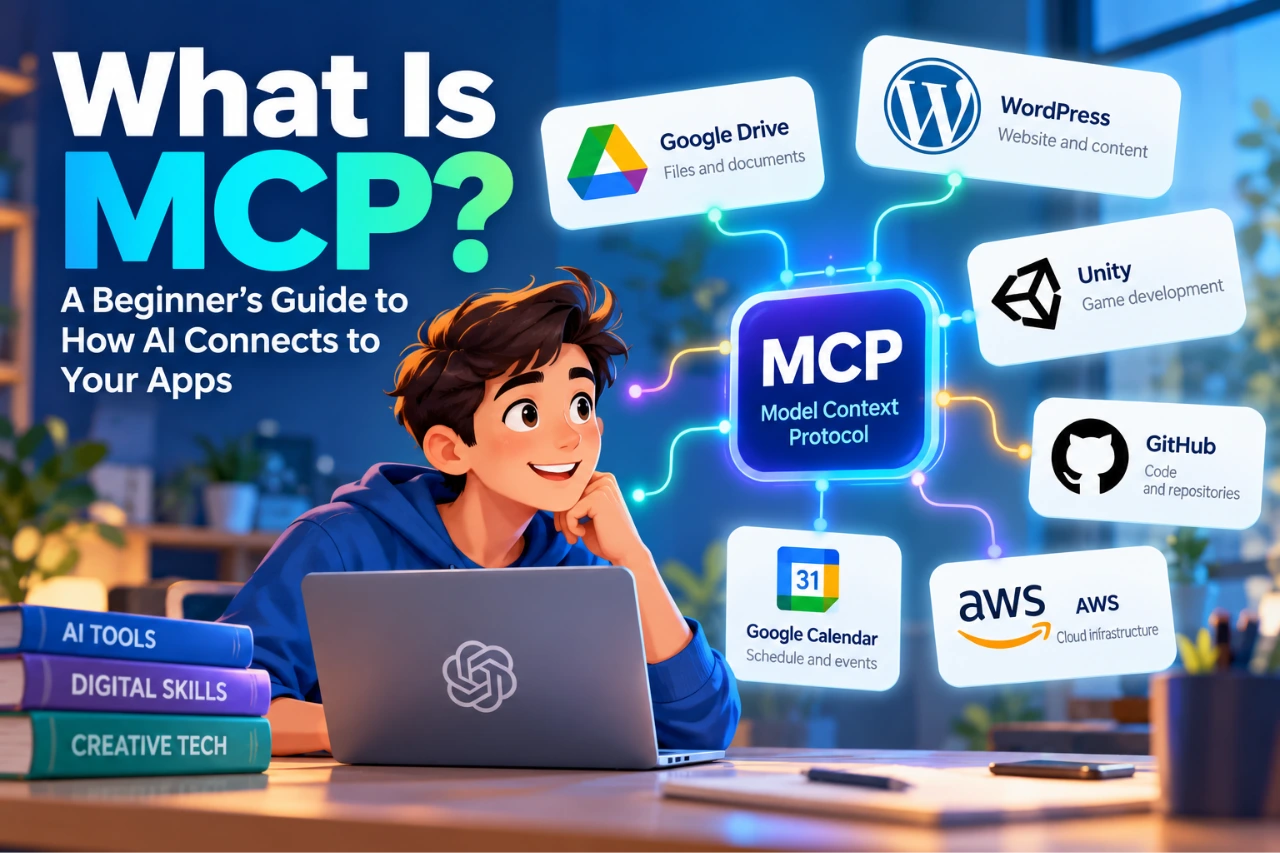
Illustration showing MCP connecting an AI assistant to Google Drive, WordPress, Unity, GitHub, Google Calendar and AWS

What Is MCP? A Beginner’s Guide to Model Context Protocol

AI assistants can answer questions, explain concepts, write text and help solve problems surprisingly well.

But there is an awkward limitation.

Ask an AI to summarize a document stored in your Google Drive, and it may not be able to see the document. Ask it what is causing an error in your Unity project, and it cannot inspect the project unless you give it the relevant code or error messages. Ask it which posts are currently sitting as drafts on your WordPress website, and the same problem appears.

So what do we usually do?

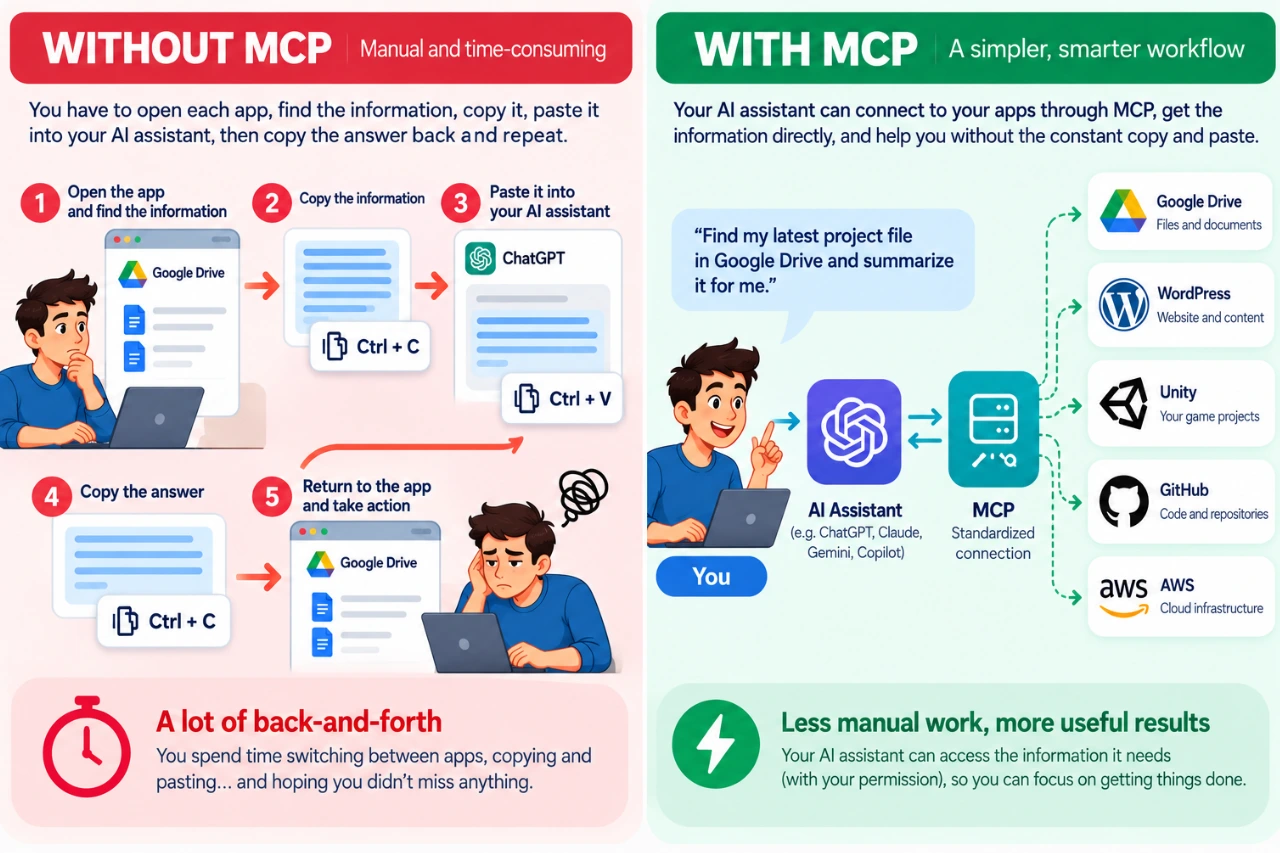
Open the app. Find the information. Copy it. Paste it into the AI. Get the answer. Copy that answer. Go back to the original app.

Humanity has become remarkably good at Ctrl+C and Ctrl+V.

MCP — Model Context Protocol — is designed to make that relationship between AI and our tools much smarter.

Comparison of a manual copy-and-paste AI workflow without MCP and a connected workflow using MCP

Instead of constantly carrying information between an AI assistant and the applications we use, MCP provides a standardized way for AI applications to connect to external tools and data.

And despite the rather technical name, the basic idea is surprisingly simple.

What Does MCP Stand For?

MCP stands for Model Context Protocol.

The three words make more sense when we separate them:

Model — the AI model helping you.

Context — information and capabilities outside the model that may be useful for your request.

Protocol — an agreed set of rules that allows different systems to communicate.

Put them together and MCP is essentially a common language that AI applications can use to work with external systems.

It was introduced by Anthropic in 2024 as an open standard and has since developed into a broader ecosystem used across different AI applications, developer tools and services.

The important word here is open. MCP isn’t a feature that belongs exclusively to one AI assistant or one software company. Different AI applications and services can implement the same protocol.

Think of MCP Like USB-C — Sort Of

The official MCP documentation uses USB-C as an analogy, and it’s a useful one.

Your laptop doesn’t need a completely different concept of connectivity for every keyboard, monitor, storage device or dock you attach to it. USB-C provides a common standard.

MCP tries to provide something similar for AI applications and external software.

But don’t take the analogy too literally. There isn’t a tiny AI USB cable hiding behind your computer.

A better way to think about it is:

MCP = the standard
MCP server = something that implements that standard and exposes particular tools or information
Your application = the system containing the data or functionality you want the AI to work with

And this distinction is important because MCP itself is not a product you install. An MCP server is one of the pieces that makes the connection possible.

How Does MCP Work?

Let’s imagine you ask an AI assistant:

Find my latest project document in Google Drive and summarize it.

Without a connection to Google Drive, the AI cannot simply wander into your account looking for the file.

With an appropriate MCP connection, the process can look roughly like this:

You → AI application → MCP → MCP server → Google Drive

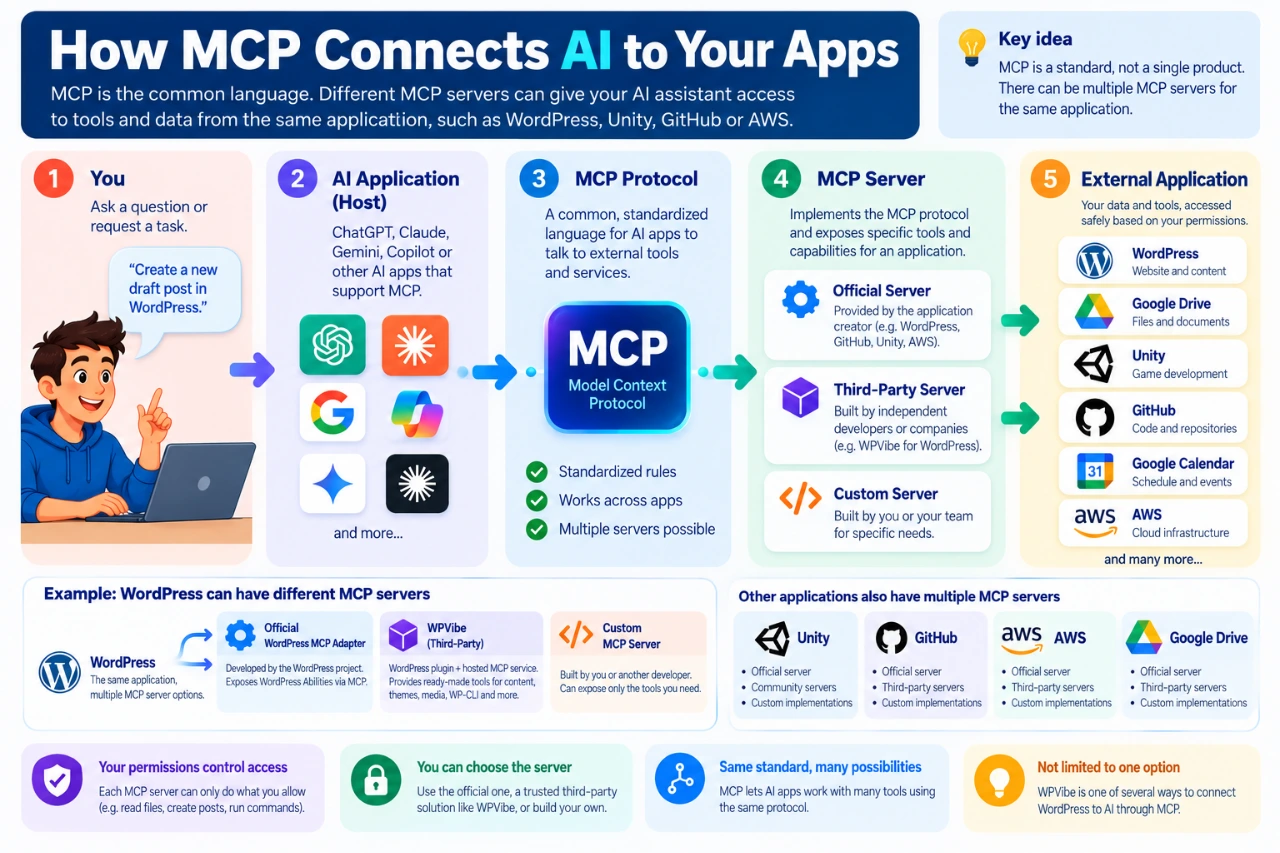
Behind that simple diagram there are a few more pieces. The AI application acts as the host. It can use an MCP client to communicate with an MCP server. The MCP server exposes specific tools, resources or capabilities that the AI application is allowed to use.

So a slightly more technical version looks like:

You → AI host → MCP client ↔ MCP server → external application

You don’t need to memorize those terms to use MCP.

The important idea is that the AI isn’t receiving unrestricted access to an entire application. It receives access to particular capabilities made available through the MCP server and permitted by your account and configuration.

Diagram showing how an AI application connects through MCP to official, third-party or custom MCP servers and external apps

One App Can Have More Than One MCP Server

This is an easy detail to miss.

An MCP server doesn’t necessarily have to be created by the company that makes the application you’re connecting to. There can be official MCP servers created or maintained by the application provider, third-party MCP servers created by another company or developer, and custom MCP servers built by you or your organization for a particular workflow.

That means two MCP servers connecting to the same application may expose very different capabilities.

WordPress is a good example. WordPress has an official MCP Adapter that can expose selected WordPress abilities through MCP. But third-party solutions can also provide MCP access to WordPress. One example is WPVibe, which provides a WordPress integration and MCP-based service for exposing WordPress capabilities to compatible AI environments. Developers can also build their own implementations.

So:

MCP is the common standard.
WPVibe is one way of implementing the connection for WordPress.

That’s similar to USB-C docks: several manufacturers can build different docks around the same standard, and those docks don’t necessarily provide exactly the same capabilities.

The same principle applies beyond WordPress. An application such as Unity, a development platform such as GitHub, or a cloud environment such as AWS may have official, community-built or specialized MCP implementations.

What Can an MCP Server Let AI Do?

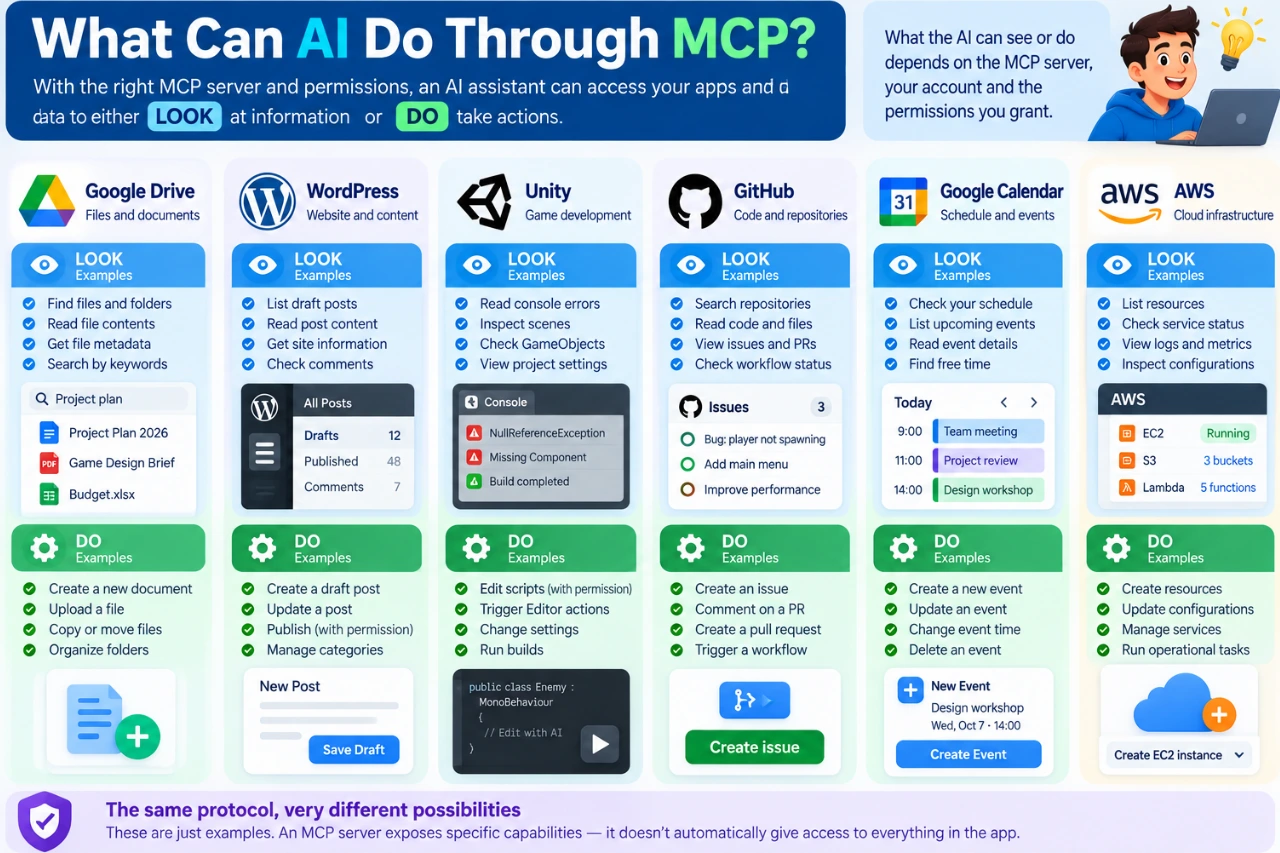
The easiest way to understand its capabilities is to divide them into two groups: LOOK and DO.

LOOK

An AI may be allowed to retrieve or inspect information. For example, it might find a document, read a file, inspect code, list WordPress posts, check a calendar, examine an error log or retrieve project information.

The AI is essentially saying: “Let me look at the information I need.”

DO

An MCP server may also expose tools that allow the AI to perform actions. It might create a document, create a WordPress draft, create a GitHub issue, update a calendar event, trigger a development workflow or perform an allowed cloud operation.

Now the AI isn’t simply reading information. It’s doing something.

And that distinction matters enormously. Giving an AI permission to read your draft posts is very different from giving it permission to publish or delete them.

Examples of information AI can read and actions it can perform through MCP across Google Drive, WordPress, Unity, GitHub, Calendar and AWS

What Can You Connect With MCP?

MCP isn’t limited to websites or cloud services. Depending on the available server and integration, MCP can expose capabilities from cloud services, local applications, files and folders, developer environments, databases, internal business systems and other software-controlled resources.

The key word is expose. MCP doesn’t automatically see everything. An MCP server deliberately makes selected capabilities available to the AI application.

Google Drive and Google Workspace

Imagine asking:

Find the project proposal I worked on last month and summarize the main points.

With an appropriate Google Workspace connection, an AI application can potentially search and retrieve permitted information from services such as Drive. Depending on the available integration and permissions, capabilities can also extend beyond reading information to actions such as working with files or calendar events.

Instead of downloading a document and uploading it into an AI conversation, the AI can retrieve the permitted information through the connection.

Unity

Unity is especially useful for understanding that MCP is not just about cloud software, particularly if you are learning game development.

An MCP server can communicate with a locally running Unity environment and expose selected project information to a compatible AI assistant. The assistant could potentially inspect project context or console errors and, when appropriate tools and permissions are available, trigger certain Editor actions.

Instead of repeatedly copying an error message into an AI chat, you can potentially give the assistant controlled access to the environment where the error actually exists.

It still won’t build GTA VII before lunch, unfortunately.

GitHub

A GitHub MCP server can give an AI assistant structured access to development information such as repositories, code, issues, pull requests and workflows.

Depending on the tools and permissions available, the AI might inspect an issue, summarize changes or perform permitted actions such as creating an issue.

This is especially useful for coding assistants because the AI can work with current project context instead of relying entirely on snippets pasted into a conversation.

AWS

MCP can also connect AI applications to cloud infrastructure. AWS provides MCP tooling that can allow compatible AI environments to interact with AWS services while respecting the user’s AWS permissions.

This is a good reminder that MCP isn’t only about documents and chat. An MCP server can expose real operational tools.

Which is also why permissions become extremely important.

WordPress

WordPress is a particularly interesting example for anyone managing a website.

An MCP connection can potentially expose selected WordPress capabilities such as reading posts, finding drafts, inspecting site information, working with media, creating or updating content, and performing selected administrative or development tasks.

But again, MCP doesn’t automatically expose your entire WordPress site.

What the AI can actually see or do depends on the MCP server, the capabilities it exposes, your WordPress permissions and the AI application you’re using.

There can also be different ways of connecting WordPress. The official WordPress MCP Adapter is one approach. Third-party services such as WPVibe are another. Developers can also create custom implementations.

We’ll explore that properly later in this series when we actually connect an AI assistant to WordPress and test what it can do.

Can MCP Connect to Software on My Computer?

Yes. MCP isn’t limited to websites and cloud services.

An MCP server can run locally and expose selected capabilities from software, files, development tools or other resources on your computer.

Unity is a good example: a suitable MCP server can communicate with a locally running Unity project and expose selected project context or Editor tools to a compatible AI environment.

But installing an application on your computer doesn’t automatically make it accessible to AI.

If you have Adobe Photoshop installed, for example, an AI assistant cannot simply open Photoshop because MCP exists. There would need to be an appropriate integration or MCP server capable of communicating with Photoshop, and the AI application would need a supported way to connect to that server.

MCP can expose what the MCP server knows how to expose — not everything on your computer.

The same principle applies to local files, databases, development environments and other desktop applications.

Can MCP Connect AI to Any Website or App?

Not automatically.

MCP isn’t a magic key that suddenly gives an AI assistant access to every application on the internet—or everything installed on your computer.

For the connection to work, there needs to be an MCP server or integration capable of exposing the relevant application’s data or tools. That server might be provided by the application itself, provided by a trusted third party, hosted locally, hosted remotely, or built specifically for your organization.

And even when an MCP server exists, the AI application still needs to support the way that server is being used.

So the real question isn’t:

“Does MCP support this application?”

A better question is:

“Is there a suitable MCP server for this application, does my AI application support it, and what capabilities and permissions does it provide?”

That’s less catchy. But considerably more useful.

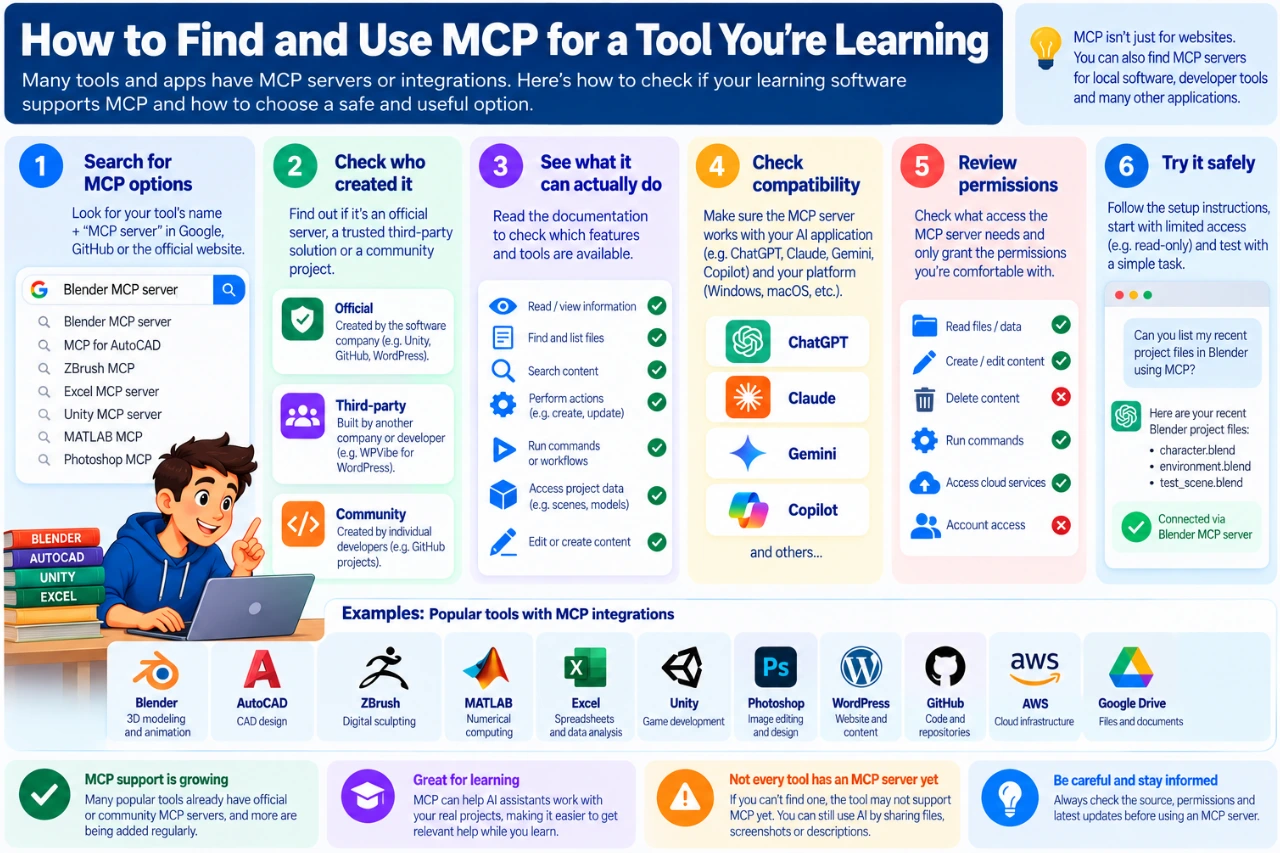
Learning a New Tool? Search for Its MCP Ecosystem

This is where MCP becomes especially interesting for students and young people learning digital skills.

Suppose you’re learning Blender, AutoCAD, ZBrush, Mathcad, Excel, Unity or another creative or technical application. Alongside ordinary tutorials, you can investigate whether an MCP integration exists for the software you’re learning.

A simple search such as “Blender MCP server”, “MCP for AutoCAD” or “Excel MCP server” can be a useful starting point.

But finding a project with “MCP” in its name doesn’t automatically mean you should install it.

Before using one, check:

  • Who created it? Is it official, from a known company or developer, or an unknown project?
  • What can it actually do? Does it only read information, or can it change your files or projects?
  • Is it maintained? Look for current documentation, recent releases or development activity.
  • How does it connect? Is it a remote service or something you install locally?
  • Does your AI application support it? An MCP server existing doesn’t mean every AI assistant can use it.
  • What permissions does it require? Don’t grant more access than you need.

For learning, the difference can be significant.

Without integration:
Student → describes the problem → AI works from the description.

With suitable MCP access:
Student → AI can inspect permitted project context → AI explains the problem using that context.

That doesn’t replace learning the software yourself. Used well, it can give an AI tutor better context about the thing you’re actually trying to learn.

Six-step guide to finding and safely evaluating an MCP server for software you are learning

MCP vs API: Haven’t Apps Been Talking to Each Other for Years?

Yes.

APIs already allow software applications to communicate with each other, and they aren’t disappearing because MCP exists.

In fact, an MCP server may use an application’s API behind the scenes.

The difference is mostly about standardization for AI applications. Traditionally, developers integrate separately with different APIs. Each service can have its own authentication, endpoints, data structures and documentation.

MCP provides a common way for AI applications to discover and use tools and context exposed by MCP servers.

A useful beginner shortcut is:

API = how software can interact with a service
MCP = a standardized way of presenting external tools and context to AI applications

They aren’t enemies. MCP often sits on top of systems and APIs that already exist.

So if someone tells you MCP has “killed the API,” you may safely keep one eyebrow raised.

Is MCP the Same as a Plugin or Connector?

Not necessarily.

This terminology gets confusing because AI products use words such as apps, connectors, integrations, plugins and tools. Those describe features you see as a user. MCP describes a protocol that may be used underneath some of those integrations.

One connector might use MCP. Another might use a company’s proprietary API.

From a beginner’s perspective, you don’t need to obsess over the terminology. Instead, ask two questions:

What information can the AI access?

What actions can the AI perform?

Those answers matter much more than the marketing label attached to the connection.

Is MCP Safe?

MCP can be used safely, but connecting an AI assistant to external systems creates responsibilities that ordinary AI chat doesn’t have.

If an AI can only answer a question, a mistake may produce a bad answer. If an AI can modify a website, create cloud resources or change a repository, a mistake can have real consequences.

A sensible approach is to:

  • start with read-only access where possible
  • use MCP servers you trust
  • grant only the permissions actually required
  • review important actions before they happen
  • be especially careful with delete, publish, payment, infrastructure and account-management capabilities
  • revoke connections you no longer use

You should also treat credentials carefully. Don’t paste ordinary passwords, API secrets or other sensitive credentials into an AI conversation simply because a random tutorial tells you to.

And remember that an MCP server itself becomes part of your security chain. An untrusted or poorly designed server can create risks regardless of how good the AI application is.

The more an AI can do for you, the more carefully you should decide what it’s allowed to do.

Do I Need to Know How to Code?

Not necessarily.

If you’re building an MCP server, then yes, you’re entering developer territory.

But if you’re using an existing MCP integration, the experience can be much simpler.

Some integrations can be configured through graphical interfaces. Others require installing software, entering configuration information, using credentials designed for integrations or running a few commands.

So MCP isn’t universally “one click” yet.

Sometimes it’s easy. Sometimes it’s still nerd territory.

But the direction is clear: more applications are packaging these connections so ordinary users don’t need to understand the underlying protocol.

Is MCP Free?

MCP itself is an open protocol.

That doesn’t mean everything you connect through MCP is free.

A typical setup can involve several layers:

AI service → MCP support → MCP server → external service

Any one of those layers may have its own pricing or usage limits.

An MCP server may be free while the AI service requires a paid plan. The AI client may be free while the external cloud service charges for resources you use. Or a third-party MCP provider may offer a limited free tier and charge for additional capabilities.

So remember:

Open protocol ≠ everything is free.

We’ll look at this more closely in the next article because the differences between AI assistants matter quite a bit here.

Why Does MCP Matter?

The bigger story isn’t really MCP itself. It’s what happens when AI assistants stop being isolated chat boxes.

For the first few years of mainstream generative AI, much of our interaction looked like this:

Ask → receive answer → manually do something with the answer.

Connections such as MCP can change that workflow to something closer to:

Ask → retrieve context → reason → use a tool → return the result.

For students, that might mean an AI assistant understanding permitted context from a coding, 3D or Unity project. For developers, it might mean working with repositories and development tools. For content creators, it could mean working with documents and publishing systems. For businesses, it can mean connecting AI to internal tools and workflows.

And for website owners, it may mean something as practical as asking:

Which WordPress posts are still drafts?

and getting the answer without opening WordPress and searching manually.

That’s a considerably more useful AI than one waiting patiently for another copy-and-paste.

Five Things to Remember About MCP

  1. MCP stands for Model Context Protocol. It is an open standard for connecting AI applications with external tools and data.
  2. MCP is the protocol, not the individual product. MCP servers implement the protocol and expose particular capabilities.
  3. There can be multiple MCP servers for the same application. They may be official, third-party or custom-built.
  4. MCP can connect to cloud and local resources. What matters is whether an appropriate server can expose them to your AI application.
  5. AI can potentially LOOK and DO — so permissions matter. Reading information and performing actions are very different levels of access.

Once those ideas click, most of the confusing MCP terminology becomes much easier to understand.

What’s Next?

Understanding MCP is only the first part of the story.

The next question is probably the one most people actually care about:

Which AI assistants can I use with MCP — and how much will it cost me?

In the next article, we’ll compare ChatGPT, Claude, Gemini, Copilot and other AI tools to see what MCP support they currently provide, what you can use for free, what requires a paid plan, and how beginner-friendly the different options really are.

Then we’ll stop talking about MCP in theory.

In the third article, we’ll connect AI to a real WordPress site, test what it can see and do, and show the process step by step.

Because eventually, even Ctrl+C and Ctrl+V deserve a day off. 😄

Game development for beginners with a student creating a 3D game using a game engine, code and game controller

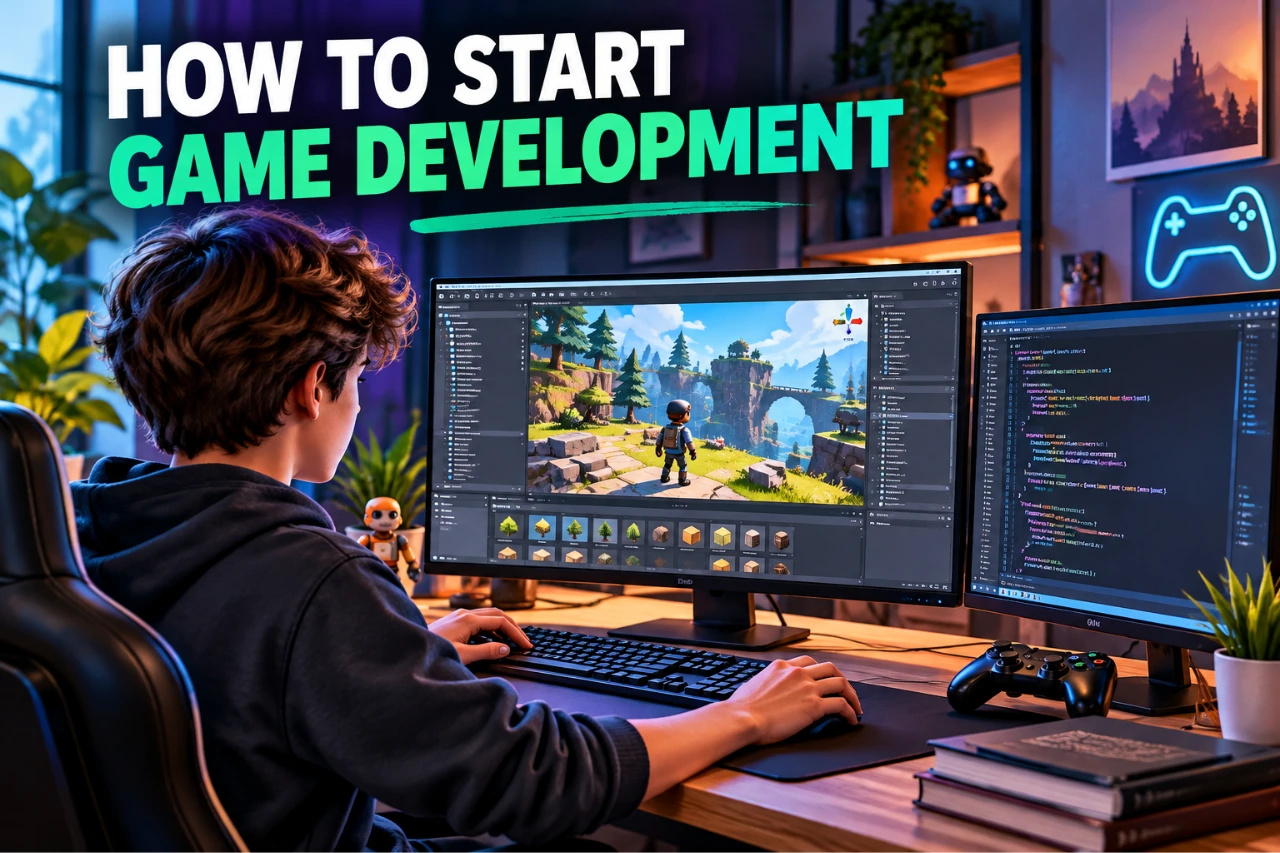
How to Start Game Development: A Beginner’s Guide

Game development for beginners can look intimidating from the outside. A finished game may combine programming, art, animation, sound, interface design, physics and storytelling—but beginners do not need to learn all of those skills before they start.

The most useful first goal is much smaller: choose a simple game engine, build one tiny playable project, and learn each new skill when the project requires it. That approach turns game development from a huge subject into a series of manageable problems.

1. What does game development actually involve?

Game development is the process of turning an idea into an interactive experience. Even a small game can involve several disciplines: game design defines the rules and player experience; programming creates behaviour and systems; visual art and animation create characters and environments; sound adds feedback and atmosphere; UI design creates menus and on-screen information; and testing helps identify bugs and improve the experience.

You do not need to become an expert in every area. Working on a small game is actually a useful way to discover which parts interest you most.

2. Do you need to know coding before learning game development?

No. You can start learning how a game engine works before you are comfortable with programming. What matters is being willing to learn basic logic as your projects become more interactive.

Modern engines provide editors and visual tools that let beginners create scenes, place objects, adjust physics, work with animation and test ideas without writing everything from scratch. Unreal Engine, for example, includes Blueprint visual scripting, while programming with C++ remains available when a project needs it. Unity also provides visual scripting alongside its native C# scripting workflow. Godot supports GDScript and C#, and its documentation recommends GDScript as an accessible starting point for people who are new to programming.

Eventually, learning some programming makes it much easier to create your own mechanics instead of relying entirely on templates. Start with variables, conditions, loops, functions, input and simple object behaviour rather than trying to learn an entire language first.

3. Unity vs Godot vs Unreal Engine: which should a beginner choose?

There is no single best game engine for every beginner. The right choice depends on the kind of game you want to make, the computer you have and the learning workflow you prefer.

Unity

Unity is a general-purpose real-time engine for 2D and 3D development. It uses C# for scripting and has structured beginner learning resources that cover programming, audio, UI, animation, materials and lighting. It is a practical choice if you want to learn an engine while gradually developing transferable programming and game-development skills.

Godot

Godot is particularly approachable for small projects and 2D development, although it also supports 3D. Its own beginner documentation recommends starting with 2D because it lets new developers become comfortable with the engine before dealing with the extra complexity of 3D. Godot’s GDScript is designed to be relatively easy to learn, and C# is also supported.

Unreal Engine

Unreal Engine is a powerful option for 3D interactive experiences. Beginners can create gameplay with its node-based Blueprint visual scripting system and later combine Blueprints with C++ when appropriate. Its advanced rendering capabilities can also make it more demanding on hardware than a lightweight beginner project requires.

Do not spend weeks trying to identify the theoretically perfect engine. Pick one that fits your first project and follow a complete beginner pathway. Skills such as debugging, game logic, level design, iteration and testing transfer when you eventually explore another engine.

4. Which programming language should you learn for game development?

Let the engine narrow the choice. Unity uses C# for scripting. Godot offers GDScript and C#, with GDScript being a beginner-friendly option. Unreal Engine combines C++ with Blueprint visual scripting.

The first language you learn does not lock you into a career. Once you understand concepts such as variables, functions, conditions, loops, objects and debugging, learning another language becomes much easier. If you are still deciding where to begin, see our guide Which Programming Language Should You Learn First?

5. How much maths do you need for game development?

You do not need advanced mathematics before making your first game. For a simple beginner project, basic arithmetic, coordinates, angles, speed, distance and logical problem-solving are enough to get started.

More advanced maths becomes useful when you work with topics such as 3D movement, vectors, physics, procedural systems, graphics or complex simulations. Learn those concepts when your projects give you a reason to use them. A moving character is often a much better motivation for understanding coordinates and vectors than memorizing formulas without context.

6. Game designer vs game programmer: what is the difference?

A game designer focuses primarily on how the game works for the player: rules, mechanics, progression, levels, balance and the overall experience. A game programmer focuses on implementing the systems that make those ideas function in software.

Real projects contain many other roles too, including 2D and 3D artists, animators, UI/UX designers, sound designers, technical artists, writers, producers and quality-assurance testers. In a small student project, one person may perform several of these roles.

That is one reason game development is such a useful field to explore while you are still deciding on a direction: one project can expose you to several creative and technical careers.

7. What should your first game be?

Your first game should be much smaller than the game you dream of eventually making. A one-level platformer, simple obstacle game, basic puzzle, short top-down game or tiny arcade-style project is enough.

A good approach to game development for beginners is to keep the first project simple: one player, one core mechanic, a goal, a lose condition, a restart function, a little sound and a simple interface. Finishing that teaches more than beginning an enormous open-world game that never reaches a playable state.

Use placeholder art when necessary. Reuse legal assets where appropriate. Concentrate first on making the game playable, then improve its appearance and sound.

8. A simple beginner game-development roadmap

  1. Choose one engine. Unity, Godot and Unreal are all capable starting points; choose according to your project and learning preferences.
  2. Complete one structured beginner tutorial. Learn the editor, scenes or levels, objects, input and basic scripting.
  3. Rebuild something small without copying every step. Change the mechanic, level or rules so you have to solve problems yourself.
  4. Learn programming as you need it. Focus on the concepts required by your current mechanic.
  5. Add basic art, UI and sound. This introduces the other disciplines involved in making a complete game.
  6. Test and improve. Ask another person to play without explaining what to do and observe where they struggle.
  7. Finish and document the project. Save screenshots or video, explain what you built and what you learned, and keep the project as early portfolio evidence.

9. What computer do you need to start game development?

You do not need a high-end gaming workstation to begin learning game development. Hardware requirements depend heavily on the engine, whether you are working in 2D or 3D, and the complexity of your project.

Godot can run simple projects on relatively modest hardware; its current documentation lists 4 GB RAM as the minimum for the native editor and 8 GB as recommended for a smooth experience with simple projects. Unity’s current documentation recommends at least 8 GB RAM for the editor, while noting that larger projects require more. Unreal Engine is considerably heavier: Epic’s current recommended Windows development specification includes 32 GB RAM and 8 GB or more graphics memory.

Those specifications are not a reason to postpone learning. If your computer is modest, begin with 2D or small 3D projects, keep scenes simple and choose tools that run comfortably on your machine. Always check the engine’s current official requirements before buying hardware because they change over time.

10. Can game development become a real career?

Yes, but “game developer” is not one job. The industry brings together programming, game design, art, animation, audio, UI/UX, production, testing and other specialties. Exploring game development can therefore help you discover a career direction even if you eventually work outside the games industry.

For students, the useful goal is not to predict a job title immediately. Build projects, notice which problems you enjoy solving, learn to collaborate and gradually develop evidence of your skills. Our Career Readiness for Students guide explains how projects and portfolios can support that process.

11. Start small, but finish something

The hardest part of beginning game development is often not coding, art or maths. It is controlling the size of the idea.

Choose one engine. Build one mechanic. Make one small level. Let someone else play it. Fix what does not work. Then finish it.

Once you have completed one tiny game, the next project can introduce a new challenge—better art, more sophisticated programming, animation, sound, UI or a larger level. That gradual increase in complexity is how a collection of unfamiliar skills starts becoming game-development experience.

If you are preparing for university or exploring creative technology more broadly, our guide What Digital Skills Should Teenagers Learn Before University? places game development alongside coding, 3D design, UI/UX, sound and AI literacy as part of a broader skills pathway.

Sources and further learning

AI system processing patterns in language and data

What Patterns Does AI Learn? A Beginner’s Guide

AI systems learn statistical patterns from examples in data. Depending on the system, those patterns can describe relationships between words, pixels, sounds, numbers or events over time. The model then uses what it learned to classify information, make predictions or generate new output.

How does AI learn patterns?

AI learns patterns by training a model on examples and adjusting its internal parameters so that its outputs become more useful for a particular task. During training, the model identifies statistical relationships in the data—for example, relationships among words in text, visual features in images, or changes in measurements over time. Once trained, it can use those learned relationships to classify new information, make predictions or generate output.

The exact learning process depends on the type of model, the training method and the data involved. To understand the broader field first, see our beginner’s guide to artificial intelligence.

What does “learning a pattern” mean in AI?

In machine learning, a pattern is a relationship the model can use to make a useful prediction. During training, an algorithm adjusts internal parameters so that its outputs better match the examples or objectives it is given. It does not simply memorize a human-written rule for every possible situation.

For example, an image classifier trained on labelled examples can learn visual features that help distinguish categories. A language model learns statistical relationships among tokens and uses them to predict or generate sequences.

What patterns can AI learn from language?

Language models can learn relationships involving word order, grammar, context, style and associations between concepts. A simple next-word suggestion on a phone and a modern generative language model are very different in scale, but both illustrate how patterns in sequences can be used to predict likely continuations.

Modern language models generally process text as tokens rather than treating whole sentences as indivisible units. Their outputs are generated from learned numerical relationships, which is one reason fluent text should not automatically be treated as proof that every statement is correct.

What patterns can AI learn from images?

Computer-vision systems can learn visual features associated with shapes, edges, textures, objects and spatial relationships. The useful features depend on the model, training method and task.

An image classifier, for example, can be trained to associate combinations of visual features with labelled categories. Other vision systems can locate objects, segment regions of an image or generate images from learned representations.

Can AI learn patterns in sound and time-series data?

Yes. Machine-learning systems can work with sequential data such as speech, sensor readings and other measurements that change over time. Depending on the application, a model may learn recurring structures, transitions, trends or unusual deviations.

Examples include speech recognition, forecasting and anomaly detection. The model and data required for each task can be very different, so “AI” does not refer to one universal pattern-learning method.

Does AI create its own rules?

It is more accurate to say that many machine-learning systems learn parameters from data rather than being programmed with every decision rule by hand. Traditional software and machine learning are not opposites: real systems often combine ordinary programmed logic with trained models.

In a neural network, training adjusts numerical values commonly called weights. Those learned parameters influence how an input is transformed into an output. The resulting decision process can be much more complex than a short list of human-readable rules.

How are prompts related to learned patterns?

A prompt is input supplied to a generative AI system. For a language model, the prompt provides context that influences which output tokens are generated next. Clear instructions and relevant context can therefore make the desired task easier for the model to infer.

For example, “Explain photosynthesis” leaves many choices open. “Explain photosynthesis to a 13-year-old in five short bullet points” provides information about the audience, format and desired length.

How can beginners write clearer AI prompts?

  • State the task: say what you want the system to do.
  • Provide relevant context: include information the model needs to answer.
  • Specify the audience: beginner, student, developer or another relevant reader.
  • Specify useful constraints: such as length, format or required topics.
  • Check important outputs: generative models can produce inaccurate information even when the wording sounds confident.

Why does training data matter?

A model can only learn from the data, feedback and objectives used during its development. If the training data are incomplete, unrepresentative or contain unwanted correlations, the resulting model can reproduce some of those limitations. Performance can also fall when the model encounters data that differ substantially from what it learned from.

Key takeaway

AI pattern learning is best understood as learning numerical relationships from data that help a model perform a task. Language, images, audio and time-series data contain different kinds of structure, and different AI systems learn and use those structures in different ways.

Related TechEduCareer guides

For more context, read what artificial intelligence is and how AI-generated language works.

Sources and further reading

Artificial intelligence and machine learning illustration

What Is Artificial Intelligence? A Beginner’s Guide to AI

Artificial intelligence (AI) is a broad field of computing in which machines are designed to perform tasks that normally require capabilities such as recognizing patterns, understanding language, making predictions, generating content or supporting decisions. Modern AI includes many different techniques, and machine learning is one important part of the field rather than a synonym for all AI.

What is artificial intelligence? A beginner-friendly explanation

AI is an umbrella term for computer systems that can produce outputs such as predictions, recommendations, classifications, decisions or generated content. Some AI systems learn statistical patterns from data, while others can use rules, search, planning or combinations of different approaches.

This distinction matters because AI is not a single program, database or robot. An AI application can combine software, trained models, data, computing infrastructure and an interface that people interact with.

What is the difference between AI and machine learning?

Artificial intelligence is the broader field. Machine learning (ML) is a group of techniques in which models learn patterns or statistical relationships from data. Machine learning approaches include methods such as regression, decision trees and neural networks.

For example, an email spam filter can learn patterns associated with unwanted messages, while an image model can learn features that help distinguish objects. Generative models can learn patterns in text, images, audio or other data and use those patterns to produce new outputs.

How does machine learning work?

A simplified machine-learning workflow has three stages:

  1. Training data: examples provide information from which a model can learn.
  2. Training: an algorithm adjusts model parameters to capture useful patterns and relationships.
  3. Inference: the trained model receives new input and produces an output, such as a classification, prediction or generated response.

Different forms of machine learning use data differently. Supervised learning uses labeled examples, unsupervised learning can identify structure in unlabeled data, and reinforcement learning learns through interactions and feedback.

For a beginner-friendly continuation, see what patterns AI can learn.

What are neural networks?

Neural networks are one family of machine-learning models. They contain connected computational units arranged in layers and can learn complex relationships by adjusting numerical parameters during training.

The name was inspired historically by biological neurons, but artificial neural networks should not be treated as digital copies of the human brain. They are mathematical and computational models.

Where do we encounter AI?

AI appears in many everyday and professional applications. Examples include search and recommendation systems, translation, speech recognition, fraud detection, image analysis, navigation, generative assistants and tools that help create text, software, images, audio and video.

The capabilities and reliability of these systems vary. An AI system that performs well on one task should not automatically be assumed to perform well on another.

Cloud AI and local AI: what is the difference?

Cloud AI runs primarily on remote infrastructure. This can provide access to powerful computing resources, but data may need to be transmitted to a service provider depending on how the product works.

Local AI runs some or all of the model directly on a user’s computer or device. Local operation can provide more control over data and offline availability, although hardware requirements and model capabilities vary considerably.

Tools such as Ollama and LM Studio have made it easier for learners to experiment with compatible models locally. Cloud services, meanwhile, can provide access to larger models without requiring powerful hardware on the user’s own computer.

A short history of modern AI

  • 1950: Alan Turing published “Computing Machinery and Intelligence,” opening with the question “Can machines think?”
  • 1956: the Dartmouth summer research project helped establish artificial intelligence as a named research field.
  • 1997: IBM Deep Blue defeated world chess champion Garry Kasparov in a match.
  • 2010s: advances in deep learning, larger datasets and computing power accelerated progress in areas such as image recognition, speech and language processing.
  • 2020s: foundation models and generative AI brought text, image, audio and multimodal AI tools to a much broader public audience.

What can AI get wrong?

AI output should not automatically be treated as fact. Systems can produce inaccurate results, reflect problems or biases in data, perform differently outside the conditions in which they were evaluated, or fail in unexpected ways.

Users should therefore consider the purpose and risk of a task, verify important information and understand what data is being shared with an AI service. For higher-stakes applications, testing and evaluation become especially important. NIST’s current AI evaluation work emphasizes that evaluation methods need to reflect the particular system, application and real-world context.

How can a beginner start learning AI?

A useful starting path is to understand basic AI terminology, learn how models use data and patterns, experiment with AI tools, and then explore programming and machine learning if you want to understand how systems are built.

Python is widely used in machine learning, but you do not need to begin by building a model. Learning what AI can and cannot do is a useful first step before moving into coding, datasets, model training and evaluation. See our guide to choosing a first programming language for a broader introduction to programming choices.

TechTitans Cloud as a learning example

TechTitans Cloud is one example of a technology-learning platform covering creative and technical skills. Where AI-related learning material is available, learners can use it alongside broader programming and digital-skills resources rather than treating any single course or platform as a complete introduction to the field.

Related TechEduCareer guides

Continue with what patterns AI learns and how AI-generated language works.

Sources and further reading

Artificial intelligence generating and processing language

Does AI Really Understand Language? How AI-Generated Text Works

AI can produce remarkably natural language, but generating a convincing sentence is not the same thing as demonstrating human understanding. Modern language models learn statistical relationships in large amounts of data and generate responses from the context they receive. Their output can be useful, persuasive or emotionally affecting, but users should not assume that human-like wording proves human-like beliefs, feelings or intentions.

How does AI generate language?

Large language models process text as smaller units called tokens. During training, a model learns statistical relationships among those tokens and other features of its training data. When generating text, it uses the current context to estimate suitable continuations, repeatedly producing additional tokens to form a response.

This is more sophisticated than simply retrieving a stored sentence. The model can combine learned patterns to produce new text, follow instructions and adapt its response to the conversation. For a beginner-friendly explanation of the broader topic, see What Is Artificial Intelligence? and our guide to patterns AI can learn.

Does fluent AI language prove understanding?

No single test of fluent output settles that question. A language model can generate explanations, jokes, summaries and apparently empathetic replies without that output establishing that the system has human experiences or emotions.

It is useful to distinguish between observable capability and claims about an AI system’s inner state. We can test whether a model follows an instruction, translates a sentence or answers a question accurately. Claims about consciousness, feelings or human-like subjective understanding are different and should not be inferred merely from conversational fluency.

Why can AI sound as if it has intentions or emotions?

Human conversation contains recurring linguistic forms for apologizing, promising, thanking, reassuring, requesting and explaining. A model trained on language can reproduce these forms in appropriate contexts.

For example, a chatbot may say, “I’m sorry for the confusion.” Functionally, that wording can signal a correction and make the interaction easier to follow. But the sentence itself is not evidence that the software experiences regret.

What does speech-act theory add to the discussion?

Philosophers of language such as J. L. Austin and John Searle examined how utterances can do more than describe facts. Saying “I promise,” for example, can perform a social act under the right circumstances.

Austin distinguished among the act of producing an utterance, what a speaker is doing through that utterance, and the effect it has on a listener. This framework raises an interesting question for AI: a generated sentence can have a real effect on a human reader even when we should not automatically attribute a corresponding human mental state to the system that generated it.

Can AI-generated words have real effects?

Yes. Regardless of how we characterize a model’s internal processes, its output can affect people. An explanation can teach someone something; a misleading answer can create confusion; supportive wording can feel reassuring; and persuasive text can influence decisions.

That is one reason AI literacy matters. The practical consequences of generated language can be real even when the language is produced by software.

Can AI-generated text be wrong?

Yes. Fluent language should not be confused with factual reliability. Generative systems can produce inaccurate statements, unsupported details or confident-sounding answers that are not grounded in reliable evidence.

For important factual questions, users should check primary or authoritative sources rather than treating confidence or conversational style as proof of accuracy.

Human language and AI-generated language: a practical comparison

Question Human communication AI-generated language
Can it produce meaningful sentences? Yes Yes
Can the words affect another person? Yes Yes
Can it adapt language to context? Yes Yes, within the system’s available context and capabilities
Does fluent output by itself prove feelings or consciousness? No; those are inferred using much broader evidence about people No
Can statements be inaccurate? Yes Yes

What should beginners remember when talking to AI?

  • Treat natural conversation as an interface, not proof that the system is a person.
  • Judge factual claims by evidence and sources rather than by how confident the wording sounds.
  • Give clear context and instructions when you want a specific result.
  • Be cautious with sensitive personal or confidential information.
  • Remember that different AI systems have different capabilities, limitations and access to current information.

The key takeaway

AI-generated language can be useful and can resemble human conversation closely. The safest conclusion, however, is based on what we can observe: language models generate responses by computationally processing learned patterns and context. Human-like phrasing alone does not establish human-like feelings, beliefs, consciousness or intentions.

For learners, this distinction is valuable because it makes AI easier to use critically: appreciate what the system can do without assuming more than the evidence supports.

Related TechEduCareer guides

Start with our beginner’s guide to artificial intelligence, then explore how AI learns patterns.

Sources and further reading

Search engine visibility and SEO concept

How to Improve Your Google and Bing Visibility Without Paying for Ads

Getting onto the first page of Google or Bing is not something any legitimate SEO method can guarantee. What you can do for free is make your website easier to crawl, understand and trust, then use search data to improve pages that already show potential.

Start with useful, people-first content

Create pages that answer a specific question or solve a real problem. Use a descriptive title, a clear introduction and headings that help readers scan the page. Avoid writing primarily to manipulate rankings or repeating keywords unnaturally.

Make each page easy to understand

  • Use one clear page title and logical heading structure.
  • Write a useful meta description for important pages.
  • Add descriptive alternative text to meaningful images.
  • Link to related pages using descriptive anchor text.
  • Keep important information in crawlable page content.

Help search engines discover your pages

Use an XML sitemap and make sure important pages are not accidentally blocked by robots.txt or a noindex directive. Internal links are especially important: a useful article that nothing else on your site links to is harder for both readers and crawlers to discover.

Use Google Search Console and Bing Webmaster Tools

Both services provide free information about indexing and search performance. Instead of guessing which keywords matter, look for pages already receiving impressions and improve them where the content does not fully answer the query.

Improve speed and mobile usability

A technically healthy site is easier to use and maintain. Compress oversized images, avoid unnecessary scripts, use responsive layouts and test important pages with PageSpeed Insights. Performance work should support the reader rather than chase a perfect score.

Earn references instead of manufacturing backlinks

Links are most useful when another relevant website chooses to reference something genuinely useful on your site. Original research, practical guides, tools, data, expert commentary and resources people want to cite give you a better foundation than mass directory submissions or link exchanges.

Measure, update and repeat

SEO is iterative. Review search queries, indexing problems, engagement and outdated information. Update pages when facts change, strengthen weak sections and connect related articles with internal links. A small site with a coherent subject focus can be more useful than a large collection of disconnected pages.

Can free SEO really get you onto page one?

It can improve your chances, but there is no guaranteed free or paid method for a first-page position. Competition, relevance, site quality and the search engine’s interpretation of the query all matter. A better objective is sustainable search visibility: publish genuinely useful information, make it technically accessible and improve it using real performance data.

For a broader launch-stage approach that includes discovery, communities, directories and promotion as well as search, see our guide to promoting a new website.

Useful official resources

Browser game development and programming concept

Browser Games: How They Work and What Makes Them Useful for Learning

Browser games run directly in a web browser, which makes them unusually easy to access and share. Modern web technologies can support everything from simple puzzles to 2D and 3D games, multiplayer experiences and interactive learning activities without requiring a traditional desktop installation.

What is a browser game?

A browser game is software delivered through the web and played in a compatible browser. Depending on the game, developers may use HTML, CSS and JavaScript together with technologies such as Canvas, WebGL, Web Audio, WebSockets and the Gamepad API.

Why browser games remain useful

  • Low friction: a player can usually follow a link and begin without a large installation.
  • Cross-platform reach: web standards allow developers to target many devices through a common platform.
  • Easy distribution: updates can be delivered through the website rather than separate app-store releases.
  • Good for experimentation: small games can introduce programming, design, interaction and problem-solving concepts.

Different kinds of browser games

The category is much broader than casual arcade games. Word puzzles demonstrate how a very small ruleset can create a repeatable daily challenge. Strategy games can model planning and resource management. Multiplayer games introduce real-time networking, while educational games can combine progression and feedback with learning tasks.

What can students learn from browser games?

Playing a game does not automatically create transferable skills, but games can become useful learning environments when the activity is connected to a clear objective. Building a simple browser game is even more instructive because it can combine programming logic, interface design, visual assets, sound, testing and iteration in one project.

If you are interested in the learning side of games, see our guide to game-based learning.

A gamified learning example

TechTitans.cloud is one example of using browser-based game mechanics alongside technology education. Its game component sits within a broader learning platform, illustrating how progression and interactive tasks can be combined with educational content. It is an example rather than a claim that one model is best for every learner.

Want to build a browser game?

Start small: create a simple interaction, add a scoring or state system, then test it with other people. JavaScript is a natural starting point for web-based projects; our beginner’s guide to choosing a programming language can help if you are deciding what to learn first.

Useful technical resource

Mozilla’s MDN Game Development documentation provides tutorials and references for building games with open web technologies.

Takeaway

Browser games are interesting not because they eliminate every limitation of native games, but because the web makes interactive experiences easy to distribute and experiment with. For learners, the most valuable step may be moving from simply playing a browser game to understanding how one is designed and built.