

Do You Really Need to Learn Prompt Engineering to Use AI?
You open ChatGPT, Claude, Gemini, or Qwen and type a perfectly ordinary question. It answers. Then you visit YouTube and discover dozens of tutorials explaining how to write “perfect AI prompts,” complete with formulas, expert roles, and elaborate instructions. Suddenly, asking a simple question feels like doing something wrong.
But is it? If conversational AI is built to understand natural language, why should everyday users need special training to talk to it? And what exactly are those courses teaching?
This guide takes a practical, balanced look at prompt engineering: what it is, why long prompts sometimes help, when a conversation works better, and when structured instructions really are worth learning. Along the way, we’ll draw on real TechEduCareer work involving WordPress troubleshooting, SEO, design, and AI tools.
What Is a Prompt? You’re Already Writing Them
A prompt is the input you give an AI system. It might be a question (“What is WordPress?”), an instruction (“Summarize this article”), a creative request (“Suggest three logo concepts”), or a detailed task description. Text is common, but depending on the system, an input can also include images, files, audio, and other information.
You do not need to label your message as a prompt. If you have ever asked an AI assistant a question, you have already used one. “Continue,” “Explain,” and “Make this simpler” can all be effective prompts when the preceding conversation makes their meaning clear.
There is a technical nuance: the model may also receive system instructions, conversation history, retrieved documents, or tool results. So your latest message is not necessarily the only information shaping the response. That distinction becomes important when comparing a fresh chat with a conversation that has developed over weeks.
Why Are There So Many Prompt Engineering Tutorials?
Prompt engineering is the practice of designing, testing, and refining instructions and context to obtain useful AI outputs. OpenAI’s prompt engineering documentation describes techniques for improving model responses, especially in developer workflows. It is a real discipline, particularly in software development and repeatable business workflows. Yet online explanations often blur two very different situations: a person exploring an idea through conversation and an application that must process thousands of requests consistently.
For a casual user, “Explain this error message” may be all that is needed. For a customer-support workflow that classifies messages into predefined categories and outputs machine-readable data, ambiguity can break the process. Developers may need carefully specified labels, examples, validation rules, and tests across many inputs.
Good educational material explains that difference. Less useful advice makes ordinary communication sound like a secret technical language. There is no universal formula that turns every prompt into a correct answer.
Are Longer Prompts Better? Not Necessarily
Consider “Help me improve my website.” The AI understands the words, but the task is broad. Does improvement mean loading speed, accessibility, design, search visibility, or conversion? A longer request can resolve those uncertainties: “My WordPress site uses LiteSpeed Cache. Help me investigate a JavaScript error. First identify the likely source; do not change settings until I approve.”
The second request is stronger because it provides relevant context, a specific goal, and a boundary—not because it contains more words. Padding it with impressive adjectives, irrelevant background, and repeated demands may add little value. Long prompts can also contain conflicting instructions that make the task harder.
A useful rule is to provide the information the AI cannot reasonably infer: your objective, the relevant environment, important constraints, and what a successful result would look like. If you do not know these yet, that is not a failure. You can discover them together.
Does “Act as a Professional Expert” Make AI Smarter?
Many prompts begin with “Act as a senior designer,” “You are an experienced researcher,” or “Behave like a professional editor.” This technique is often called role prompting. Anthropic’s prompting guidance emphasizes clear, direct instructions and explaining the context that a new collaborator would need. It can encourage the model to adopt a useful perspective, vocabulary, or style. A request framed around SEO may naturally emphasize search intent, indexing, and internal links.
But role wording does not grant qualifications, unlock hidden knowledge, or guarantee factual accuracy. “Act as a world-class WordPress developer” is less actionable than supplying the actual browser error, installed caching setup, and steps already tried. You can use both, but the evidence and task definition usually matter more than the grand title.
Try replacing a theatrical role with an explicit expectation: “Review this article for factual accuracy, readability, and search intent. Identify weaknesses and explain your reasoning.” That tells the AI what to evaluate and how to respond.
The Alternative: Build the Answer Through Conversation
Not every project begins with a complete specification. When designing a logo, you may not know the final shape, colors, typography, or proportions until you see alternatives. A giant upfront prompt forces you to predict decisions you have not made. Iterative prompting takes a different path: begin with a direction, inspect the result, react, and refine. Google’s Gemini prompt design guide likewise describes iteration and breaking complex tasks into smaller steps.
- “I need a logo, but I haven’t decided on a visual direction.”
- “Let’s explore simple geometric symbols.”
- “The second idea is promising, but it feels too complicated.”
- “Keep the concept and simplify the shape.”
- “Now compare two typefaces before we finalize.”
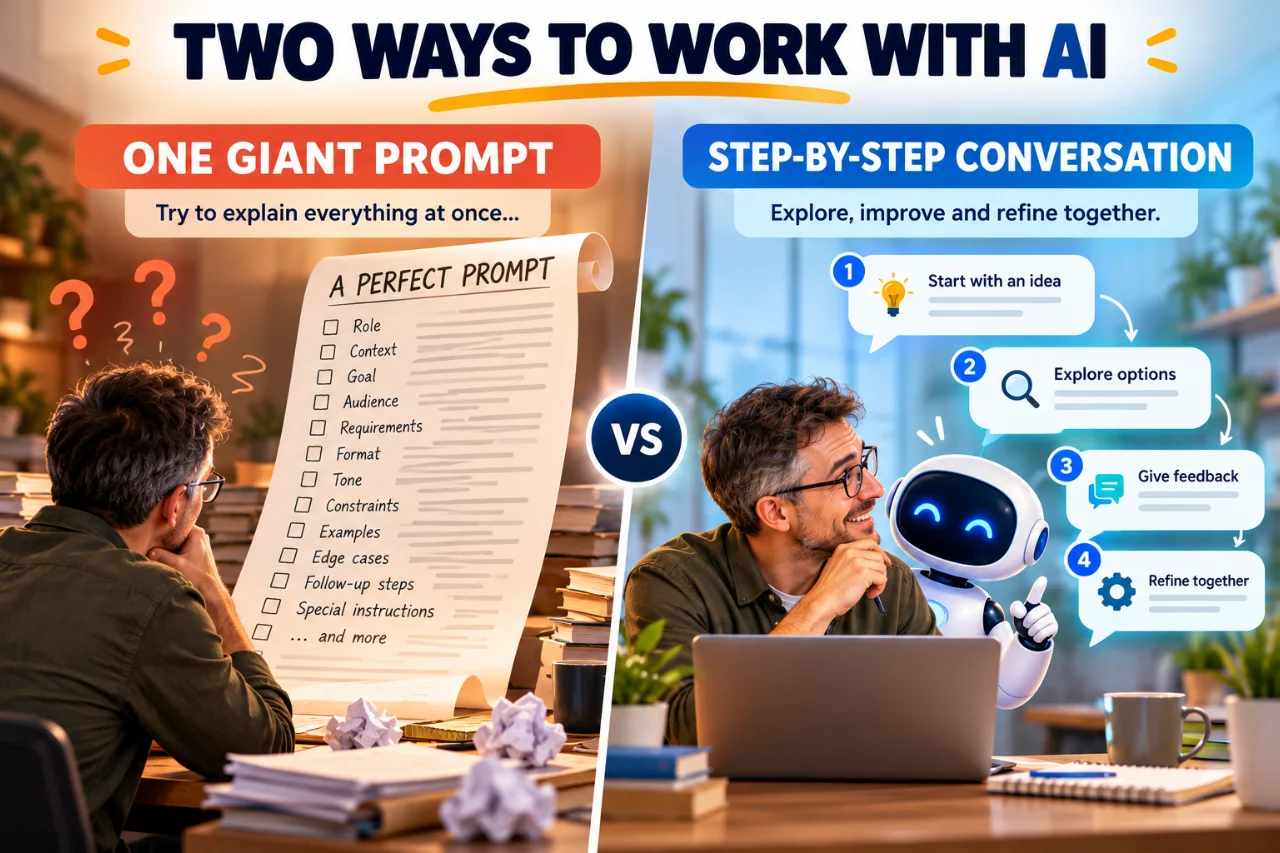
Two approaches to working with AI: detailed instructions upfront or an evolving conversation. Both can be useful depending on the task.
Each message is a prompt. Together they form a working process. The same method applies to article planning, learning a new subject, debugging code, and researching unfamiliar options. The AI can offer alternatives, ask questions, and explain trade-offs while the user makes the decisions.
In our TechEduCareer design work with AI, the final direction often emerged only after reviewing actual results. No amount of advance description could fully replace seeing a shape on screen. The practical lesson is simple: when visual feedback or testing is available, use it instead of endlessly polishing instructions.
Ask the AI to challenge you, not merely agree
A productive conversation also needs disagreement. AI assistants can sometimes become overly agreeable—a behavior often described as sycophancy. If you ask “Is my design perfect?” you may get less useful feedback than if you say “Critique this design. Identify weaknesses and tell me if a new choice conflicts with decisions we made earlier.”
The goal is not to make the AI argumentative. It is to encourage evidence-based feedback, distinguish facts from preferences, and preserve the user’s control over final decisions. A helpful collaborator should be able to say, “We tried that approach before; here is what happened and what has changed.”
Why Shared Context Changes Everything
Think about speaking with someone you know well versus a neighbor you have just met. With a close family member, a few words may be enough because you share experiences, preferences, and history. With a new acquaintance, you naturally explain more. The difference is not intelligence; it is shared context.
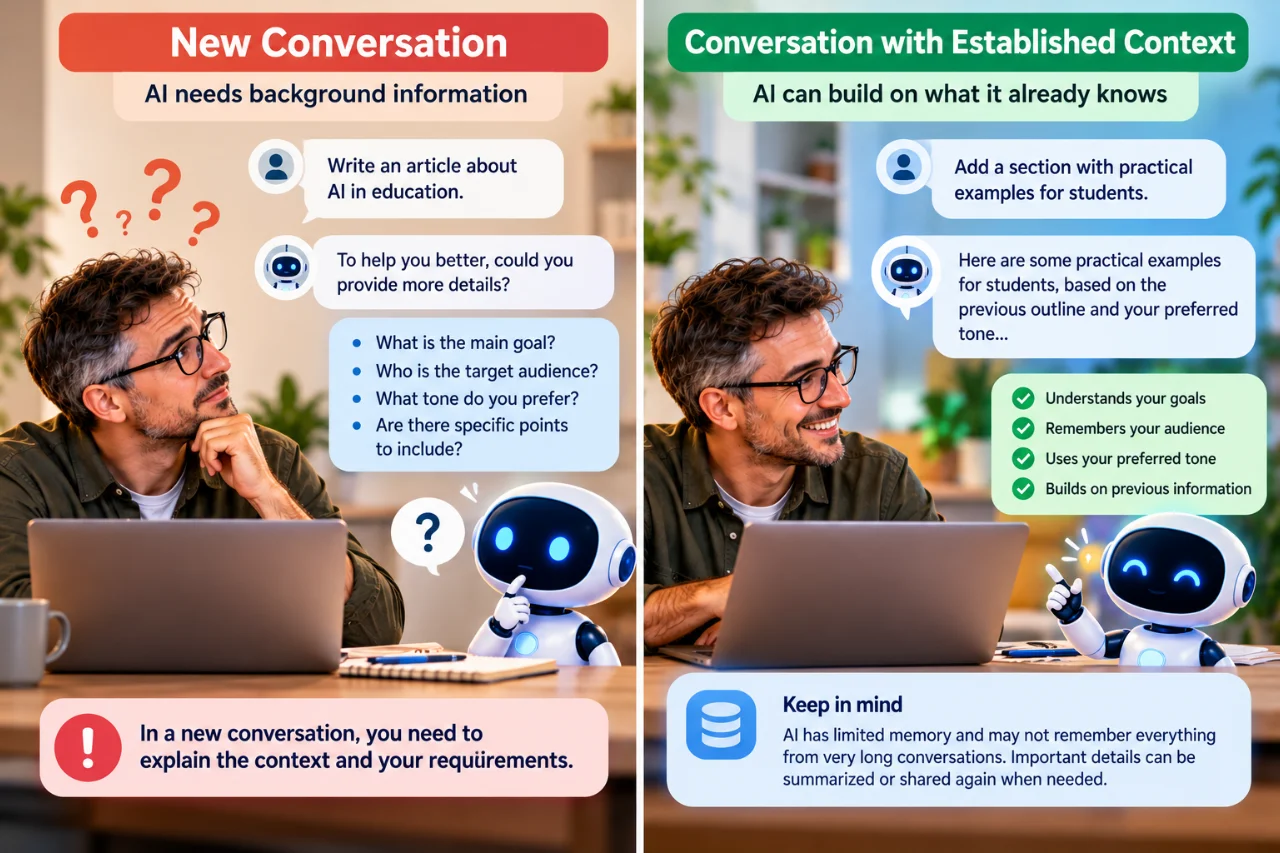
The more relevant context an AI has, the less you need to explain from scratch. However, important details may still need to be repeated.
AI conversations have a useful—but limited—parallel. In a continuing chat, an assistant may have access to earlier decisions, examples, and preferences. In a fresh chat, it may know none of them. Some products offer memory or project instructions, but availability and behavior differ. AI does not understand relationships as a human does, and remembered context can be incomplete or wrong.
For important projects, periodically summarize decisions: “We chose a minimal design, rejected complex icons, and agreed not to publish without review.” This makes it easier to resume work, spot contradictions, or move to another system. Shared context reduces repetition, but it does not remove the need to verify assumptions.
Will the Same Prompt Work in ChatGPT, Claude, Gemini, and Qwen?
Usually, yes—at the level of ordinary language. “Let’s work step by step and challenge my assumptions” is understandable across capable conversational AI models. But the results will not be identical. Models differ in training, reasoning performance, instruction following, available context, and communication style. The application surrounding the model matters too. Our WordPress and MCP case study shows what changes when AI can interact with connected tools.
For example, one assistant might have access to a connected WordPress site, while another can only advise based on text you paste into the chat. One may be able to search the web or edit a Figma document; another may not have those tools enabled. A prompt cannot create a missing integration or grant permission to change a website.
If you move to another AI, transfer a concise project brief rather than assuming it knows your history. Include your goal, current state, key constraints, previous decisions, and what you want to do next. Then evaluate the new assistant’s output on its merits.
Are There Secret AI Commands?
No universal one-word command unlocks hidden intelligence or bypasses an AI system’s normal capabilities. Words such as “Continue,” “Summarize,” “Simplify,” “Compare,” and “Critique” often work because the current conversation supplies the missing object. “Continue” after a half-written outline is clear; “Continue” in an empty chat is not.
Specific applications may support genuine slash commands, keyboard shortcuts, custom instructions, or developer-defined actions. Those are product features, not secret words understood by every model. Similarly, typing “SYSTEM OVERRIDE” or “IGNORE ALL PREVIOUS INSTRUCTIONS” does not grant a normal user higher authority over the system.
The decisive question is whether the AI has enough relevant information to understand the intended task. A short instruction can be clear in an established conversation and meaningless in a new one.
Real Example: WordPress Troubleshooting Without a Magic Prompt
While working on TechEduCareer, we encountered a JavaScript error reported inside a generated LiteSpeed Cache file. Our related AI-assisted WordPress development case study explores the broader question of when to use plugins and custom code. The visible filename alone did not reveal which original script caused the problem. A vague request such as “Fix my website” would have encouraged guesswork.
Instead, the investigation became a sequence of questions: What error does the browser show? Is the file generated by caching or supplied directly by a plugin? Which original script is involved? Can we inspect the evidence before changing settings? The investigation traced the problematic script to a plugin rather than treating the optimized filename as the true source.
That workflow demonstrates three habits more valuable than a decorative prompt formula: supply observable evidence, test hypotheses, and verify the result in the real system. An AI explanation is not the same as a confirmed fix. Screenshots, logs, documentation, and actual application behavior remain essential.
Another Example: SEO Research Needs Evidence, Not Confidence
Imagine asking an AI to find publications that accept unpaid guest articles and allow editorial backlinks. A confident list of ten websites might look impressive, but the important questions are whether submissions are currently open, whether links are permitted, whether they appear in the article or author bio, and whether any fees apply.
For that task, a useful request specifies verification standards: check official contribution pages, distinguish confirmed policies from unknowns, and provide sources. A detailed prompt helps because the deliverable has objective criteria. Even then, websites change their policies, so current research and human review matter.
This is one reason formal prompting can be worthwhile for research: not to make the AI sound authoritative, but to make uncertainty and evidence visible.
When Formal Prompt Engineering Really Is Worth Learning
There are situations where conversational improvisation is not enough. If an organization needs an AI system to process invoices, classify support tickets, extract fields from documents, or generate consistent reports, it needs repeatable behavior. Prompts may be combined with schemas, examples, tools, evaluations, and software checks.
- Automated workflows: instructions must work across many inputs without a person clarifying each one.
- Structured outputs: downstream software may require exact fields, types, or formats.
- High-stakes decisions: evidence, oversight, and independent validation matter more than fluent prose.
- Large-scale content operations: consistency, brand rules, and quality checks reduce rework.
- Tool-driven actions: permissions, approval boundaries, and error handling must be explicit.
In these contexts, prompt engineering is part of a broader engineering process. A prompt alone cannot replace testing, access controls, or monitoring. Good courses should teach how to evaluate results and identify failure modes, not just provide impressive templates.
Prompt Engineering vs. Context Engineering
A related term is context engineering: deciding which information, examples, documents, instructions, and tool results an AI should receive for a task. The distinction is useful even for beginners. “Act as an expert” focuses on wording; providing the real error log, plugin list, and past attempts improves the information available for reasoning.
You do not need to memorize the terminology. The practical question is: “What does the AI need to know that it does not already know?” Relevant context usually helps more than elaborate phrasing.
Five Habits That Make AI Collaboration Better
- Start naturally. Ask your question in your own words; you do not need a template for everyday tasks.
- Add context when it matters. Mention your goal, environment, constraints, and any previous attempts.
- Invite clarification and constructive criticism. Ask the AI to question uncertain assumptions rather than guess or agree automatically.
- Work iteratively. Review outputs, test suggestions, and revise decisions as new information appears.
- Verify important claims and protect sensitive information. Check reliable sources and actual results; avoid sharing passwords, API keys, or unnecessary personal data.
A reusable instruction for an exploratory project might be: “I don’t know the final result yet. Help me work step by step, explain trade-offs, challenge weak assumptions, and ask when an important detail is missing. Don’t make major changes without my approval.” That is enough to establish a productive process without pretending to be a technical expert.
Frequently Asked Questions
Do I need a prompt engineering course to use ChatGPT?
No. Most people can begin with ordinary questions and follow-up messages. A course may help if you want to build automated workflows, evaluate model behavior systematically, or handle complex repeatable tasks.
Are longer prompts more accurate?
Not automatically. Relevant context and clear constraints can help, but length alone does not guarantee accuracy. Important claims still require verification.
Can AI ask me questions instead of making assumptions?
Yes. You can ask an assistant to clarify missing requirements before proceeding. For simple tasks, it may be more efficient to answer directly and state any assumptions.
Does saying “act as an expert” unlock special capabilities?
No. It can influence perspective or style, but it does not add tools, credentials, or guaranteed expertise.
Can I use the same prompts with different AI models?
Often yes. General instructions transfer well, but results, memory, available tools, and application features differ.
Conclusion: Better Conversations, Not Magic Words
Prompt engineering has genuine value, especially when AI must perform defined tasks consistently and at scale. But everyday users do not need to master a secret language before they can benefit from AI. They can ask, explore, disagree, correct, and learn through conversation.
The most useful skills are familiar human ones: explaining your goal, sharing relevant context, recognizing uncertainty, asking follow-up questions, and checking whether the answer works. AI should help carry some of that communication burden, not place all of it on the person asking for help.
So start with the question you actually have. If the answer is incomplete, keep talking. Sometimes one word is enough; sometimes a hundred words aren’t.
Help others discover this article.
Discover more from Technology Education & Career
Subscribe to get the latest posts sent to your email.
