

What are the best Slack alternatives for startups, and why do so many small teams still choose Slack when other messaging services offer free plans? The answer is not simply that Slack is better. A communication tool becomes the place where decisions, files, questions, and project context accumulate. The best choice depends on how much history a team needs, how it organizes discussions, and what it can afford as it grows.
For this comparison, imagine a startup with 25 employees planning to use the same communication platform for three years. We focus on four ready-to-use, cloud-hosted workplace messaging services: Slack, Pumble, Zoho Cliq, and Zulip Cloud. None requires the startup to manage a server. All four free plans support 25 employees, so team size alone does not force an upgrade. We also explain why Discord may suit a different type of collaboration.
Why message history matters more than a free-plan label
When evaluating the best Slack alternatives for startups, searchable project history deserves as much attention as pricing or storage.
A team chat is not only a place to exchange today’s messages. Six months later, someone may need to find why a feature was delayed, what a customer requested, or which technical approach the team rejected. If those conversations cannot be searched, colleagues may have to repeat discussions or rely on fragmented notes.
Free plans differ in a crucial way: some limit history by time, others by number of messages, and one of our candidates offers unlimited searchable messages on its free tier. A visibility limit does not always mean older data is immediately deleted; retention and deletion policies must be considered separately.
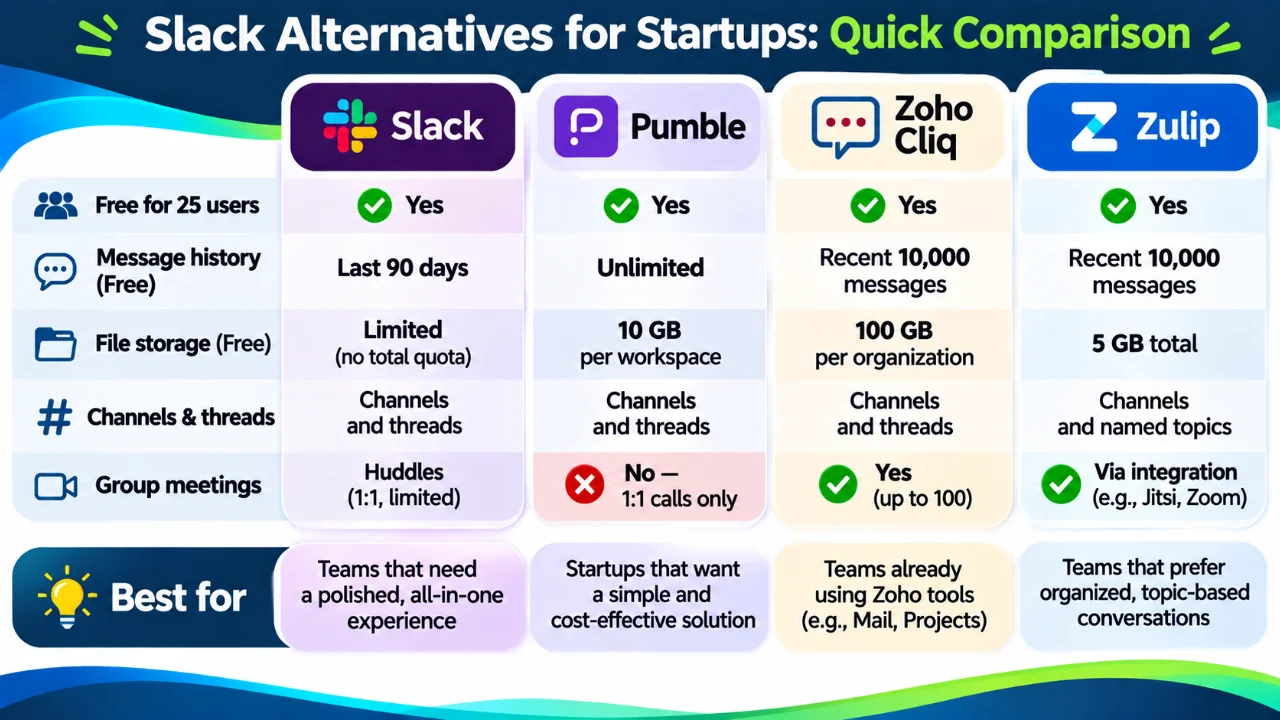
Best Slack alternatives for startups: free-plan comparison
| Feature | Slack Free | Pumble Free | Zoho Cliq Free | Zulip Cloud Free |
|---|---|---|---|---|
| Cloud-hosted, no server maintenance | Yes | Yes | Yes | Yes |
| Suitable for 25 users | Yes | Yes | Yes | Yes |
| Searchable message history | Most recent 90 days | Unlimited | Recent 10,000 messages | Recent 10,000 messages |
| Free file storage | Files subject to free-plan history limits; no comparable published total-GB quota | 10 GB per workspace | 100 GB per organization | 5 GB total |
| Conversation structure | Channels and threads | Channels and threads | Channels and threads | Channels and named topics |
| Group meetings included | No; free huddles are 1:1 | No; 1:1 calls | Yes, up to 100 participants and 60 minutes | Through an external meeting provider |
| Most notable advantage | Broad app ecosystem | Unlimited free history | Storage and free meetings | Organized asynchronous discussions |
Can all 25 employees stay on a free plan? Yes. All four platforms support a 25-person team without requiring a subscription simply because of headcount. Whether the free plan remains practical for three years depends on message volume, file usage, meetings, integrations, and administration needs. A larger team may reach message-count and storage limits sooner than a smaller one.
Plan features and prices can change; confirm current terms before subscribing.
1. Slack: the familiar benchmark
Slack organizes work around channels, direct messages, threads, and integrations. Its broad app ecosystem and established workflows help explain why teams continue to choose it even when less expensive alternatives exist.
What does Slack Free actually limit?
Slack Free provides access to the most recent 90 days of messages and files. Older content becomes unavailable to free users; Slack also applies a separate one-year deletion policy to older free-workspace content. This means day 91 does not erase an entire conversation, but a team that waits too long before upgrading or exporting may permanently lose older material.
Slack Free also limits app integrations to 10 and huddles to one-to-one conversations. For a startup with occasional discussions and a few connected tools, this may be adequate. For a company using chat as its long-term project memory, the history restriction is a serious consideration.
Slack Pro is listed at $7.25 per user per month when billed annually on its official comparison page. Its paid plan removes the free history-search window and expands meetings and integrations.
2. Pumble: a strong option for startups that need free history
Pumble follows a familiar channel-and-thread approach, with direct messages, file sharing, and workplace collaboration features. Its standout benefit is straightforward: unlimited message history on the free plan.
For 25 employees, Pumble Free offers 10 GB of total workspace storage. That can be enough for documents and occasional screenshots, but a team exchanging many videos, design assets, or large files should monitor usage. Free calling is focused on one-to-one communication; group meetings and screen sharing are paid features.
Pumble Pro is listed at $2.49 per seat per month billed annually. It adds group meetings, screen sharing, and 10 GB of storage per paid seat. A startup that primarily needs searchable conversations can begin free and consider an upgrade when meetings or storage become limiting.
3. Zoho Cliq: generous storage and group meetings on the free plan
Zoho Cliq provides workplace channels, direct and group conversations, integrations, and meetings. Its free plan includes 100 GB of storage per organization and group meetings with screen sharing, for up to 100 participants and 60 minutes.
The important trade-off is search history: free users can search the most recent 10,000 messages. This is a message-count limit, not a 90-day limit. A quiet team might take a long time to reach it; an active startup with multiple channels may reach it much sooner. The published limit concerns searchable history, so it should not automatically be described as permanent deletion of older messages.
Zoho Cliq Standard is listed at $16.20 per month for up to 25 users on annual billing, with unlimited searchable history. That makes its entry paid plan particularly interesting for a 25-person team. Professional and Enterprise plans add more advanced administrative capabilities; teams should assess whether they need those extras rather than paying for them by default.
4. Zulip Cloud: best for discussions that need clear topics
Zulip Cloud approaches workplace chat differently. Instead of relying mainly on channels and nested replies, it organizes conversations into channels and named topics. A development channel, for example, can contain separate discussions for an API change, a release issue, and a customer bug, making it easier to return to a specific subject later.
Zulip Cloud Free includes 10,000 messages of searchable history and 5 GB of total file storage. It offers extensive integrations and permissions. Calls use a selected external meeting provider rather than a built-in free group-meeting service.
Its Standard cloud plan costs $6.67 per user per month billed annually, with unlimited searchable history and 5 GB of storage per user. For engineering, distributed, or asynchronous teams, Zulip’s discussion structure may justify a higher price than simpler chat alternatives. For teams expecting a conventional Slack-like interface, it may require a change in habits.
Do startups really need large file storage in team chat?
Free storage allowances differ substantially: Zulip Cloud provides 5 GB, Pumble 10 GB, and Zoho Cliq 100 GB. But the largest allowance is not necessarily the most valuable feature for a startup. Many teams already keep project plans, specifications, contracts, and working documents in shared storage such as Google Drive, OneDrive, or Dropbox. In those cases, posting a link to the authoritative document is often more useful than uploading another copy to a chat channel.
For example, if a project manager shares a 2 MB project plan as an attachment, that upload uses approximately 2 MB of chat storage. Repeatedly uploading revised versions can create unnecessary duplicates and confusion over which file is current. A link to the centrally managed document helps colleagues collaborate on the latest version, provided they have the appropriate access permissions. Screenshots, quick illustrations, and temporary files may still be convenient to attach directly.
Set communication rules before the team grows
Startup management should define how employees use messaging and shared storage rather than leaving everyone to invent their own habits. A simple internal communication policy can establish:
- What belongs in chat: questions, brief updates, coordination, links to approved documents, and notifications.
- What belongs in shared storage: current project plans, specifications, contracts, deliverables, and documents requiring version control.
- What should not be posted in ordinary channels: passwords, API keys, confidential personal information, or sensitive client material without the required access controls.
- How decisions are preserved: record important approvals, responsibilities, and final decisions in a designated project system or document so they do not disappear into message history.
- Who can access shared links: check permissions before posting; a link does not automatically grant access, and an overly broad link can expose information.
This process can reduce unnecessary attachments, make information easier to find, and lower dependence on any messaging service’s free storage quota. It also makes future platform migration less disruptive. A related lesson appears in our article on choosing custom features versus WordPress plugins: select tools based on a real workflow, not just a feature list.
Why 10,000 messages may not be enough for a 25-person startup
A 10,000-message history allowance sounds substantial until you consider how a team actually communicates. The limit is measured in individual messages, not conversations: if a project manager asks a developer a question and the developer replies, that is two messages. A follow-up and another reply bring the total to four. Messages from different employees and conversations contribute to the shared history allowance.
Message volume is rarely distributed evenly. Project managers and team leads may coordinate several departments, while developers may send fewer but longer updates. Consider this illustrative 25-person startup:
| Role | Employees | Messages/ person/ day | Team messages per day |
|---|---|---|---|
| Project managers | 2 | 80 | 160 |
| Developers | 15 | 15 | 225 |
| Designers | 3 | 20 | 60 |
| Sales and operations | 5 | 30 | 150 |
| Total | 25 | — | 595 |
At 595 messages per working day, the team generates 10,000 messages in approximately 17 working days—roughly three to four working weeks. These numbers are hypothetical, not measured usage statistics; the point is how quickly a busy team can reach a message-count threshold.
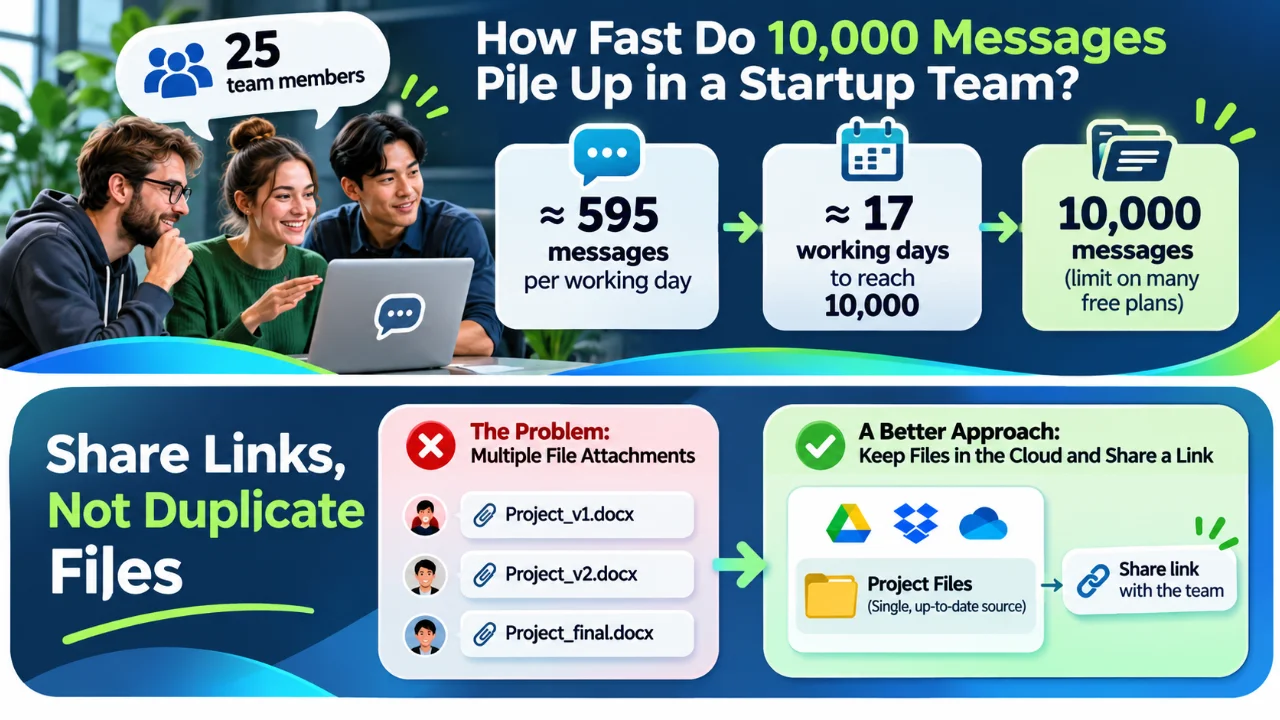
For Zoho Cliq Free and Zulip Cloud Free, a 10,000-message searchable or accessible history limit can mean that older discussions fall outside the free history window. That does not necessarily mean the underlying messages have been permanently deleted. A developer returning from leave may nevertheless struggle to retrieve a decision made just a few weeks earlier.
Practical tip: Before choosing a free plan, estimate the number of messages your team sends each day—not just the number of employees. If you depend on old decisions, document important outcomes separately and verify the platform’s history, export, and upgrade rules.
What would a 25-person startup spend over three years?
To compare costs fairly, we use 25 paid users for 36 months, annual-billing list prices in US dollars, and no promotional discounts. We assume team size and prices remain constant. Taxes, additional storage, optional add-ons, and future price changes are excluded. The free plans are all $0 in software subscription fees for 25 users, but their limitations differ. The paid comparison illustrates optional upgrades, not a requirement to pay at this team size.
| Platform / plan | Monthly cost for 25 | Three-year total |
|---|---|---|
| Slack Free | $0 | $0 |
| Pumble Free | $0 | $0 |
| Zoho Cliq Free | $0 | $0 |
| Zulip Cloud Free | $0 | $0 |
| Zoho Cliq Standard (up to 25 users) | $16.20 | $583.20 |
| Pumble Pro ($2.49/user) | $62.25 | $2,241.00 |
| Zulip Cloud Standard ($6.67/user) | $166.75 | $6,003.00 |
| Slack Pro ($7.25/user) | $181.25 | $6,525.00 |
These figures compare published entry-level paid plans, not identical feature bundles. Check the features your team needs before selecting a plan.
For perspective, the difference between Slack Pro and Pumble Pro at these prices is $4,284.00 over three years for 25 users. That money could matter to a bootstrapped startup—but only if Pumble supports the tools and processes the team actually uses.
Which Slack alternative should your startup choose?
The best Slack alternatives for startups solve different communication problems. Match the platform to your team’s actual working style rather than choosing only by price.
- Choose Slack when established integrations, familiar workflows, and collaboration with external partners justify its cost. Be especially careful with the free history window.
- Choose Pumble when keeping searchable project conversations without paying is the highest priority and 10 GB of free storage is sufficient.
- Choose Zoho Cliq when free group meetings and generous storage are important, or when its fixed-price Standard tier suits a growing team.
- Choose Zulip Cloud when discussions are complex, asynchronous, and easier to manage as clearly named topics. Consider the 10,000-message and 5 GB free limits.
Before committing, run a short pilot with real projects: create channels, invite the team, connect essential tools, upload typical files, and test how easily someone can retrieve a decision from weeks earlier. The interface matters, but finding important information later matters more. If your startup is also building its online presence, see our firsthand guide to launching a business website for another example of practical software choices.
What about Discord as a free Slack alternative?
Discord deserves a brief mention. It offers text channels, threads, voice communication, screen sharing, and searchable discussions. For gaming studios and creative groups, those features can be attractive.
However, Discord was developed primarily around communities, not the full administration and workflow needs of a business workspace. That difference is relevant in practice. For example, TechTitans, a platform connecting technology education and creative learning, has used Discord for its creative community. You can also read our overview of the TechTitans learning platform for background on its educational focus. Organizing a community around shared interests is a different challenge from maintaining an internal company’s long-term record of project decisions.
If your startup is primarily a creative or gaming community, Discord may be worth exploring. If your main requirement is structured internal workplace communication, start with the four cloud services compared above.
Final thoughts: free today, useful three years from now?
Ultimately, the best Slack alternatives for startups are those that preserve access to decisions and fit established workflows as the business grows.
For a 25-person startup, the best Slack alternative is not necessarily the product with the most features or the lowest advertised price. It is the service that keeps conversations organized, preserves access to important decisions, supports the team’s everyday workflow, and remains affordable as activity grows.
Our practical takeaway: Pumble offers the clearest free-history advantage; Zoho Cliq stands out for storage and meetings; Zulip Cloud rewards teams that value topic-based organization; and Slack remains a strong benchmark with a meaningful free-plan history trade-off. Test the contenders with your own team before making a long-term commitment.