
Why we tested encrypted email ourselves
I wanted to find out whether free encrypted email services could protect a real conversation with someone using an ordinary mailbox. I tested Proton Mail, Atomic Mail and Tuta, focusing on what worked in practice rather than relying on feature lists. If you are starting with everyday account security, our guide to managing passwords explains the basics before you add encrypted email.
Our practical scenario was simple: send a password-protected email from a privacy provider to an external mailbox hosted by Hostinger, open it there, and reply securely. We used Microsoft Edge for the main test; this was not a Tor Browser experiment. We also noted practical limitations visible on the free plans.
How an unexpected alternative changed my plans
I started this experiment expecting to compare Proton Mail and Tuta. I wanted firsthand evidence, not a list of marketing promises. Proton’s password-protected external email and secure reply worked. Mailfence registration did not succeed, so we could not complete its test.
Then I discovered Atomic Mail. Its verification code landed in Gmail’s Spam folder, and its interface was labeled beta. Neither was an ideal first impression. But the free account opened successfully, and the password-protected message reached my external Hostinger inbox. I unlocked it and replied through Atomic Mail’s secure webpage. The reply appeared in my Atomic Mail inbox without another password prompt.
Tuta’s password-protected external message and secure reply also worked in our November 7 test. What happened next was the real surprise: I found a free custom alias feature so useful that I decided to keep using Atomic Mail alongside my main Gmail account. I might even consider paying for it if it proves reliable over time. That is my personal experience, not proof that a beta service is more secure than an established competitor.
Our results at a glance
| Test | Proton Mail | Tuta Mail | Atomic Mail |
|---|---|---|---|
| Registration | Passed | Created | Passed |
| Protected external email | Passed | Passed | Passed |
| Secure external reply | Passed | Passed | Passed |
| Free email alias | Passed (Proton Pass) | Not included | Passed (built-in) |
| Receive email via alias | Passed | Not included | Passed |
| Reply without exposing primary address | Passed (alias reply) | Not included | Passed (protected reply) |
| Inactivity policy | 24 months (terms) | 6 months (deletion) | No inactivity deletion |
Inactivity policies (official documentation, not tested): Proton’s Terms of Service allow deletion of free accounts after 24 consecutive months of inactivity; its support article also contains annual-activity advice, so users should follow the more cautious guidance. Tuta says free accounts are deleted after more than six months without a login. Atomic Mail’s terms say accounts are not deleted solely for inactivity, although other suspension or termination grounds still apply. These policies may change.
Alias terminology matters: Proton Free includes up to 10 hide-my-email forwarding aliases, according to Proton’s official documentation, but newly created permanent additional Proton addresses generally require a paid plan. Proton also supports plus-address variations. Tuta’s official free-plan comparison does not include additional email addresses; aliases require a paid plan. We personally created a Proton Pass alias, sent a test message to it from Hostinger, received it in Proton Mail and replied. Hostinger showed the alias in both the From and Reply-to fields, not our primary Proton address. Atomic Mail’s built-in alias and password-protected reply were also tested firsthand. These are different alias workflows; Proton’s alias reply test was not a separate password-protected-message test.
Proton Mail: our completed encrypted email experiment
1. Compose and protect the message
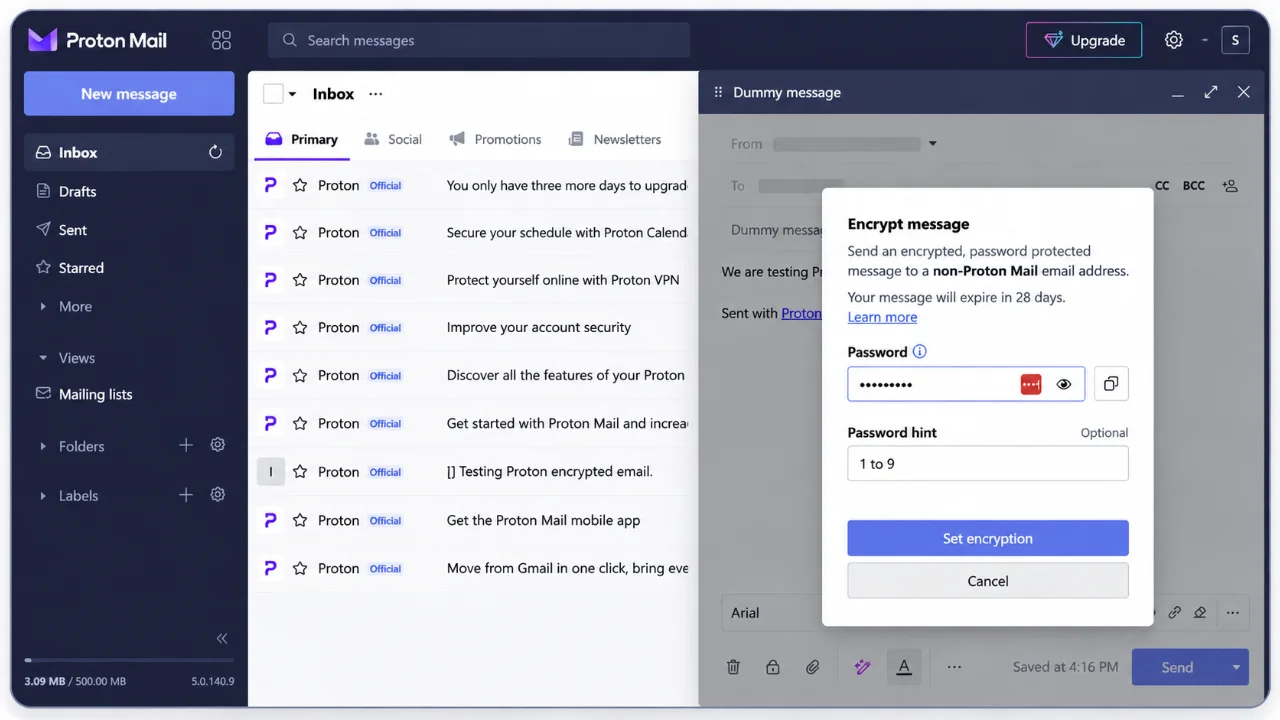
Using a free Proton Mail account, we wrote a test email titled “Dummy message” to an address outside Proton, hosted by Hostinger. In the composer we selected the option to encrypt the message with a password and could add an optional password hint. The interface indicated that the protected message would expire after 28 days, consistent with Proton’s official password-protected email instructions.
2. What arrived in the ordinary inbox?
In Hostinger Mail, the recipient received a notification containing the sender, subject, password hint and a button to unlock the message. The original message body did not appear in the ordinary inbox. Instead, the recipient followed the link to a Proton-hosted secure webpage.
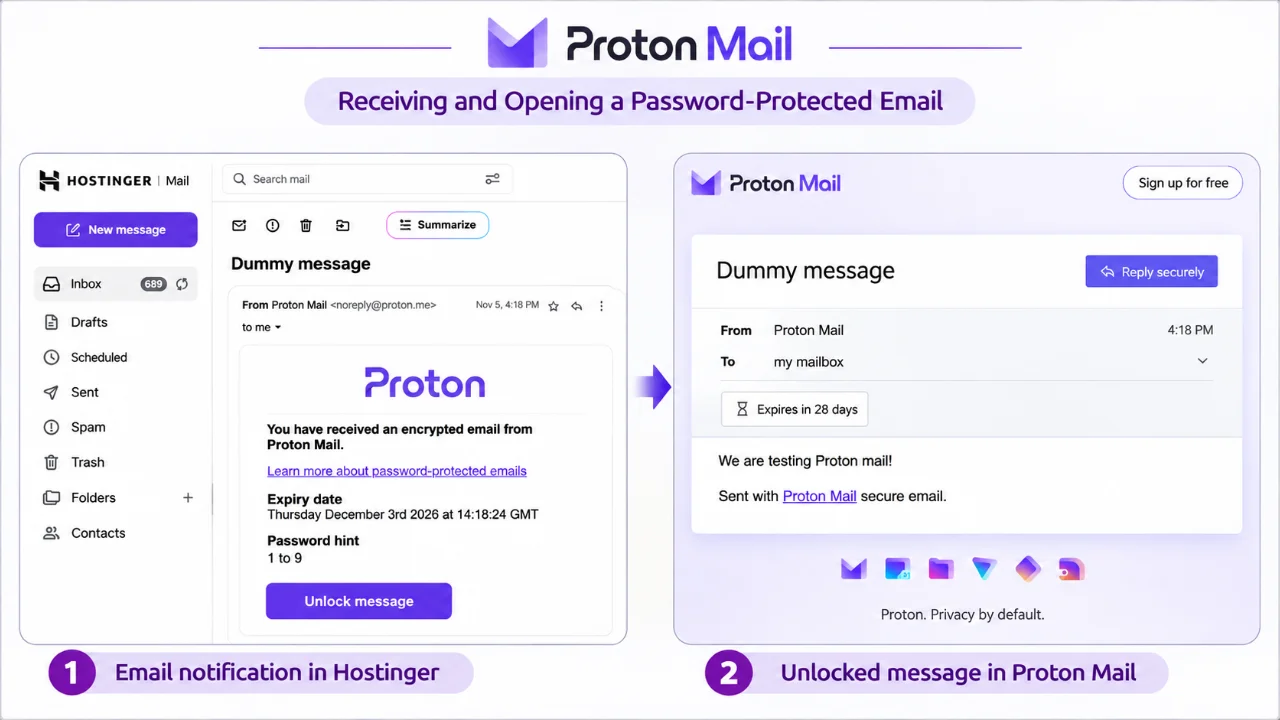
Importantly, the external inbox receives a notification, while the protected content is accessed through Proton’s secure page. The subject and other notification details should not be mistaken for end-to-end encrypted content.
3. Unlock and read the message
Once the recipient entered the shared password on Proton’s secure page, the recipient successfully read the test message. The page also offered a “Reply securely” action.
4. Reply securely without a Proton account
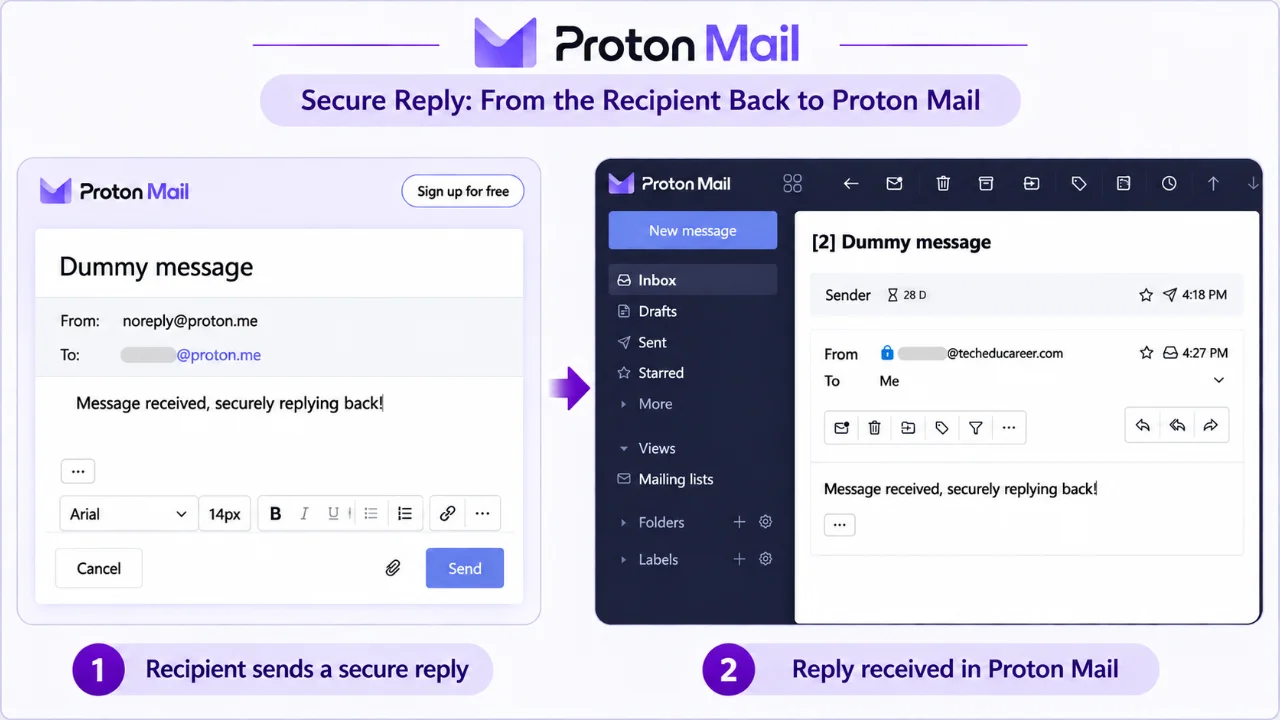
Next, the external recipient used the secure reply form to send “Message received, securely replying back!” In turn, the response arrived in the original sender’s Proton inbox and could be read while logged in, without another password prompt. This confirmed that our two-way protected conversation worked on the free account.
What this test does not prove: encrypted email is not the same as anonymity; and it does not replace two-factor authentication and passkeys for protecting account access. The recipient can still copy or screenshot content, and a compromised device remains a risk. We did not conduct a cryptographic audit of either service.
Atomic Mail: our second completed secure-email experiment
Atomic Mail also made a positive impression with its modern, clean interface and intuitive user experience. I installed it as an app on my Windows computer, where it now sits near the clock in the taskbar notification area. As a result, I can access my mailbox without keeping an Edge tab open all day. It is a small but genuinely useful everyday convenience.
After difficulties with Tuta and Mailfence registration, we successfully created a free Atomic Mail account. Its interface was marked “beta.” The verification email sent to our Gmail recovery address landed in Spam, a deliverability observation rather than proof of weak encryption.
1. Compose a password-protected message
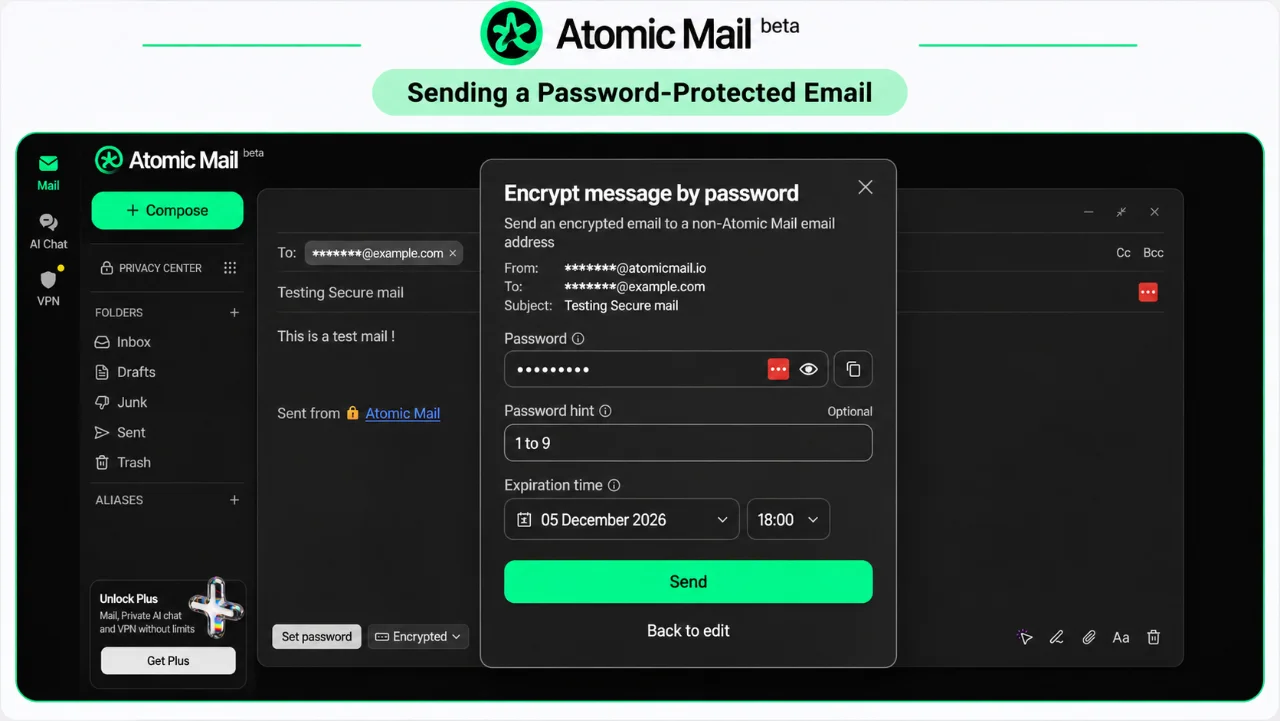
We addressed a test email titled “Testing Secure mail” to the same external Hostinger mailbox used for Proton. Atomic Mail offered an “Encrypt message by password” dialog with a password, optional hint and expiration date. We selected December 5, 2026, approximately 30 days after sending.
2. Notification, unlocking and reading the message
The Hostinger inbox received an Atomic Mail notification displaying the sender, expiration date, password hint and “Unlock message” button, but not the protected message body. This resembles the workflow we observed with Proton.
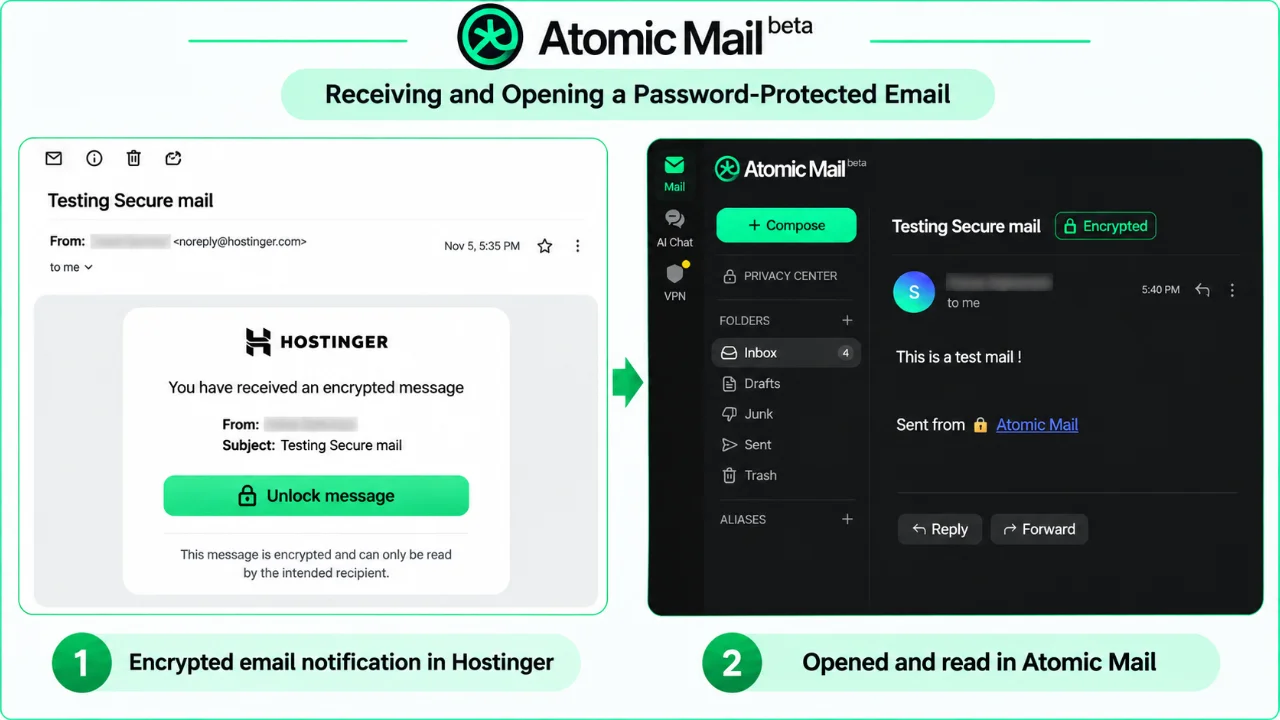
We opened the protected message on Atomic Mail’s webpage and read the body “This is a test mail !”. The page offered a Reply button without requiring the external recipient to register an Atomic Mail account.
3. Secure reply delivered
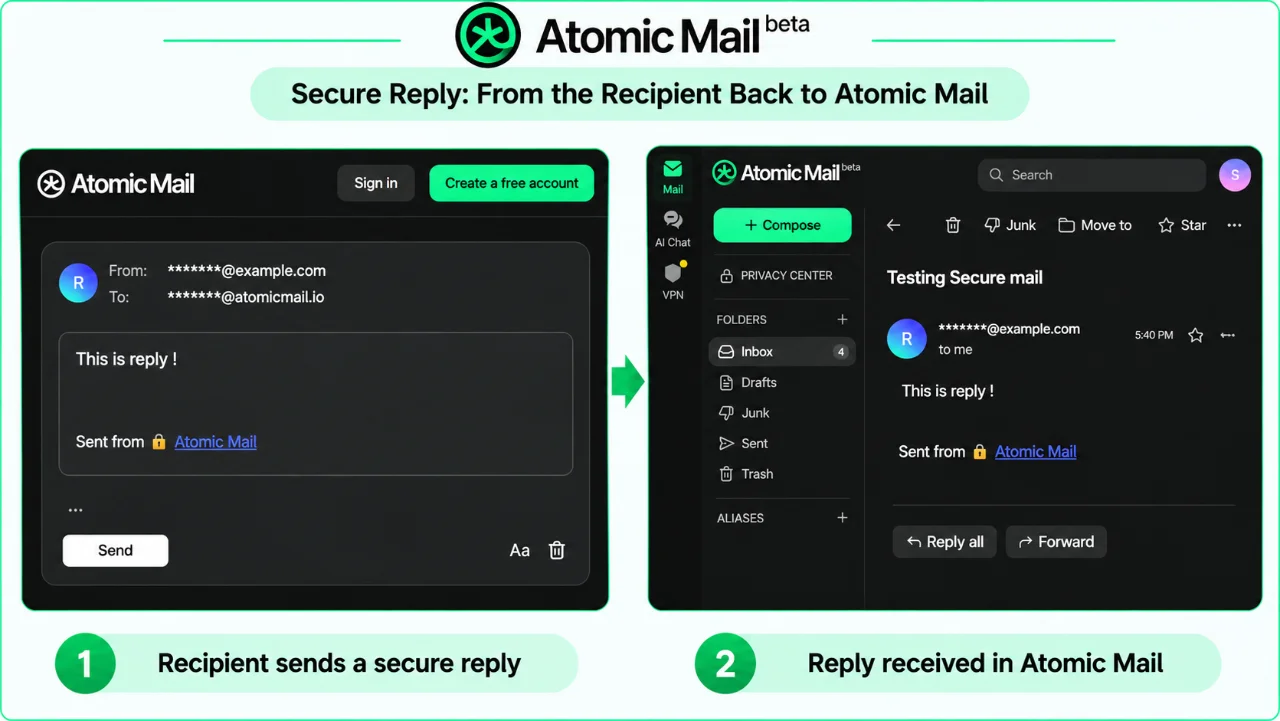
The external recipient composed and sent “This is reply !” through the secure reply page. It arrived in the Atomic Mail sender’s conversation and was readable without entering the shared password again. The full send–unlock–reply workflow therefore worked in our free-account test.
Limits of our findings
This is a functional test, not an independent cryptographic audit. Atomic Mail was marked beta, and we have not assessed its long-term reliability, all free-tier limits or whether its security architecture is equivalent to Proton or Tuta.
Free aliases: the feature that surprised me most
An email alias is an additional address connected to your main inbox. For example, you can use one alias for online shopping and another for newsletters, without sharing your primary address everywhere. If an alias attracts unwanted mail, you can disable it without changing your main address. Aliases help with organization and address separation, but they do not guarantee anonymity. For the setup steps and current plan allowances, see Atomic Mail’s official email-alias FAQ.
Atomic Mail displayed a free-alias allowance of 10.
For comparison, Proton Free officially includes up to 10 hide-my-email forwarding aliases, and we tested one of those aliases ourselves. However, these differ from permanent additional Proton addresses, which generally require a paid plan. Tuta lists additional addresses as a paid feature.
Meanwhile, the Atomic Mail creation screen distinguished longer custom aliases from premium four-character addresses, advertised from $5 per month. A separate randomly generated “Hide My Email” feature was promoted with Atomic Mail Plus. These are distinct features.
Proton Pass aliases: our follow-up test
To make the comparison fair, we also tested Proton’s free hide-my-email aliases. We signed into Proton Pass with the same free Proton account, selected an alias domain and created a shopping-themed forwarding alias. Proton Pass showed an allowance of 10 aliases on the free account. Next, we sent an ordinary email from our Hostinger mailbox to the alias. As expected, it arrived in our regular Proton Mail inbox.
We clicked Reply in Proton Mail and sent a response. In Hostinger, the received reply displayed the Proton Pass alias in both the From and Reply-to fields—not our primary Proton address. This confirms that the free reply workflow protected the primary address in our test. We did not test sending a new, unrelated message from that alias or adding password protection to this particular alias reply.
Which alias experience felt simpler?
Both free workflows worked. However, I personally preferred Atomic Mail’s approach. The Atomic Mail alias we created also looked cleaner and easier to share than Proton Pass’s automatically generated address, which included an extra random-looking suffix. This was an impression of the particular aliases we created, not a claim that every Proton alias must look that way.
Atomic Mail lets me create and manage the tested custom alias within the same email application where I read and reply to messages. By contrast, with Proton, I used Proton Pass to create and manage the forwarding alias and Proton Mail for correspondence. Although the products integrate successfully, moving between them added steps and could be less intuitive for a newcomer. Importantly, this is a usability preference based on our test, not evidence that either provider copied the other’s design or that one offers stronger encryption.
Creating and receiving through a free alias
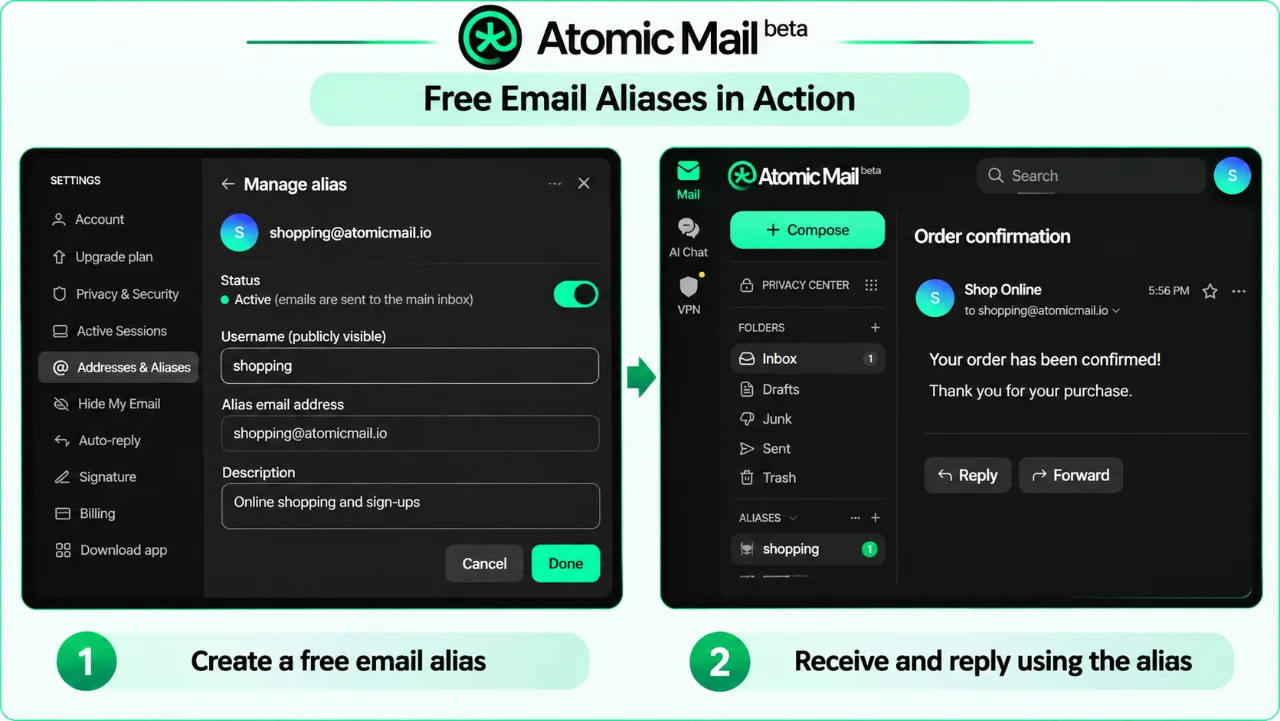
I created a free Atomic Mail alias without paying. The management screen showed it as active, with an on/off switch, a public username and an optional description. Atomic Mail indicated that messages sent to the alias would arrive in my main inbox. I tested this by sending a regular email from my Hostinger mailbox to the alias; it arrived successfully, confirming inbound delivery. The screenshot below is an illustrative, anonymized recreation of the same workflow, using a shopping alias and an order-confirmation example rather than my actual test address or message. Atomic Mail also describes free email aliases among its privacy features.
Sending an encrypted reply from the alias
I replied to the incoming message and selected password protection. The encryption dialog showed my test alias in the From field—not my primary Atomic Mail address. Hostinger then received an encrypted-message notification showing the alias as sender. I unlocked the message on the Atomic Mail webpage and read the protected reply. The entire alias-receive-and-encrypted-reply workflow worked in my free account.
This is useful address separation, not complete anonymity. In addition, I tested one working alias, not all ten advertised slots, and did not test long-term deliverability or the separate paid Hide My Email feature.
Tuta Mail: our completed encrypted email experiment
1. Send a password-protected email to an external mailbox
For the Tuta test, we composed a message using our free account to the same external Hostinger-hosted mailbox used for Proton and Atomic Mail. The subject was “This is test message from Tuta,” and the body said “This is a test message from Tuta with encryption.” Tuta’s composer displayed a password field for the external recipient and indicated that the message would be sent end-to-end encrypted.
2. Receive the notification and unlock the message
In turn, the ordinary external inbox received a notification headed “Confidential email from sahak.sg.” It contained a link labeled “Show encrypted email,” rather than displaying the protected message body. Next, following that link opened a Tuta password screen asking for the password agreed with the sender. Once we entered it, we could view the original test message in Tuta’s secure mailbox interface.
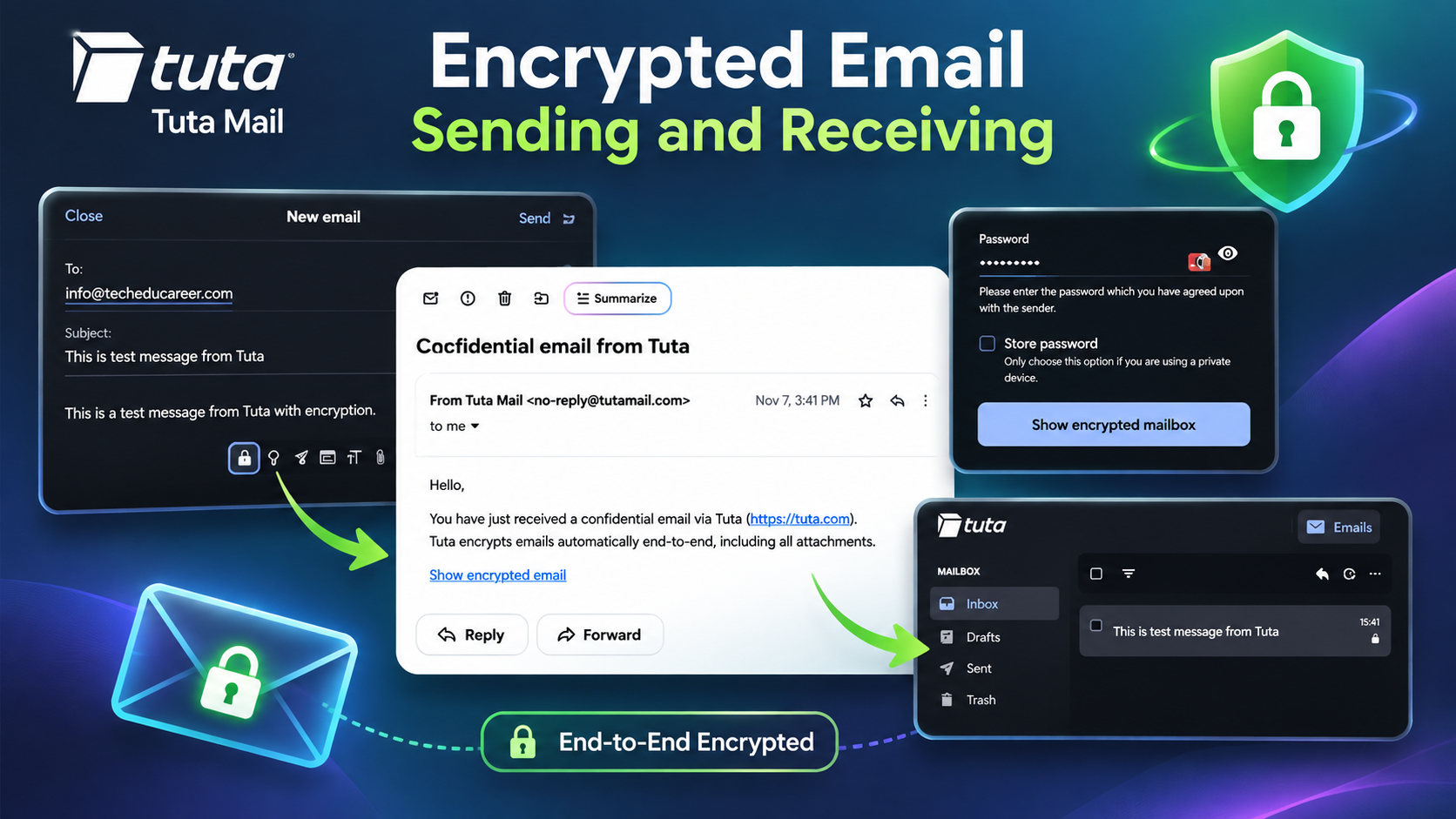 Caption: Our Tuta Mail test: a password-protected message was sent to an external mailbox, which received a notification linking to the secure message.
This is an important practical distinction: the ordinary inbox received a notification and link, while reading the protected body required access to Tuta’s password-protected interface. The notification and its visible metadata should not be treated as end-to-end encrypted message content.
3. Reply from the external recipient and receive it in Tuta
Next, we replied from the external recipient’s secure message interface with the text “Encrypted mail received! This is reply”. At 3:55 PM on November 7, the response appeared in the Tuta inbox with a reply subject and the expected text. The reply was readable in the signed-in Tuta account. This completed the two-way external-message workflow in our free-account test.
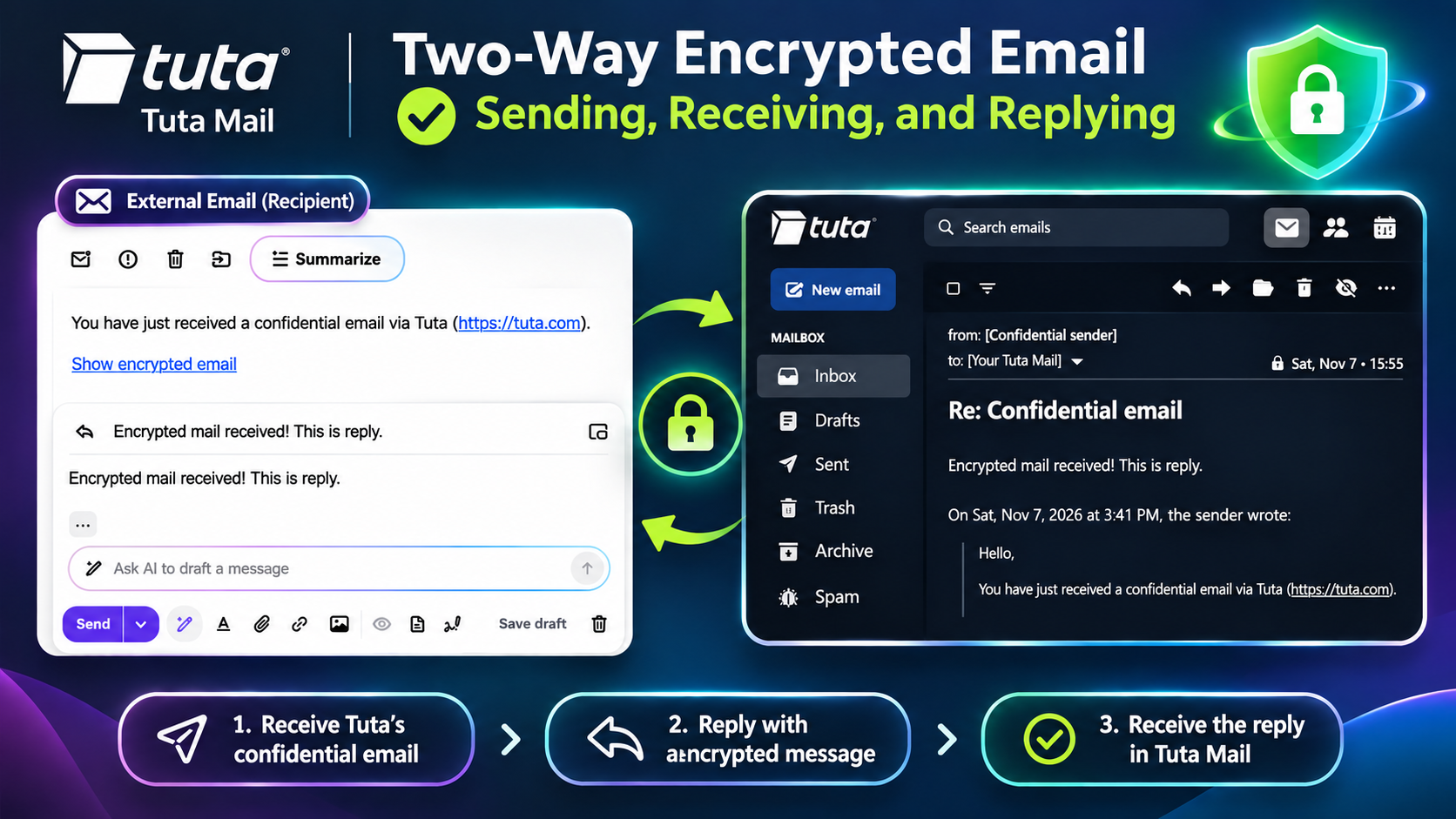 Caption: The external recipient replied through Tuta’s protected interface, and the response arrived in our Tuta Mail inbox during the November 7 test.
4. A free-plan condition worth noting
Tuta’s free-plan registration page stated: “Account will be deleted after 6 months if not logged into.” It also displayed 1 GB of storage, one free account per person, no extra email addresses and a restriction against business use. For an address used only occasionally, this inactivity condition is worth considering. We later checked the published inactivity policies of all three providers, as summarized in the comparison table. These are policy statements, not outcomes of a long-term inactivity test.
Limits of our findings: we demonstrated a successful password-protected send, unlock and secure reply using one free account and one external mailbox. We did not audit Tuta’s encryption implementation, measure long-term reliability or test every free-plan feature. Our observations describe the tested workflow rather than every possible Tuta use case.
Mailfence: our registration did not succeed
We attempted to create a Mailfence account, but the service displayed a registration failure. Its message listed several possible reasons: potential abuse detection, temporary country or IP restrictions, a banned or disposable activation/recovery email domain, or an outdated browser. The message did not specify which reason applied to us. It advised retrying in 24 hours and contacting support if the problem continued.
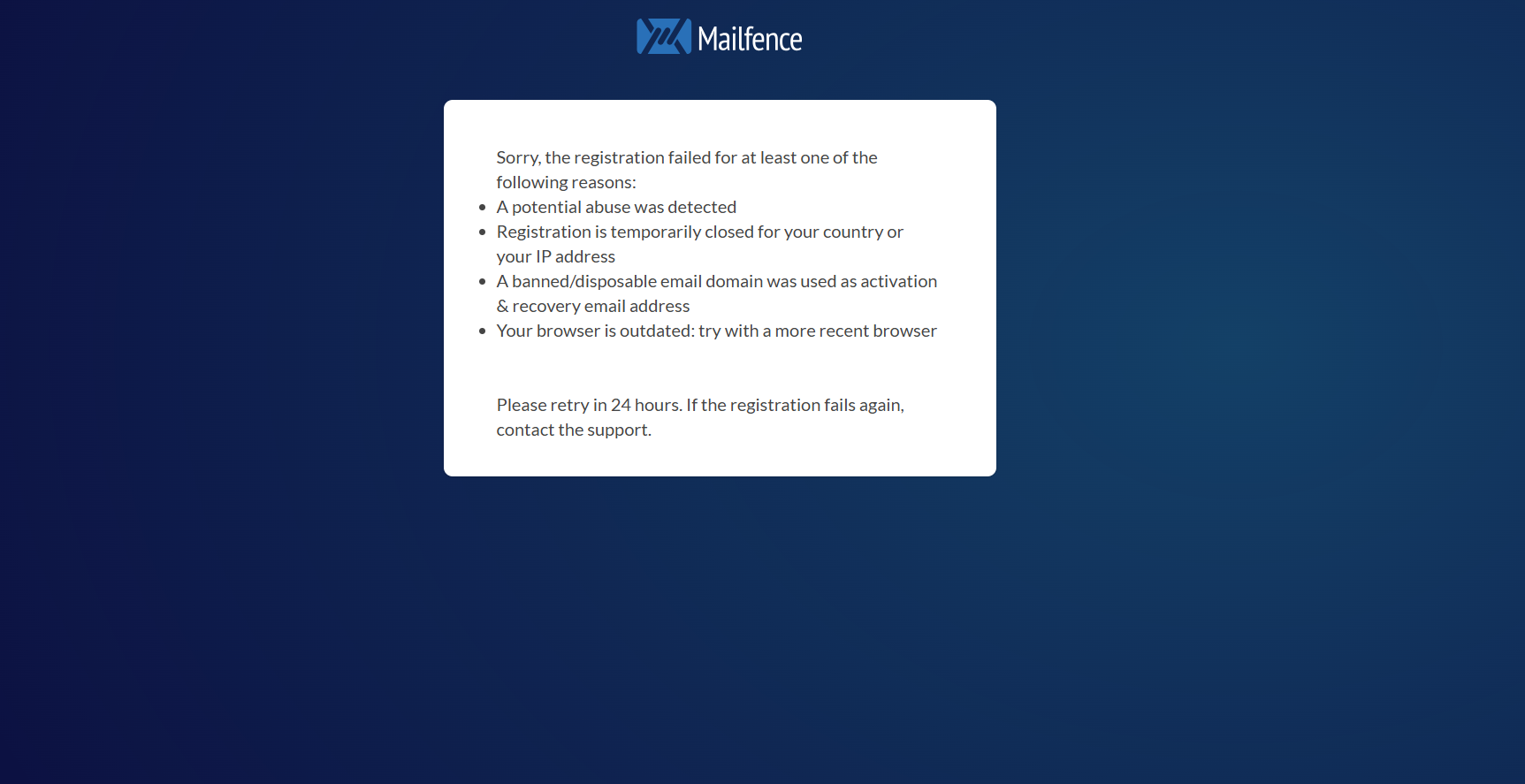 Caption: Mailfence registration-failure notice.
We decided not to change networks or continue troubleshooting. As a result, we cannot evaluate Mailfence’s actual encrypted-message workflow from firsthand experience, and a failed registration alone does not establish a general problem with the service.
What we learned from the completed tests
The biggest surprise was how well both Proton’s and Atomic Mail’s free aliases worked in practice. Proton’s reply preserved the alias address, while Atomic Mail let us receive through its built-in alias and send a password-protected reply from it. I preferred Atomic Mail’s single-interface workflow, although Proton’s separate Pass and Mail applications worked together successfully. I now intend to use it alongside Gmail, while keeping critical accounts on an established provider until I have more experience with its reliability.
In our tests, Proton Mail, Atomic Mail and Tuta all completed the core journey: send a password-protected message to an ordinary mailbox, unlock it and reply securely. Mailfence did not allow us to finish registration.
All three tested providers worked for the protected external-message workflow. Proton and Atomic Mail also passed our respective free-alias receive-and-reply tests, although their alias types and reply protection differed; this does not establish which service is best overall. Encryption architecture, metadata handling, recovery options, account retention, paid-plan features and long-term reliability all deserve separate assessment.
These results come from my own hands-on experiments, and your experience may be different. That’s why I’d encourage you to try a few services yourself. Gmail is familiar, convenient, and widely used, but that doesn’t mean it has to be your only option. You might discover a feature you didn’t know you needed, a different approach to privacy, or simply an email service that feels better to use. That’s exactly what happened to me—and sometimes the most interesting discoveries begin with a little curiosity.