
Part 2 of the BrickMint story: why getting a working game onto Google Play was harder than I expected—and how an AI companion helped me find the next step.
I Thought the Hard Part Was Over
In Part 1, I described how I turned my HTML5 brick-breaker, BrickMint, into an Android app with ChatGPT. It ran on my phone. The paddle responded, the music played, and the game adapted to portrait and landscape screens.
I was proud of that little achievement. I thought the next step would be simple: upload the game to Google Play and let people try it.
I was wrong.
Building an app and preparing it for Google Play are two different adventures. I had made it through the first without knowing Android development. The second introduced an unfamiliar world of developer verification, store listings, content declarations, signing keys, bundles, testing tracks, and menus that seemed to hide the option I actually needed.
At one point, I seriously considered abandoning the publishing process. Not the game—I liked the game. It was everything surrounding it that made me want to walk away.
What kept me going was my AI companion.
Not because ChatGPT could press one magic button and publish BrickMint for me. It couldn’t. But it could help illuminate the next few steps when I couldn’t see a way forward.
A Torch in a Maze, Not a Magic Wand
Imagine entering an unfamiliar building. Every corridor has a different sign, every door opens onto another corridor, and you aren’t sure which ones matter. A torch doesn’t remove the obstacles. It lets you see where you’re putting your feet.
That is the best description of what AI did for me during this experience.
I could show ChatGPT a screenshot and ask, “What now?” It could explain a term I had never encountered, distinguish an important warning from a routine message, or tell me why a step mattered before I committed to it.
Sometimes I didn’t even know how to formulate a technical question. I simply knew that I was looking at a screen I didn’t understand.
That kind of help is different from following a conventional tutorial. Tutorials usually assume your screen looks like the author’s screen and that you already understand a few basics. My experience was messier. The menus were unfamiliar, the process was personal to my app and account, and every decision raised a new question.
AI could respond to my obstacle, not just describe the ideal route.
The Paperwork Behind a Tiny Game
BrickMint is a modest arcade game. It doesn’t need user accounts, subscriptions, or a complicated online service. Yet getting it ready for Google Play still meant thinking like a publisher.
I registered the developer account under Vivaccess Ltd, the Cyprus company behind the release. Then came account verification and the practical details of presenting a real application: its name, description, icon, screenshots, feature graphic, audience, content rating, and required declarations.
None of those tasks was impossible on its own. The difficulty was their accumulation. Finish one page, discover another. Answer one question, encounter a term that sounds as though you should have studied Android development for years.
ChatGPT helped translate that language into ordinary English. Instead of blindly choosing options, I could ask why Google needed a particular declaration or what would happen if I selected a testing track.
We also had to be careful. AI explanations are useful, but they don’t replace reading the actual choices on the screen or checking Google’s requirements. The final decisions were mine.
When Even the Guide Gets Lost
One of the funniest—and most frustrating—moments had nothing to do with complex programming. I needed to find the correct Build option in Android Studio.
ChatGPT told me what to select. I couldn’t find it. It explained again. I still couldn’t find it. At one point we were looking at the wrong menu entirely.
I had to remind my AI companion that I was a beginner. “Choose this option” isn’t helpful if I don’t know where the option is.
That experience taught me something valuable: you are allowed to challenge your AI guide. Ask it to slow down. Ask for one click at a time. Send another screenshot. Tell it that its instructions don’t match what you see.
ChatGPT also encountered a real technical obstacle when we prepared the Android Studio release project. It could inspect and integrate the source, but an automated Gradle build ran into an environment-related directory problem. We didn’t need to pretend that the automation had worked. We used the integrated project in Android Studio, where the build succeeded.
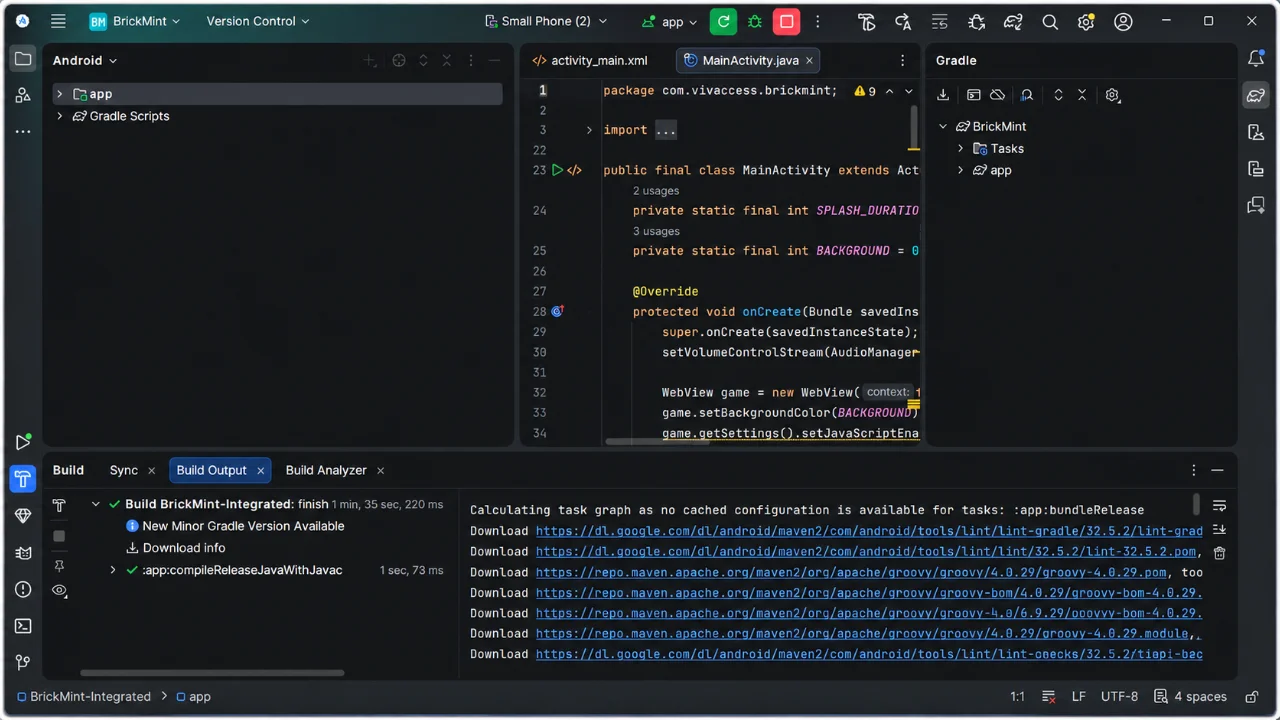 BrickMint’s Android Studio project after a successful build, bringing us one step closer to Google Play.
Later, the emulator appeared to have no game audio. Before rewriting anything, we tested the APK on a real phone. The music and sound effects worked there.
Those moments matter because they show the difference between AI as an infallible authority and AI as a collaborator. We questioned, checked, corrected, and carried on.
The Strange Vocabulary of Release Day
When the game was already running on my phone, I had an APK. I thought that meant I had the file Google Play wanted.
Not quite.
For our new Google Play release, we needed a signed Android App Bundle (AAB). We also needed an upload key, kept in a keystore, to sign that bundle. Google Play uses its own app-signing process to prepare the app distributed to users.
Those words sounded intimidating at first. But once I understood the distinction, the task became manageable: generate the upload key securely, build the release bundle, and submit the resulting file.
We kept the signing credentials private and created the signed bundle in Android Studio. No dramatic breakthrough in programming was required. What I needed was a clear explanation, patience, and confidence that I was taking the correct step.
Eventually, the file was ready: app-release.aab.
And then came the moment I had been working toward: Google Play accepted the upload. After all the unfamiliar terminology, missed menus, and repeated checks, seeing the bundle accepted felt like a real achievement—even though I knew there were more steps ahead.
A Small Game, a Big Milestone
On November 23, 2026, BrickMint version 1.2.4 (build 17) reached an active internal testing release in Google Play Console.
It wasn’t a public launch. The release was for selected testers, and Google Play still displayed the app as unreviewed. We had more to do before making it available to everyone.
But this was no longer just an APK installed manually on my own phone. The signed Android App Bundle had made it into Google’s release system, and BrickMint now had an active internal testing release. It was a modest milestone, but one I could actually see on the screen.
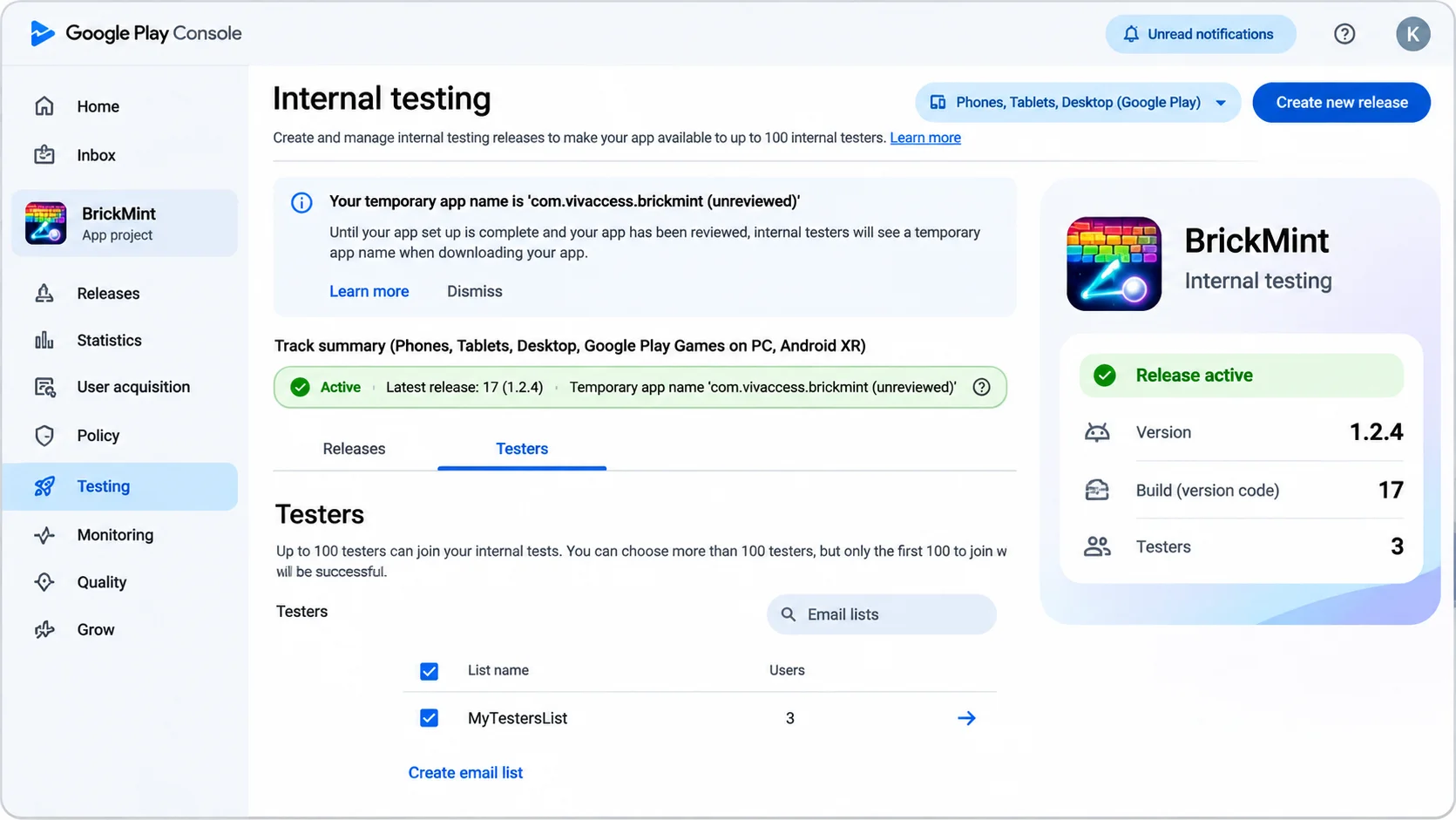 BrickMint reaches Google Play’s internal testing stage with version 1.2.4 (build 17). Illustrative recreation based on the actual release dashboard.
I remember the relief more than the technical details. All those unfamiliar forms, warnings, and menus had finally led somewhere.
The Moment I Nearly Walked Away
Looking back, without ChatGPT beside me, I probably would have stopped before reaching this point.
Not because I couldn’t learn the process. But because the time and energy needed to navigate something completely unfamiliar were starting to outweigh the joy of sharing a small game.
And I suspect I’m not alone. Many people can make something interesting—a game, a useful tool, a small app—but hesitate when the next step involves accounts, policies, unfamiliar software, and a long chain of requirements.
What changed wasn’t the complexity of the process. It was knowing I could ask about the next step, challenge an answer that didn’t fit my screen, and keep moving without understanding everything at once.
What I Would Tell Another Beginner
If you’ve built a small Android app and the thought of publishing it makes you nervous, don’t assume the process is reserved for professional developers. My experience trying to publish an Android app with ChatGPT showed me how much a patient, adaptable guide can help.
Google Play has real rules, and you still need to satisfy them. You need to protect your signing credentials, make honest declarations, test the app, and understand that an internal test is not the same as a public release. An AI assistant cannot waive any of those responsibilities.
But you don’t need to memorize the entire publishing process before starting. Use AI to understand what you’re seeing. Share screenshots when you get stuck. Ask it to explain the purpose of each decision. Verify important instructions against the official documentation. And don’t hesitate to tell it, “That doesn’t match my screen.”
Above all, take one step at a time.
Publishing your first app may be complicated. Complicated doesn’t have to mean impossible.
The Journey Isn’t Finished
Our next task is to install BrickMint through Google Play’s internal testing link, confirm that the distributed version behaves correctly, and complete the remaining steps toward a public release.
BrickMint still isn’t publicly available on Google Play. There are tests to complete and more decisions ahead. But the game has reached a place I almost gave up trying to reach.
ChatGPT didn’t remove the maze. It helped me find the next door—and sometimes, that was all I needed to keep going.
Further Reading
- Part 1: From HTML5 to Android — How I Built My First Mobile Game with ChatGPT
- Play the browser version of BrickMint
- Google Play: Set up an internal test
- Android Developers: App signing explained
Help others discover this article.
Discover more from Technology Education & Career
Subscribe to get the latest posts sent to your email.
