
Microsoft Defender Stopped the Malware. But the Real Attack Was Just Beginning.
How an apparently routine conference networking conversation led to a cybersecurity incident—and what it reveals about phishing and account takeovers.
It Started Where We Least Expected It
A business conversation that began through the official networking app of an international iGaming conference eventually led to a serious cybersecurity incident. A contact shared business documents, suspicious software was downloaded, and Microsoft Defender detected and quarantined threats. At the time, I believed the immediate danger had passed.
Several hours later, I learned that unauthorized messages had been sent from compromised accounts to business contacts and other trusted connections. The antivirus alert had been only the beginning of the story.
I’m sharing this account without identifying the people or business affected. I distinguish what I observed from what I cannot verify. I have no evidence that the suspicious contact physically attended the event or that the conference platform itself was breached.
1. The Business Proposal
The incident began when someone using the conference’s networking app approached me with what sounded like a genuine business opportunity. The contact presented themselves as a founder interested in a partnership and shared a document through the app. At that stage, I saw no obvious reason to treat the introduction as a security threat.
2. Moving the Conversation to Telegram
The contact then asked to continue the conversation on Telegram, where another account introduced themselves as an assistant. That request did not seem especially unusual: connectivity at the event was poor in our experience, and attendees reported that Telegram was one of the channels they could use.
After the conversation moved to Telegram, the supposed assistant shared another business document through an external link. Accessing the documents involved requests to install unfamiliar software. A supposed decryptor was downloaded, although I cannot establish whether it executed.
Looking back, the warning signs were the request to move away from the event app and the pressure to install software simply to review a proposal. I cannot determine why the contact preferred Telegram.
3. Microsoft Defender Found the Threats
At approximately 16:00, Microsoft Defender detected and quarantined suspicious software. I later recovered two detection names: Win32/Bearfoos.A!ml and Win32/Wacatac.H!ml. Microsoft’s threat intelligence associates Wacatac classifications with potentially serious malicious activity, including information theft. The !ml suffix indicates machine-learning-based detection; it does not mean the alert was a false positive.
I initially assumed quarantine had resolved the immediate problem. I now understand that removing a suspicious file does not automatically revoke credentials or authenticated sessions that may already have been exposed. I cannot establish the exact mechanism of compromise in this case.
4. Seven Hours Later
At approximately 11 PM, I believed the situation was under control. Microsoft Defender had quarantined the detected threats, and the computer had been switched off.
Then a family member alerted me to suspicious messages being sent from a Discord account.
I began investigating and discovered that unauthorized emails had also been sent to existing business contacts. Some appeared within genuine, previously established conversations, making them particularly convincing.
I also noticed unexpected Telegram logouts when the phone reconnected to Wi-Fi. This raised concerns about possible unauthorized access, although I had not yet confirmed whether messages had been sent through Telegram.
What initially appeared to be a contained malware incident had developed into a broader account compromise. The unauthorized activity continued even after the computer was switched off.
5. The Attacker Used Existing Relationships
As I reviewed the affected accounts, I found approximately 20–23 suspicious outgoing emails in one corporate mailbox’s Sent folder and three in another email account. The proposal was substantially the same across recipients, sometimes translated into different languages; one contact received an Italian version.
Saved email conversations revealed something more concerning than mass spam. At least two fraudulent proposals appeared within genuine business correspondence dating back several months. Those recipients had previously discussed different opportunities with the account owner, yet both received essentially the same new collaboration proposal containing Google Sheets and DocSend links. The attacker did not need to invent a relationship: the existing conversation history supplied credibility.
I also noticed that the malicious emails included a polished professional signature that the account owner had not configured in the mailbox. It referred to the business’s public-facing website and used a professional title also displayed on the conference networking profile. This suggests that information available through the event’s networking platform may have been reused to make the impersonation more convincing. I cannot prove whether it came from the profile, public research, or earlier correspondence—or how the signature was composed.
Numerous Discord messages were also sent. Contacts later reported suspicious Telegram messages, but I cannot establish the total number because the account was reset and accessible chat history was lost. The email recipients appeared to include contacts with substantial prior correspondence, although I cannot determine exactly how they were selected.
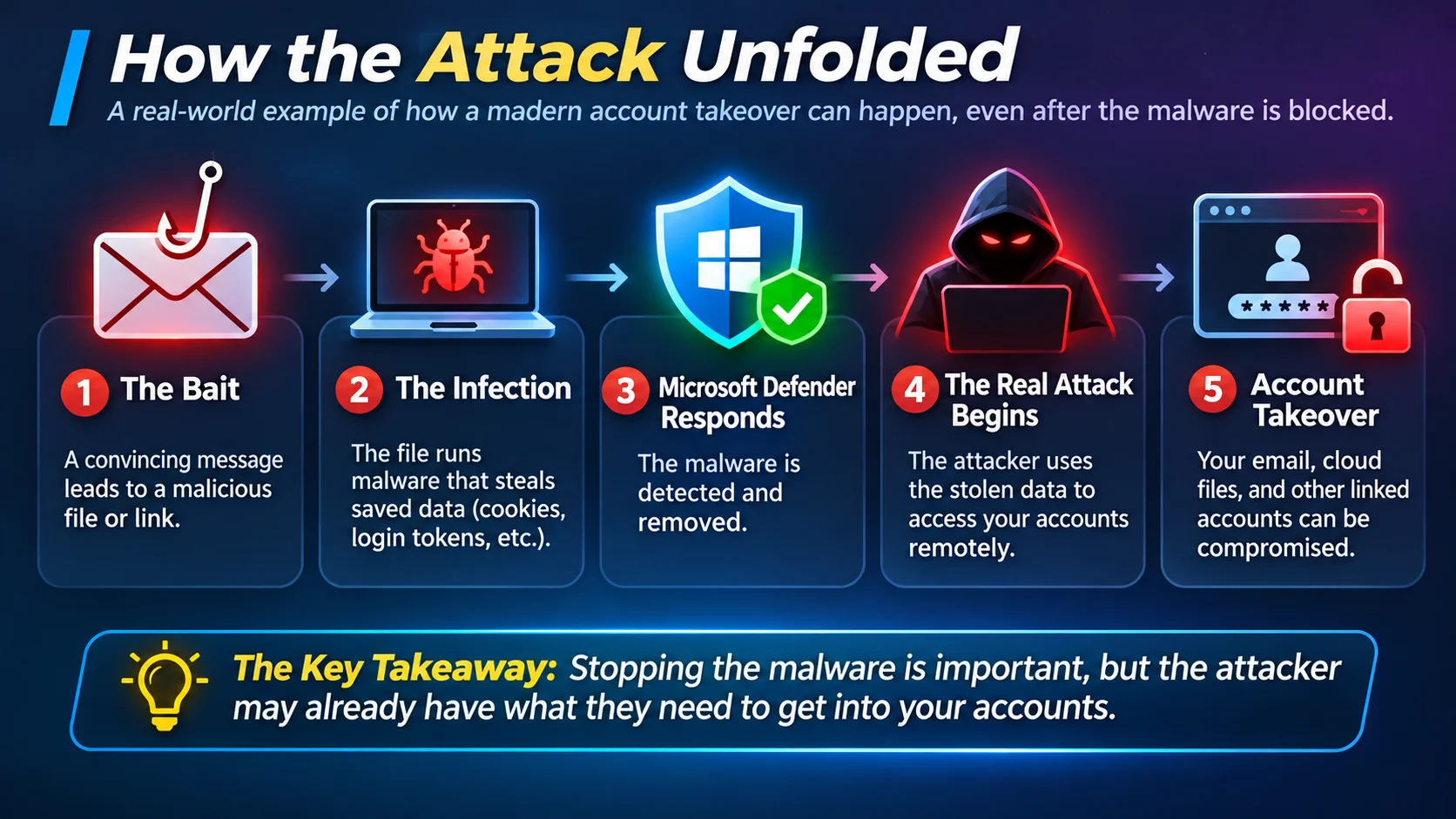
Illustration of how a phishing attack can progress from a malicious download to account compromise, even after antivirus software detects the threat. The precise mechanism in this incident remains unconfirmed.
What concerned me most was not just the unauthorized access, but how the attacker used existing relationships to make malicious messages look trustworthy. A genuine sender address and a real conversation history do not guarantee that the latest message came from the legitimate account owner.
6. The Race to Stop the Damage
Once I understood the extent of the incident, the priority became containment rather than collecting perfect forensic evidence. We changed passwords from a clean environment, enabled multifactor authentication across email and professional accounts, warned contacts about the fraudulent messages, and replaced the affected Windows installation.
Securing email was only part of the recovery. For readers considering additional email privacy protections, I have also compared free encrypted email services, although encryption alone does not prevent account takeover. Regaining control of Telegram proved more difficult and ultimately required an account reset, which meant losing accessible cloud chat history. Even after the unauthorized activity stopped, its consequences remained.
I could not document every detail while responding to the incident. That uncertainty matters: I still cannot confirm precisely how the attacker gained access.
7. What We Would Do Differently
Based on this experience, these are the precautions I would emphasize:
- Never install unfamiliar software just to view an unsolicited business proposal or document.
- Verify unexpected requests through a separate trusted channel, particularly when a conversation moves between platforms.
- Do not automatically trust familiar email conversations. A message can come from a genuine address, appear within months of legitimate correspondence, and still be malicious. Verify unexpected documents or requests independently.
- After a malware or information-stealer warning, investigate accounts as well as the computer: change passwords from a clean device, revoke sessions where possible, review recovery details and forwarding rules, and enable MFA.
- Remember that MFA is vital but not infallible: some attacks target already-authenticated sessions.
- Warn contacts quickly if an account may have sent malicious messages.
8. The Conference Trust Trap
The initial approach came through the official networking application of an international iGaming conference. I have no evidence that the suspicious profile was authentic, that the person physically attended, or that the platform itself had been breached. What the incident illustrates is how a credible-looking profile can move a business conversation to another channel and introduce dangerous documents.
Reporting the profile: what happened next?
After discovering the unauthorized activity, I reported the suspicious profile and external document link to the event organizer and asked for an investigation, including whether other attendees might have received similar approaches.
Support acknowledged the report and said it would involve relevant internal teams. A later automated follow-up asked whether the response had been reviewed. We asked what protective action had actually been taken and explained that the incident had affected the accounts.
Approximately a day and a half after the report, I could still see the suspicious profile in the networking application. Its visibility does not prove that the account could still send messages or that the organizer had taken no action behind the scenes. However, the replies available to me did not confirm whether the links were assessed, the account was restricted, or other attendees were warned.
In my view, a credible report of suspected malware distribution deserves prompt assessment, consideration of protective restrictions where justified, and a substantive response. Acknowledging a report is not the same as explaining how a possible ongoing risk is being addressed.
When an event organizer receives a report that a networking profile may be distributing malware, what immediate protections should attendees reasonably expect?
Final Thoughts
This incident changed how I think about digital trust. A legitimate networking platform does not guarantee that every profile is authentic. A familiar email address does not guarantee that the sender is genuine. And an antivirus quarantine does not necessarily mean that every connected account is secure.
The lesson I took from this experience is to question unexpected requests, verify them independently, and treat suspicious downloads as a possible account-security incident—not merely a problem with one file.
Technical references
- Microsoft Security Intelligence: Wacatac.H!ml
- Microsoft Security Intelligence: Bearfoos.A!ml
- Dropbox: What is DocSend?
- MITRE ATT&CK: Phishing
- MITRE ATT&CK: Steal Web Session Cookie
- Google Threat Intelligence: Adversarial Use of AI
Help others discover this article.
Discover more from Technology Education & Career
Subscribe to get the latest posts sent to your email.
