
We Built Our Own Lightweight WordPress Plugin Instead of Adding Another One. Here’s What Happened.
Every time I want to add a new feature to my WordPress website, I face a familiar decision: should I install another plugin, subscribe to an external service, or build something myself?
Installing a plugin is usually the easiest option. Search the WordPress directory, compare a few choices, click Install, configure the settings, and hope everything works as expected. But what if I only need two or three features from a plugin that offers twenty?
That question became particularly relevant while working on TechEduCareer, where we publish articles about technology, digital skills, cybersecurity, AI, and practical online tools. Our latest challenge was straightforward: automatically share new WordPress articles to Discord and Mastodon without adding an unnecessarily complicated publishing system. Instead of immediately installing another social media plugin, we decided to experiment with a different approach. We built our own.
The problem: We needed publishing automation, not an entire marketing platform
TechEduCareer already had a social media publishing workflow. Some platforms were handled through Metricool, others manually, and Telegram through its own WordPress integration. What remained was a simple requirement: when a new article went live, we wanted it to appear on our Discord channel and Mastodon profile.
We didn’t need advanced campaign management, social listening, analytics dashboards, or a dozen additional integrations. We needed automatic publication for new and scheduled posts, manual sharing for existing articles, duplicate prevention, independent platform controls, delivery history, and secure handling of credentials.
This was a good opportunity to test whether a purpose-built WordPress plugin could solve a narrowly defined problem. The experiment would also show whether a focused solution was easier to manage than a feature-heavy publishing plugin.
Can a WordPress plugin really be that small?
Yes. According to the official WordPress Plugin Developer Handbook, a basic plugin can begin with a PHP file containing a valid plugin header. WordPress provides hooks and APIs for interacting with posts, settings, metadata, and external services. We could use existing WordPress functionality to detect publication, retrieve post information, store settings, and contact social platforms.
A lightweight plugin is not necessarily a plugin with the fewest lines of code. For us, lightweight meant a focused feature set, minimal unnecessary dependencies, and no large external framework just to publish an article. It did not mean skipping security checks, logging, or error handling. We have not benchmarked our plugin against commercial alternatives, so we are not claiming a measured performance improvement.
Building TechEduCareer Social Publisher
We started with Discord. The initial version configured a Discord webhook, provided a connection test, and allowed us to select an existing published article and share it manually.
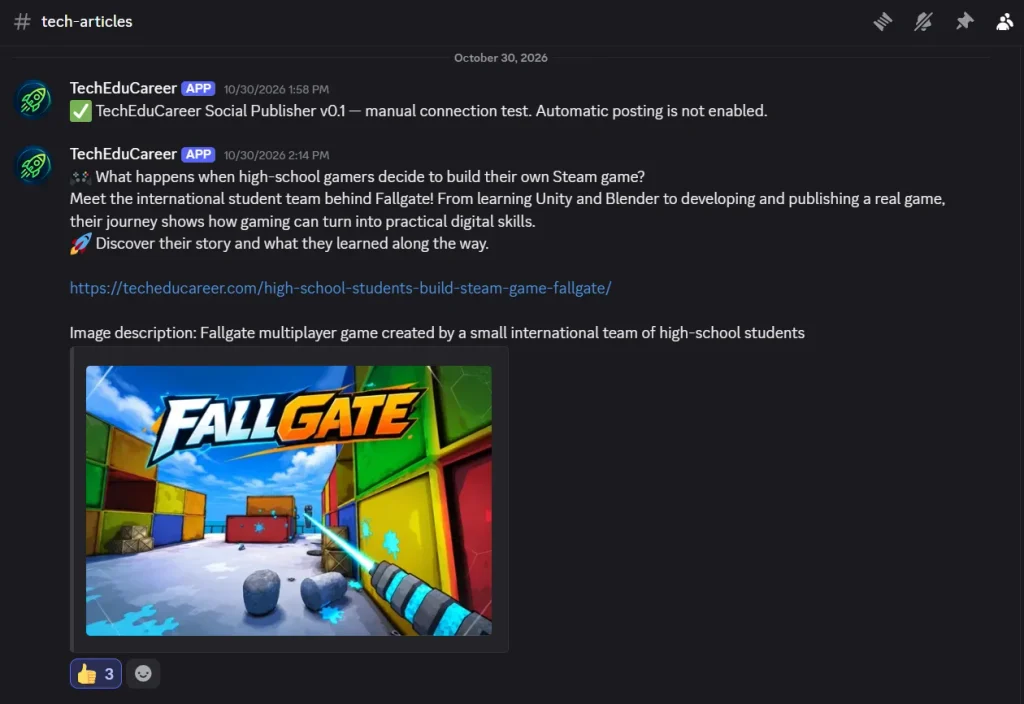
Our first real test used an article about a high-school team that created a game for Steam. The article appeared in Discord with its message, link, and featured image. That was our first milestone.
Once manual publishing worked, we added automatic publishing. WordPress provides a hook called transition_post_status, which can detect when an article changes from a draft or scheduled state to published. We used that mechanism to publish only when an article became public for the first time.
Without this check, editing an existing article could unintentionally trigger another social media post. We also added delivery records and duplicate checks. The first automatic Discord test succeeded, and updating the article afterward did not publish another copy.
Adding Mastodon was a different challenge
Discord was relatively straightforward because we could use a webhook. Mastodon required integration through its API and an access token. We began with a limited-permission application, then tested whether WordPress could publish a public status. Once the connection worked, we added manual article sharing.
Initially, we experimented with uploading featured images to Mastodon, including image descriptions. Then we noticed something interesting: when we manually pasted a TechEduCareer article URL into Mastodon, the platform could generate a compact preview card automatically.
Why upload the same image separately if a link preview already gives readers a useful introduction? We simplified the automatic workflow to send the article title, a short description, and the URL. Mastodon could then retrieve the article metadata and generate its own preview card. This removed the need for automatic media uploads. The trade-off is that Mastodon controls link preview appearance, and a card is not guaranteed for every URL.
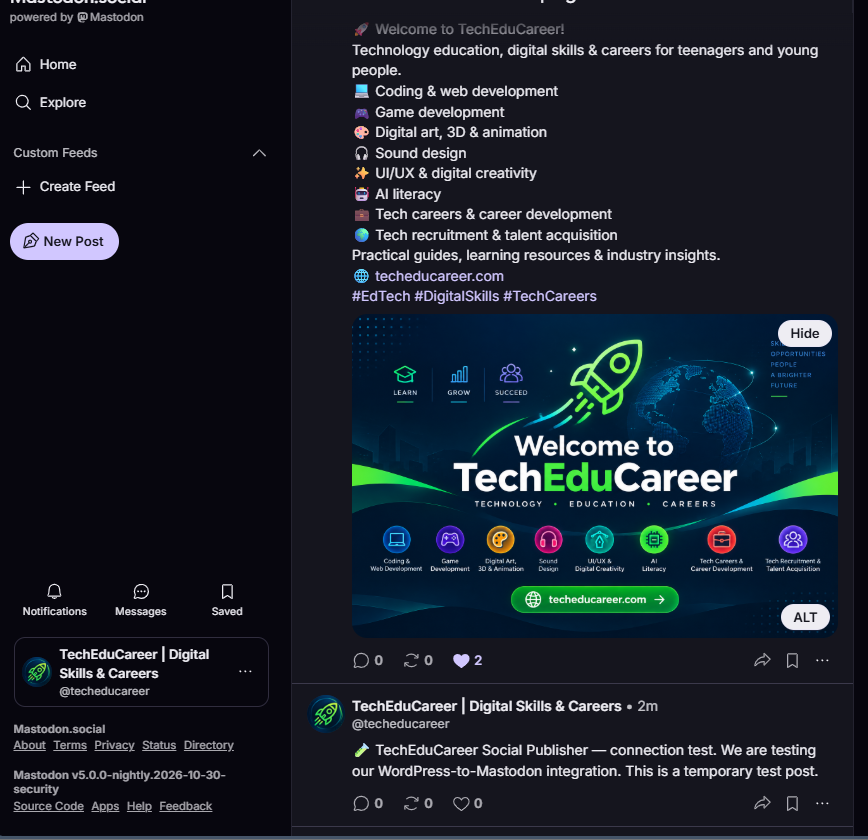
Our Mastodon connection test succeeded: the plugin reported that Mastodon accepted a public test status, and we verified the message on our profile. The screenshot below captures both the WordPress confirmation and the actual Mastodon test post. It demonstrates that the API connection worked, rather than claiming the final article formatting was perfect.
Our first automatic Mastodon test revealed a bug
We published a temporary WordPress article to test automatic Mastodon posting. The article appeared on Mastodon, so the API integration worked—but the message displayed literal backslash-n characters instead of proper line breaks. A successful API response had not guaranteed a correct user-facing result.
We corrected the message construction, updated the plugin, and tested again. This time, the title, description, and URL appeared on separate lines, with a compact link preview. The lesson: inspect what was actually published, not just the API response.
Testing duplicate prevention
After successfully publishing the second temporary article, we opened it in WordPress, added another sentence, and clicked Update. Refreshing Mastodon showed no new post. That confirmed the expected behavior in our test: editing an already published article did not trigger another announcement.
This matters because blog posts are frequently updated to fix typos, improve explanations, or add links. Routine edits should not flood social channels with duplicates.
One dashboard for two publishing destinations
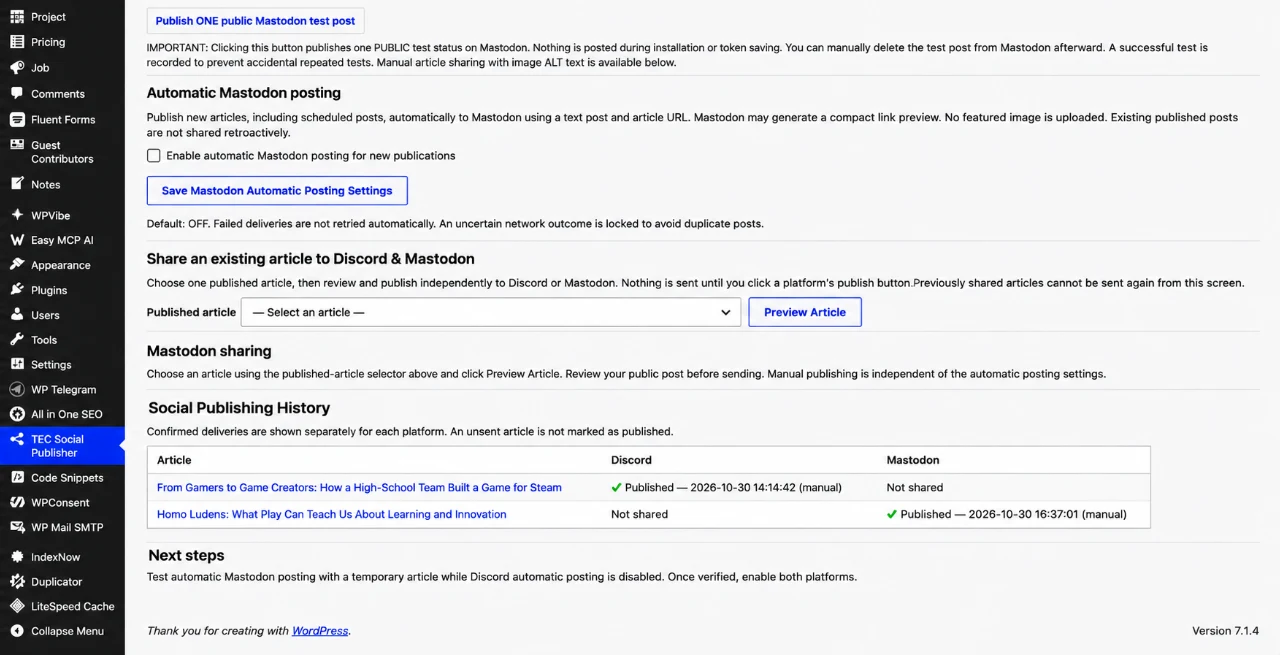
As the project evolved, the separate Discord and Mastodon sections became inconvenient. When managing a blog, I think in terms of an article and where it has been published—not two unrelated integrations. So we introduced a shared article selection area and one Social Publishing History table.
Each article now has independent Discord and Mastodon statuses. We also retained separate automatic-posting switches, which proved useful when we temporarily disabled Discord to test Mastodon in isolation.
What about security?
Building your own WordPress plugin means accepting responsibility for its security and maintenance. For our implementation, we used permission checks, nonce verification for administrative actions, input validation, and output escaping. Credentials were stored in WordPress settings rather than displayed on public-facing pages.
These precautions do not automatically make custom code secure. WordPress documentation emphasizes validating and sanitizing inputs, escaping outputs, checking permissions, and protecting sensitive actions. A production plugin should also be reviewed for error handling, unexpected API responses, credential exposure, compatibility, and recovery behavior.
For social publishing, uncertain network outcomes deserve special attention: a request may reach the platform even if WordPress does not receive confirmation. Blindly retrying can create duplicate posts, so our implementation takes a conservative approach to uncertain outcomes.
What we learned about scheduled publishing
WordPress scheduled posts use WP-Cron, which is not a continuously running system scheduler. On typical installations, due tasks are checked when the site receives requests. Publication may therefore occur later than scheduled on a low-traffic website. Our plugin reacts when WordPress actually transitions the article to Published; it does not run an independent scheduler.
Should you build your own plugin or install an existing one?
I would not recommend custom development for every WordPress feature. Established plugins can offer mature integrations, ongoing maintenance, documentation, compatibility, and support. For complex payment, authentication, backup, or security features, those advantages can be particularly important.
Custom development makes more sense when requirements are narrow, well understood, and realistic to maintain. Existing plugins often win when you need many features or vendor support; custom plugins can offer tighter control over a unique, focused workflow. The real question is whether maintaining the code makes sense over time.
The production test changed our decision
After numerous connection, formatting, and duplicate-prevention tests, our first real scheduled article was published automatically to both Discord and Mastodon. The delivery history confirmed both requests succeeded. But successful delivery was not the same as a satisfying publishing experience.
Discord initially failed to show the article image as expected. We replaced the featured image with a WebP version, reset the article’s delivery record, and shared it manually again. The image then appeared correctly. We also removed an unnecessary visible image-description line from Discord messages, leaving a cleaner post with the article link and preview.
Mastodon was different. Although its API accepted our posts, its automatically generated link card cropped the featured image and repeated information already present in the message. We experimented with shorter text and the optional image-upload setting, but the result still wasn’t the presentation we wanted. When posting directly in Mastodon, we could control the final appearance more comfortably.
So we made a deliberate choice: remove Mastodon from our custom plugin and handle those posts manually, alongside LinkedIn and X. We kept Discord automation because it solved a real problem and worked reliably for our workflow. The plugin became a focused, Discord-only publisher, with manual sharing, automatic publication, duplicate prevention, and a per-article history reset. Resetting a record does not delete a social post; we handle that separately.
Regardless of how many tests we performed, we came to a simple conclusion: more automation doesn’t necessarily mean a better publishing experience. The purpose of automation is not to connect every possible platform. It is to save time without sacrificing the quality of what readers actually see.
The bigger lesson: Build what you need, not everything you can
The most valuable part of this project wasn’t writing PHP or connecting another API. It was deciding what not to build. We didn’t need to recreate an entire social media management platform or maintain an integration merely because we had managed to make its API work. A simple delivery table was useful; keeping every platform inside our plugin was not.
AI-assisted development made it easier to prototype and refine the implementation, but it didn’t remove the need for human decisions, real testing, or maintenance. If you’re considering a small WordPress plugin, start with one clearly defined problem. Build the smallest useful version, test it in the actual environment, expect mistakes, fix them, and keep the features proportional to the problem.
Sometimes, the most useful WordPress plugin isn’t the one with the longest feature list. It’s the one that does exactly what your website needs—and nothing more. Our final decision to keep Discord and publish to Mastodon manually was part of the development process, not a failure of it.
Official resources
- WordPress Plugin Developer Handbook
- WordPress Plugin Basics
- WordPress Plugin Security
- WordPress WP-Cron Documentation
- Mastodon Statuses API Documentation
Help others discover this article.
Discover more from Technology Education & Career
Subscribe to get the latest posts sent to your email.
