
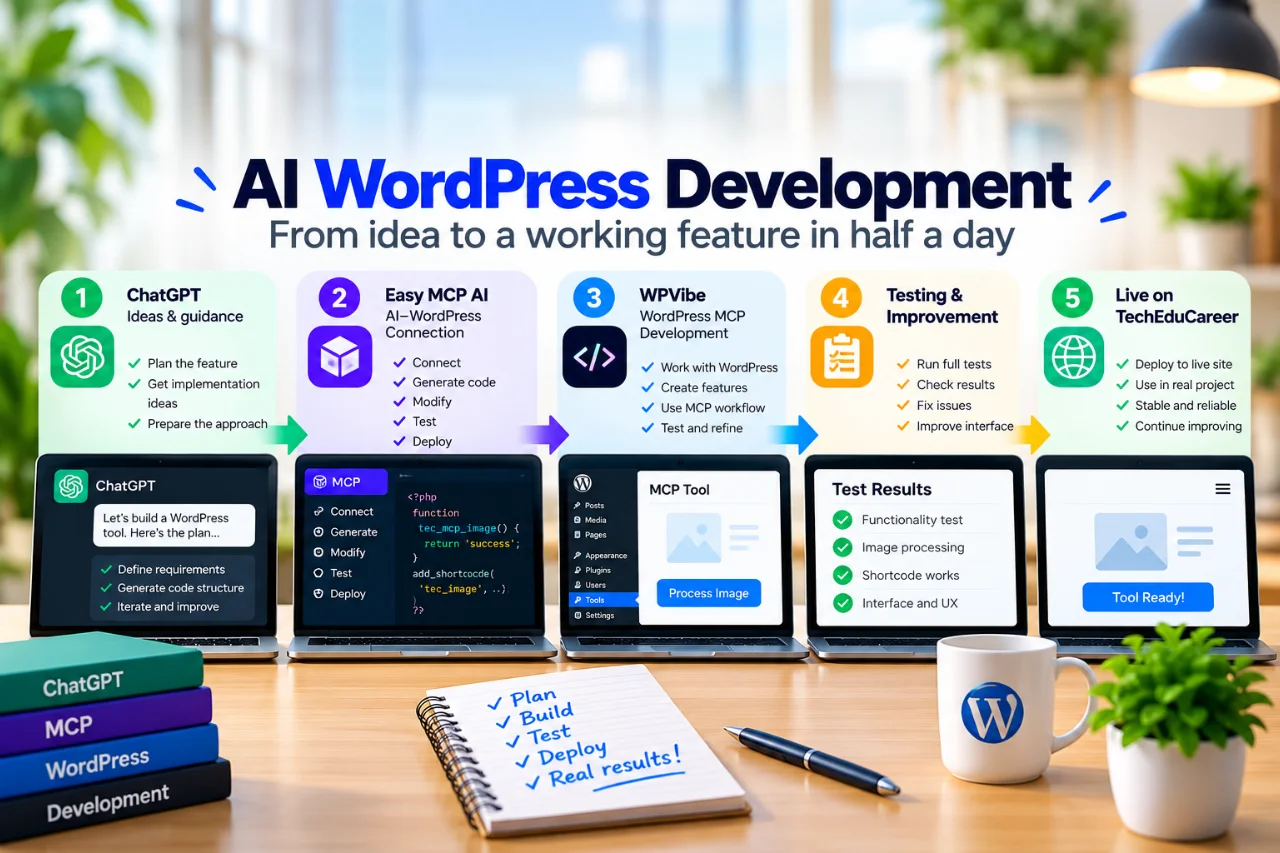
Building a WordPress Tool in Half a Day with ChatGPT, Easy MCP AI and WPVibe
Can AI WordPress development take a project from idea to a working feature in half a day—without buying another domain or using up a pile of connector credits? We decided to find out on TechEduCareer. This is the story of what worked, what surprised us, and why we’re thankful to the teams behind both Easy MCP AI and WPVibe.
In our beginner’s guide to Model Context Protocol (MCP), we explained the basics. We also looked at which AI tools support MCP. This time, we wanted to move beyond explanations and put an AI-connected WordPress workflow to work on a real project.
First, the challenge: more than a quick WordPress edit
Our goal was to build a new, multi-function browser-based feature for TechEduCareer. It needed a usable interface, several image-processing operations, downloadable results, and a clean way to live inside our existing WordPress website. This was more involved than changing a headline or adding a button.
We also wanted to avoid the classic development mistake: testing an experimental feature on a live website and hoping for the best. Hope is lovely, but it’s not much of a rollback plan.
So we set ourselves a few practical rules: develop away from the public site, test the main functions, keep backups, avoid unnecessary theme changes, and use AI connectors only where they genuinely helped.
Why we added Easy MCP AI to our toolkit
We had already been using WPVibe to work with WordPress through ChatGPT. It was helpful, and we wanted to keep it. But as our experiments grew, we became more conscious of credit usage. Development involves plenty of small operations: checking a page, looking at a plugin, inspecting a template, making a change, and checking again. Those little steps add up.
That made us think more carefully about which connector to use for each task.
We wondered whether we could handle many routine WordPress operations through another MCP connection, saving WPVibe for occasions when its particular capabilities were needed.
That’s what led us to Easy MCP AI. We installed it and started small: checking WordPress information, creating a test draft, and updating content. Once those operations worked, we became more comfortable using it in a larger project.
Importantly, this wasn’t a switch from one “winner” to a “loser.” Easy MCP AI became our primary route for supported everyday WordPress operations, while WPVibe remained connected in parallel for specialized theme and template work. WPVibe also provides a useful fallback when a task calls for capabilities outside our everyday workflow. That division of responsibilities turned out to be valuable later.
A development website without a second domain
Before building the feature, we prepared a separate WordPress development environment at dev.techeducareer.com. Our public website remained at techeducareer.com.
Here’s a useful tip for anyone starting out: you don’t necessarily need to buy a second domain to create a development site. If your hosting plan supports subdomains and has enough capacity, you can often create something like dev.example.com under the domain you already own.
The general approach is:
- Create a subdomain in your hosting control panel.
- Give the development installation its own WordPress files and database, rather than pointing it at production data.
- Set up HTTPS and make sure the development site works independently.
- In WordPress, go to Settings → Reading and select Discourage search engines from indexing this site.
- Add access protection, ideally at the hosting or HTTP-authentication level, so the site isn’t simply open to anyone who knows the address.
- Install and test experimental functionality there before bringing approved changes to the public website.
“Not indexed” doesn’t mean “private”
There’s a distinction worth making. WordPress’s search-engine visibility setting is a request to search engines, not a security lock. A noindex directive can discourage indexing when crawlers can access it, but it does not stop a person from visiting the URL. Blocking crawlers with robots.txt alone can also prevent them from seeing a noindex instruction.
For a development site, use proper access controls if the contents should be private. Also remember that two WordPress installations on one hosting account may still share server resources. A subdomain is a convenient starting point, not magical isolation.
For our project, the separate environment gave us room to install, experiment, correct problems, and test the feature’s main functions without putting those experiments directly in front of visitors.
AI WordPress Development Takes More Than Writing Code
ChatGPT helped us plan the functionality and prepare the PHP, JavaScript, and CSS needed for a standalone WordPress plugin. The browser handled the image-processing work, rather than requiring visitors to upload their images to our server for processing.
Our experience showed that AI WordPress development works best when coding, testing, and website management are treated as connected but distinct tasks. That was only part of the job.
We still needed to package the plugin, install it, make sure its shortcode rendered correctly, and try the actual user interactions. A feature that looks good in generated code isn’t automatically a feature that works on a real site.
We tested the main operations on the development installation, then installed the finished plugin on production and tested the functions again. Having a backup and a clear path to undo changes was part of the process—not an optional extra.
The surprise: our WordPress page wasn’t really controlled by the page editor
When it was time to integrate the new feature into our site’s existing directory, we expected a fairly ordinary page update.
Instead, we found that the directory’s layout came from a PHP page template. One of its existing entries had been added separately through a WPCode snippet. In other words, editing the page in Gutenberg wasn’t going to tell the whole story.
WordPress had hidden the interesting part backstage.
This was where keeping WPVibe available proved valuable. We used its capabilities to investigate the theme structure and understand how the existing entry had been integrated. Rather than rewrite the template or disturb the existing layout, we followed the site’s established pattern and added a separate, targeted snippet for the new entry.
The result was a consistent addition to the directory, with the existing elements left in place. It was a small integration change compared with the amount of functionality we’d built—and that’s exactly what we wanted.
How the tools worked together
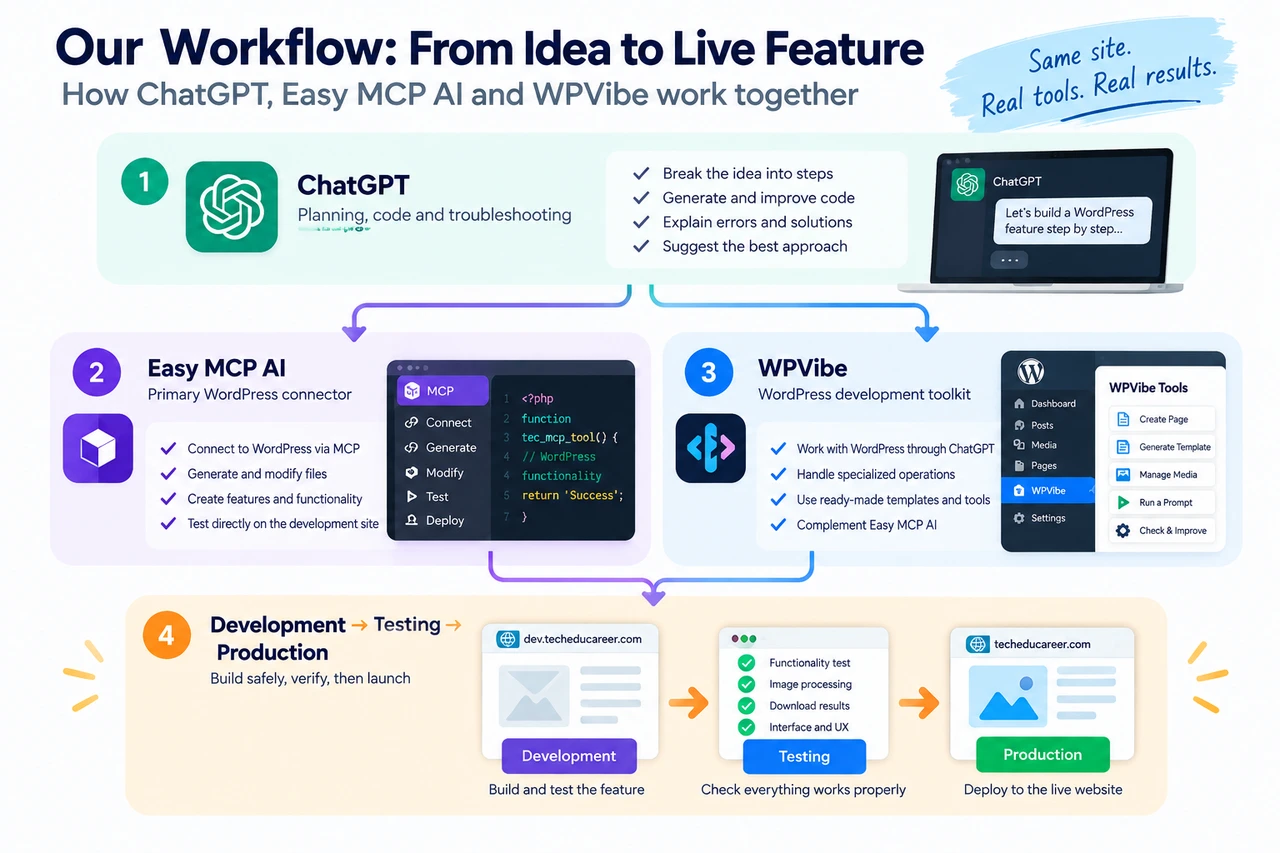
Looking back, the most useful decision was not asking one tool to do everything.
- ChatGPT supported planning, code development, troubleshooting, and packaging the feature.
- Easy MCP AI provided a practical connection for supported WordPress management operations, including working with pages and checking site resources.
- WPVibe worked alongside Easy MCP AI, helping us inspect theme templates and handle the specialized integration work. We also keep it available for controlled theme-file changes and draft previews, rather than treating it only as an emergency backup.
- Our development subdomain provided a place to test before deploying to the public site.
- WordPress and WPCode supplied the plugin, shortcode, template, and snippet mechanisms that made the integration possible.
We didn’t bypass any connector’s credit system. We simply did most application development outside those connectors and called on them for the operations they were good at. In this project, that meant almost no WPVibe credit consumption, even though WPVibe still played a useful role.
That is our experience, not a measured pricing comparison or a guarantee that every project will cost the same. Hosting, AI model usage, time, and other services still have costs.
From idea to live feature in roughly half a day
In approximately half a day, we moved through planning, plugin development, testing on a separate WordPress installation, production installation, page creation, integration into the existing directory, and final checks.
We finished with a working multi-function feature, rather than a mockup or an unfinished code sample. The timeline surprised us, too—but it reflects this particular project’s scope and our existing setup. A larger application or a more complicated hosting environment could take much longer.
What impressed us most wasn’t just the speed. It was that we could keep the process relatively controlled: test first, make focused changes, verify the result, and avoid rebuilding parts of the site that were already working.
A genuine thank-you to the Easy MCP AI and WPVibe teams
We want to thank both the Easy MCP AI and WPVibe development teams. Connecting an AI assistant to a platform as flexible—and occasionally surprising—as WordPress is not a trivial job. Both teams have built tools that helped us accomplish something practical.
Easy MCP AI made our everyday AI-to-WordPress workflow more accessible and efficient. WPVibe supplied complementary theme and template capabilities, and we continue to use both connections side by side according to the task. We’re grateful for both, and we look forward to seeing how their products develop.
This article is an account of our own experience, not a sponsored review or a controlled head-to-head benchmark.
What we’d tell another WordPress site owner
If you’re curious about building with ChatGPT and MCP, start with a manageable task. Set up a development installation if you can. Protect it properly. Keep a backup. Test the actual functionality—not just the code. And don’t assume that every WordPress page is controlled by the editor you see on screen.
Most importantly, don’t feel you must pick one connector and force it to handle every part of the project. Different tools can work together remarkably well.
Our half-day experiment reminded us that AI WordPress development is most useful when paired with ordinary good engineering habits: understand the environment, choose the smallest safe change, test carefully, and give credit where it’s due.
And yes, sometimes the “quick WordPress update” turns out to involve a PHP template, a code snippet, and a small detective story. At least this one had a happy ending.
Discover more from Technology Education & Career
Subscribe to get the latest posts sent to your email.
