
Digital skills for teenagers before university do not mean becoming professional programmers, designers or engineers while still at school. But learning how digital tools are used to create things—not only consume them—can give students a much clearer idea of what they enjoy, what they are good at and which education or career paths they may want to explore.
The most useful preparation is therefore not memorizing one programming language or collecting certificates. It is building a broad foundation of digital skills and then using those skills to make something real: a website, a 3D model, a game, an animation, a prototype, a piece of audio or another project that solves a problem.
1. Computer literacy: the foundation students often overlook
Before specializing, students should be comfortable with the everyday mechanics of computing: files and folders, cloud storage, browsers, accounts and permissions, common document formats, installing and updating software, backups, basic troubleshooting and online safety.
These skills are less glamorous than game development or artificial intelligence, but they reduce friction everywhere else. A student who understands how a computer and its files are organized can learn new creative and technical software much more independently.
Computer literacy is one part of broader digital literacy. Computer literacy is about using devices, software, files and online services confidently. Digital literacy goes further: it includes finding and evaluating information, communicating and creating responsibly online, understanding privacy and security, and making informed choices about digital and AI tools.
2. Coding and computational thinking
Coding teaches more than syntax. Students learn to break a large problem into smaller steps, recognize patterns, test assumptions, debug mistakes and keep iterating when the first solution does not work.
A teenager does not need to master several languages at once—or become a professional programmer before university. One accessible starting point—such as Python, JavaScript or a game engine’s scripting environment—is enough to begin learning how instructions, variables, conditions, loops and functions fit together. The aim at this stage is to develop computational thinking and use it in small projects that turn ideas into working results.
3. 3D modelling and digital art
Tools such as Blender introduce students to modelling, materials, lighting, composition and three-dimensional thinking. These skills can lead toward game development, animation, visualization, product design and other creative-technology fields.
More importantly, digital art teaches students that technology is not only about code. Many successful digital projects combine technical and artistic skills, and teenagers often discover their strongest interests only after trying both.
4. Game development: where several skills meet
Game development is particularly useful as a learning environment because it brings multiple disciplines together. A small game can involve programming, 3D assets, interface design, sound, storytelling, testing, problem-solving and project planning. Trying these roles within one project can also help a student discover whether they are more drawn to programming, visual design, 3D work, audio or organizing the project itself.
A real student example: from playing games to helping build one
We have seen this transition at close range. A secondary-school student who previously had no Unity or Blender knowledge began learning both through TechTitans courses. About a year earlier, his relationship with games had mainly been as a player. After developing practical skills, he was able to apply them in a school project rather than keeping the learning inside exercises and tutorials.
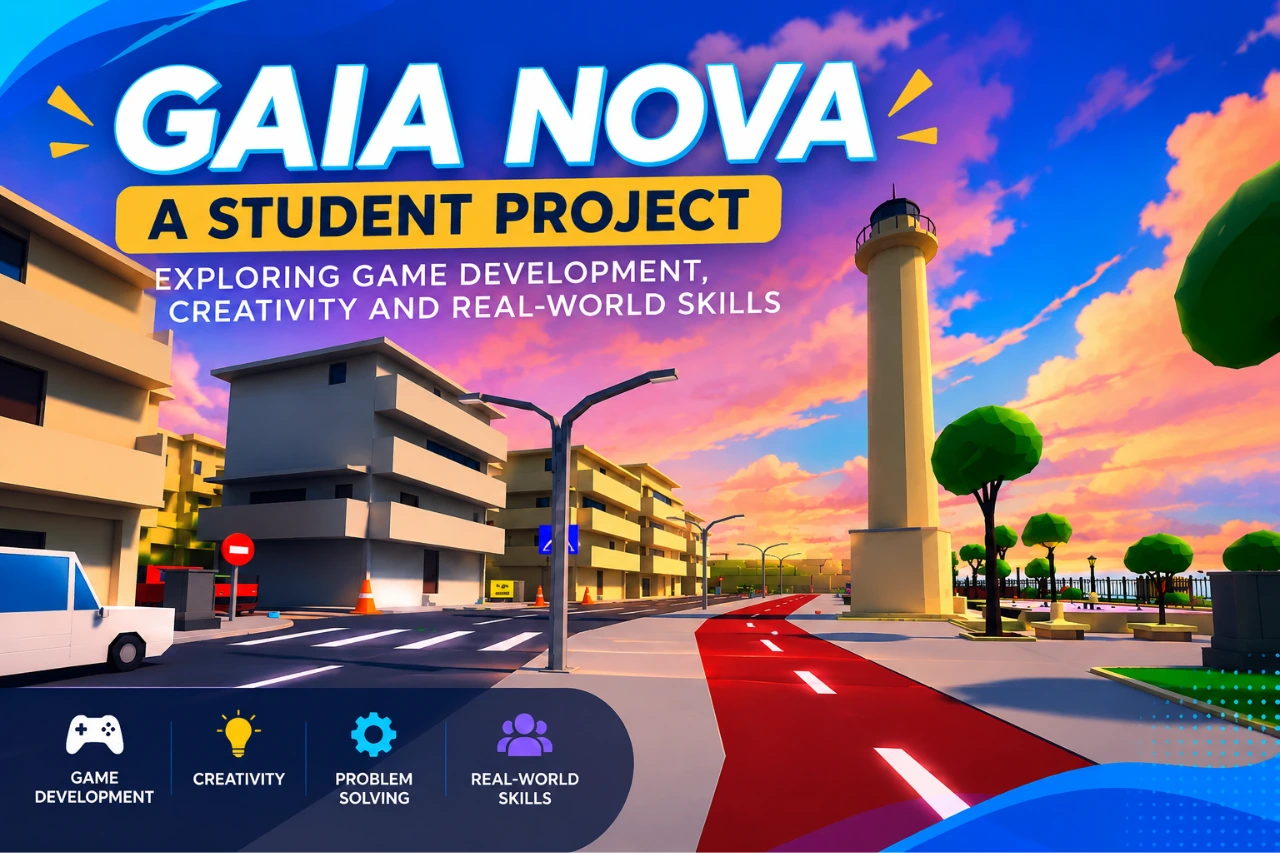
The project, GAIA NOVA: Rebuild the Earth, is an educational 3D game created through collaboration between vocational schools in Alexandroupolis and Xanthi. Its working prototype uses Unity and Blender and represents Alexandroupolis and Xanthi in 3D. Players complete missions connected with sustainability, environmental responsibility and community life.
The project has also moved beyond a private classroom exercise. It has been piloted with students, presented publicly and covered by Greek public broadcaster ERT. That is a useful illustration of what project-based digital learning can become: a student starts with unfamiliar tools and eventually uses those skills as part of a real collaborative product with an educational purpose.
For students interested in building the visual side of projects like this, the Digital Art learning path on TechTitans provides practical experience with creative digital tools, while game-development learning can connect those assets with interactive environments.
5. UI/UX: learning to design for other people
Students often begin by asking, “Does it look good?” UI/UX introduces a more useful question: “Can another person understand and use it?” Learning basic interface design, user flows, wireframes and prototypes helps teenagers think about users rather than only their own preferences.
6. Animation, video and sound
Modern digital communication is multimedia. Basic animation, video editing and sound-production skills help students present ideas more effectively and also expose them to creative careers they may never encounter in a traditional computing class.
7. AI literacy: use AI without outsourcing your thinking
Teenagers will almost certainly encounter generative AI in education and future work. The important skill is not simply knowing how to type a prompt. Students should learn what AI systems can and cannot reliably do, how to verify generated information against reliable sources, how bias and training data can affect results, when attribution matters, and why private or sensitive information should not casually be submitted to online tools. Responsible use also means knowing when AI should assist learning rather than replace it: students should still understand their work, be able to explain their reasoning and follow the rules set by their school or teacher. AI can help generate ideas, explain difficult concepts or provide feedback, but students should avoid becoming dependent on it for every answer. For more background, see our guides What Is Artificial Intelligence? and What Patterns Does AI Learn?.
8. Collaboration and versioning
University and professional technology projects are rarely solitary. Students benefit from learning how to share files safely, organize project versions, document their work, accept feedback and divide a project into responsibilities. Even a small school game can require students, teachers and collaborators to coordinate ideas, assets, code and testing.
9. Research and information literacy
Knowing how to find information is now inseparable from knowing how to judge it. Students should become comfortable comparing sources, identifying who published a claim, distinguishing evidence from opinion and checking whether information is current.
Projects matter more than collecting tools
A teenager can watch dozens of tutorials and still be unsure what to do without them. Projects force skills to connect. A simple game, for example, may require a student to model an object, import it into an engine, write or adapt code, create an interface, test the result, diagnose failures and explain the finished project to somebody else.
The goal before university should therefore be exploration plus creation. Try several fields, identify the ones that generate genuine curiosity, and then build increasingly ambitious projects around them.
Students should also keep simple evidence of what they create. Screenshots, demo links, project files or a GitHub repository where appropriate, together with a short explanation of the problem, process and their own contribution, can gradually become the foundation of a portfolio for university applications, internships or a first job.
A practical learning sequence
- Start with digital foundations: computer literacy, safe online behavior and research skills.
- Try creation: coding, digital art, game development, UI/UX, animation or sound.
- Choose a small project: make something that can actually be finished.
- Combine skills: add art to code, sound to animation or UX thinking to a game.
- Work with others: learn feedback, collaboration and project organization.
- Document what you build: keep screenshots, links, files and a short explanation of what you contributed and learned.
- Publish or present the result: explaining what you built is itself an important skill.
- Reflect: decide which part of the process you enjoyed enough to study more deeply.
Digital skills can help teenagers choose a direction
Learning digital skills before university is not about forcing every teenager into a technology career. It gives students evidence about themselves. Someone may discover that coding is satisfying, that 3D modelling feels more natural, that designing interfaces is fascinating, or that organizing a team is more enjoyable than building the product personally.
Related TechEduCareer resources
For specific paths, see our guides to choosing a first programming language, robotics for teenagers and game-based learning.
Continue with our online technology learning resources for teenagers and our guide to career readiness for students.
Sources
For independent information about the GAIA NOVA project, see ERT’s coverage of the educational 3D game and the GAIA NOVA project entry in Bravo Schools.